A Teams Rooms upgrade pays off only when the hardware is still supported by its maker and can run a Windows version Microsoft supports. Check each room’s app release, its Windows version and whether the device is on Microsoft’s end of service list. If the Windows or maker check fails, plan a replacement. Patching won’t rescue a device the maker has dropped.
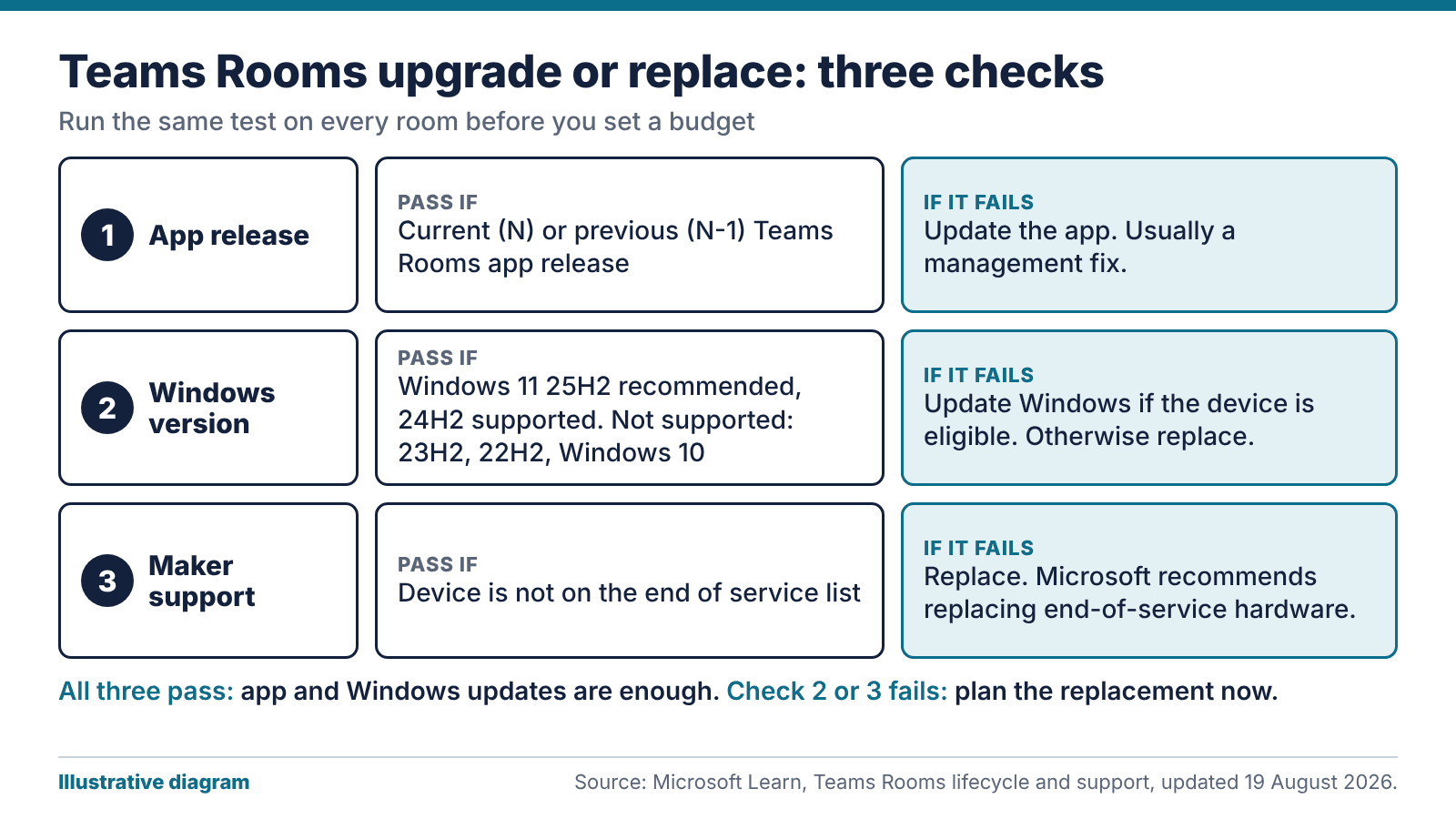
Illustrative diagram: the three checks that decide a Teams Rooms upgrade or a replacement. Source: Microsoft Learn Teams Rooms lifecycle page, updated 19 August 2026.
Three checks that decide a Teams Rooms upgrade
Start with the room, before you open a price list. Pull the same facts for every Teams Rooms device you run and put them on one sheet, so the pattern shows.
App release. Is the room on the current Teams Rooms app, or the one before it?
Windows version. Is the device on a version Microsoft lists as supported?
Maker support. Has the manufacturer stopped supporting the hardware, so that Microsoft lists it as end of service?
If all three pass, the Teams Rooms upgrade is just an update to the app and operating system, and it’s a small job. If the first fails, fix it. That’s usually a management problem. If the second or third fails, find out how long the room has left and plan its replacement.
Our view: the third check sets the budget. A software problem gets fixed in place, but a device the maker has dropped has to be swapped.
How the Teams Rooms app is supported
The Teams Rooms app is evergreen. Microsoft’s lifecycle support page says it supports the most current major release (N) and the previous one (N-1). If you hit a defect in a release that isn’t the latest, you have to install the latest to get the fix.
A room left alone for long enough can fall two releases behind. Then a fault call turns into an upgrade job before anyone can diagnose anything, and you’re running unsupported software on a room that still looks fine.
We’d treat every Teams Rooms upgrade, even a minor app update, as routine maintenance with a named owner. Check the rooms monthly and flag any that are a release behind. The register needs a column for the release number, because “updated recently” tells you nothing. Management tooling helps. Someone still has to look.
If a room turns out to be two releases behind, the fix is the same as for any missed update: bring it current, then find out why it fell behind and who was meant to be watching it.
Which Windows versions a Teams Rooms upgrade can use
Teams Rooms on Windows needs a version Microsoft has validated for the app. At the time of writing, the lifecycle page lists:
Windows 11 25H2, available from 3 August 2026: supported and recommended.
Windows 11 24H2: supported.
Windows 11 23H2 and 22H2: not supported.
A device still on 23H2 boots and looks fine, but Microsoft doesn’t support that version for Teams Rooms. It may need a feature update, or it may be unable to take one.
Microsoft also holds feature updates back on purpose, by up to six months or more after general availability, while it validates the app against the new build. During that period you shouldn’t update room devices by any means, including overriding the group policies. A brand-new room running one version behind is normal.
Windows 10 is a separate case. Support ended on 14 October 2025, and Microsoft says Teams Rooms on Windows doesn’t support devices placed on extended security updates. Eligible devices must move to Windows 11, and the rest need replacing. We cover the cost side in our post on Windows 10 ESU costs for AV PCs.
When the maker stops supporting the hardware
Device makers set their own hardware sales and support lifecycles, Microsoft explains. Once a maker stops supporting a device, Microsoft adds it to the end of service tab on its certified devices page.
Hardware on that list can keep receiving app updates and Windows feature updates. Without maker support, though, the device may meet bugs that can’t be fixed, and Microsoft recommends replacing end-of-service hardware to keep full supportability.
The NCSC takes the same line on out-of-date technology. Its guidance on obsolete products says that when buying hardware or software you should always consider the support lifetime of the product. It also treats paid extended support as a way to buy time, with a migration plan still needed.
Ask for the support end date in writing when you buy. If a supplier can’t give you one, that’s worth knowing before you sign. Put the date in your asset register with a reminder set a year before it arrives.
Where a Teams Rooms upgrade stops helping
A Teams Rooms upgrade can bring a room back into support when the fault is software. It can’t revive a device whose maker has walked away, and it won’t fix weak microphones, a camera mounted too high or an echoing ceiling.
Where only part of the room has aged, a partial refresh can work. The compute unit might be at end of service while the display, cabling, mounts and ceiling speakers are fine. Check the certified list before mixing parts, because an uncertified combination may be hard to get supported.
New camera features bring licensing and privacy questions. If AI framing is part of the reason for the refresh, read our post on AI tracking and UK GDPR for meeting room cameras before you specify it.
If more than one part has aged, or the layout has changed since the room was fitted, replace the whole room. A new compute unit in a room people have outgrown fixes the wrong problem. Our meeting room AV service can survey and advise.
A register for the whole estate
Build a register with one row per room: the device, the app release, the Windows version, the date the maker’s support ends and any recent faults. Colour the rows: green for supported, amber for a release behind or a year from the support end date, red for out of support. Review it at least once a year, and again whenever Microsoft changes the supported list.
Stagger the replacements. Putting every room on the same day for the same year creates a spike in cost and disruption, and it makes everything age together again. A steady replacement rate smooths both. If you buy in volume, our hardware procurement and staging service can build, image and test the units before they reach site.
Run each round of Teams Rooms upgrade and replacement work from the register: rooms in red first, then amber, with the green ones left alone. Put the register in front of whoever holds the budget as well. A support end date is something finance can act on.
The bottom line: a Teams Rooms upgrade works when the fault is the app or Windows and the maker still supports the device. For anything else, replace. Keep the three checks in a register that somebody reviews every year.
FAQ
How long does Teams Rooms hardware last?
There’s no single figure. Device makers set their own sales and support lifecycles, and Microsoft lists devices that are out of support on its end of service tab. Ask your supplier for the support end date in writing.
Which Windows versions are supported for Teams Rooms?
As of Microsoft’s page updated 19 August 2026, Windows 11 25H2 is supported and recommended, and 24H2 is supported. Versions 23H2 and 22H2 are not supported. Check the page before any rollout, because the list changes.
Can I keep a Teams Rooms device on Windows 10 with ESU?
No. Microsoft says Teams Rooms on Windows doesn’t support devices placed on extended security updates. Eligible devices need upgrading to Windows 11, and the others need replacing.
What does N and N-1 mean for the Teams Rooms app?
Microsoft supports the latest major release of the app (N) and the one before it (N-1). Any older release is out of support, and a defect fix means installing the latest. Review your rooms monthly so none falls behind.
Should I replace the whole room or just the computer?
Swap the compute unit alone only when the rest of the room is sound and the combination is certified. If the camera, microphones or layout have aged too, replacing the whole room costs more at first and saves repeat visits.
Will a Teams Rooms upgrade make an old device safe?
Only partly. The NCSC says out-of-date technology exposes you to vulnerabilities that become known to attackers, and that the only fully effective fix is to stop using the obsolete product. A software update can’t restore maker support, so plan the replacement before support ends.
A meeting room camera can crop to the group or follow whoever is talking without naming anyone. Putting names on faces is another matter, because the ICO treats biometric recognition as special category data. Settle the lawful basis, the data protection impact assessment question and the door signage before anyone switches it on.
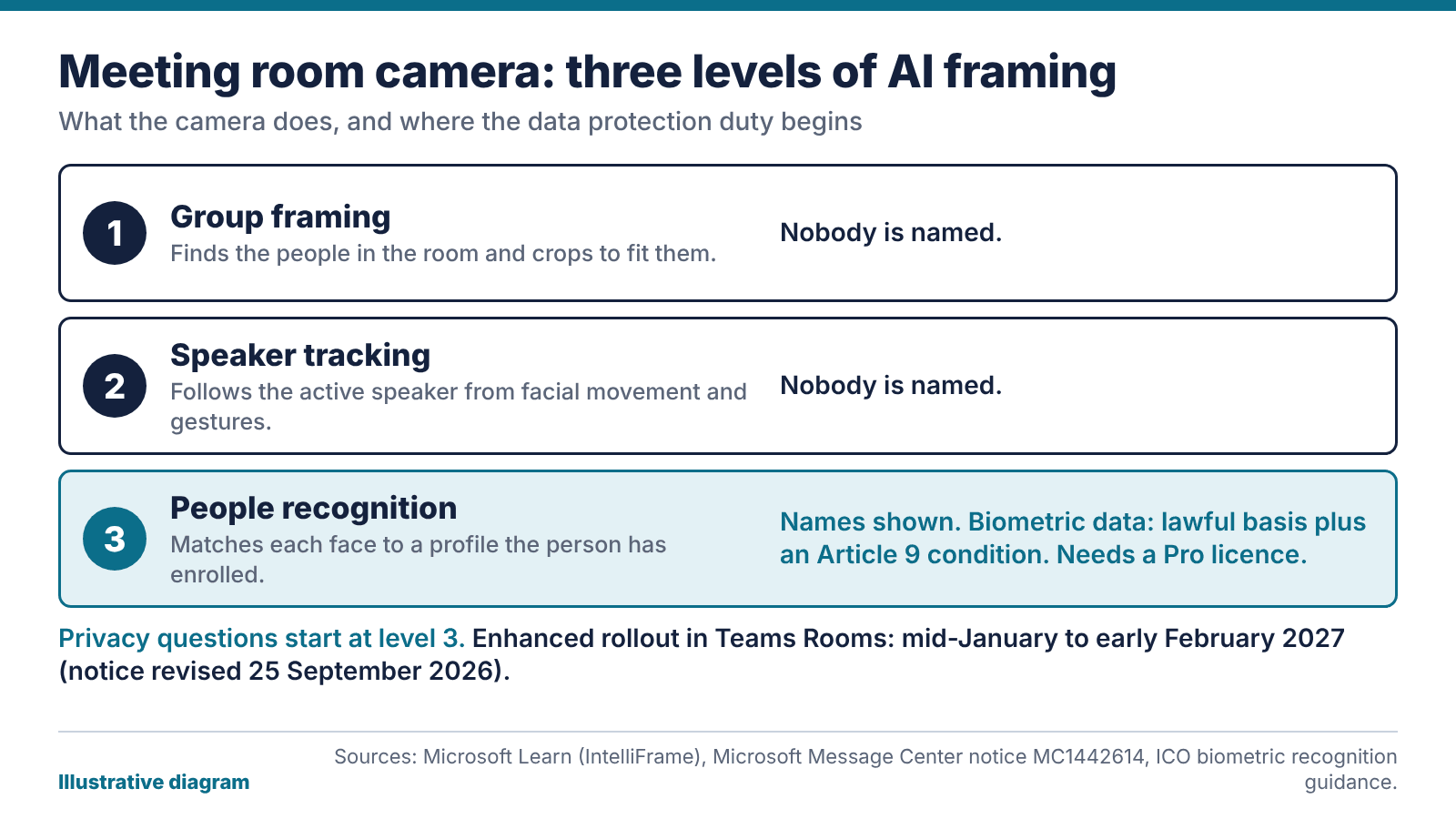
Illustrative diagram: the three levels of AI framing in a meeting room camera, and where the privacy questions start. Source: Microsoft Learn and the ICO.
What changed: as of 15 October 2026, Microsoft’s notice for the enhanced IntelliFrame feature in Teams Rooms was revised on 25 September 2026. General availability now starts in mid-January 2027 and should finish by early February 2027. The earlier timeline was mid-October to mid-November 2026, so older articles quoting autumn dates are out of date.
What a meeting room camera with AI tracking does
There are three levels. The first is group framing: the camera finds the people in the room and crops to fit them. The second is speaker tracking, which Microsoft’s IntelliFrame documentation describes as certified cameras picking out the active speaker by recognising facial movements and gestures. Nobody is named at either level.
The third is people recognition. The camera sends several video streams, and the Teams service matches each person on screen against a face profile they’ve enrolled, then shows their name under their video. Microsoft says this needs a Teams Rooms Pro licence. Rooms on the Basic licence get active speaker and panoramic views only, so a meeting room camera in one of those rooms follows the speaker but never labels anyone.
Enrolment comes in stages. A person enrols their voice first, then their face. Only enrolled people get a name label, up to 12 at once in the room, so anyone else on screen stays unlabelled.
What the ICO says about biometric data
The ICO’s biometric recognition guidance is blunt on the key point: “If you use a biometric recognition system, you are using special category biometric data.” So you need a lawful basis under UK GDPR and a separate Article 9 condition. Its worked example is a staff access system, but the same logic covers anything that identifies people from their faces or voices.
The page is dated 9 October 2025 and says it’s under review because of the Data (Use and Access) Act, so check it again before you rely on it. This isn’t legal advice either. Your data protection officer or solicitor decides what your organisation can do.
For a sense of how the regulator treats workplace biometrics, read the ICO’s February 2024 order against a leisure operator. It was told to stop using facial recognition and fingerprint scanning to monitor staff attendance at 38 sites. The ICO’s concerns included necessity, proportionality and the imbalance of power between employer and employee.
That case was about attendance and had nothing to do with meeting rooms, so don’t read it as a ruling on cameras. What it does show is that the ICO weighs the power imbalance. That matters if enrolment is voluntary on paper but expected in practice.
Signage, notice and the DPIA question
Microsoft’s documentation puts the responsibility on you. If you install an AI-capable meeting room camera and use face enrolment and people recognition, you answer for compliance with local laws, including notice, consent and data retention. It also tells customers to put signage outside any meeting room with an AI camera, advising people about people recognition, face enrolment and voice recognition.
We’d go further than a sticker. Put the notice at the door, say what’s switched on and who can see the result, and carry the same wording into your visitor guidance. People from outside your organisation walk into these rooms too, and they haven’t read your intranet.
Then ask about a data protection impact assessment. UK GDPR requires one where processing is likely to result in a high risk to people, and special category data is a reason to raise it. Whether you need one is for your DPO, but they can’t decide without facts. We’ll write up the room side: the hardware, the licences, which features are on and what the settings allow. Your IT team supplies where profiles are held, how long they’re kept and how someone withdraws.
Speaker tracking from a meeting room camera without naming anyone
For most rooms, speaker framing does most of the job. Remote colleagues see who’s talking and get a sensible view of the room. Nobody enrols a face, no biometric profile sits in your tenant, and the DPIA conversation is far shorter. A meeting room camera used this way is much easier to defend.
Our view: leave people recognition off unless a specific room has a specific reason, and write the reason down. A boardroom where remote directors can’t tell the members apart on a long call is a reason. “It was in the feature list” isn’t.
The controls are in the admin settings. Microsoft documents a Teams policy that allows or blocks end-user face enrolment, so your IT team can switch it off and keep the framing. Set it on purpose and check what the default is. Camera height, a clear view of every seat and lighting that doesn’t put faces in silhouette cut the need for clever framing anyway. Our corporate meeting room AV checklist covers those.
What the revised rollout date means for your meeting room camera
The enhanced version adds faster speaker framing and labelling of in-room participants. Microsoft says the AI processing happens on the camera, with metadata sent over a dedicated data channel. Only certified AI-capable cameras are eligible. The notice, MC1442614 (a third-party mirror of the Message Center post), says the feature is on by default for Teams Rooms on Windows with those cameras and Pro licences, and needs no admin action.
Microsoft moved the start from mid-October 2026 to mid-January 2027 on 25 September. We wouldn’t promise the date holds, because it has already moved once. Treat mid-January as the point after which any eligible meeting room camera might show the feature.
Use the gap. List which rooms have Pro licences and certified cameras, and decide the policy for each. Update the signage, brief the people who book rooms and give your DPO the dates. If you’re weighing platforms, our comparison of the two main room platforms sets out how the choice affects room hardware.
Questions to settle before you switch people recognition on
Put these to your IT lead and DPO in a single meeting. If you can’t answer one, leave the feature off until you can.
Which rooms have a Pro licence and a certified camera, and who owns each room’s settings?
Who is the feature for, and what does it fix that plain speaker tracking on the meeting room camera doesn’t?
What is the lawful basis, and which Article 9 condition applies?
How does someone enrol, refuse, withdraw and have their data deleted?
How long are profiles kept, and who can see them?
Where’s the signage, and does the visitor guidance say the same?
Has the DPO been asked about a DPIA, and is the answer recorded?
If you’d like us to check the room side, our meeting room AV team can audit what’s installed, which licences apply and what the settings allow, then give you a plain list to hand to your DPO.
The bottom line: Microsoft puts the compliance duty for people recognition on you, and the enhanced rollout is now due from mid-January 2027. Use the gap to find out which rooms are eligible, put signage on the door and write down the reason for any room where recognition stays on.
FAQ
Does a meeting room camera with AI tracking identify people?
Not by default. Group framing and speaker tracking follow faces and movement without naming anyone. Naming happens only with people recognition, which needs a Pro licence and each person to have enrolled their voice and face.
Is facial recognition from a meeting room camera legal in the UK?
Legality turns on your lawful basis, your Article 9 condition, how you give notice, how long you keep data and whether people can withdraw. The ICO treats biometric recognition as special category data. We can’t give legal advice, so ask your DPO or a solicitor.
When is the enhanced IntelliFrame feature arriving?
The notice, revised on 25 September 2026, gives mid-January 2027 for the start and early February 2027 for the finish. The earlier dates were mid-October to mid-November 2026. It has already moved once, so check the notice again nearer the time.
Do I need a Teams Rooms Pro licence for people recognition?
A Pro licence is required for IntelliFrame and people recognition, according to Microsoft. Rooms on the Basic licence get active speaker and panoramic views only.
Can a meeting room camera track speakers without face recognition?
Yes. Speaker tracking works from facial movement and gestures alone, so nobody needs to enrol. Face enrolment is controlled separately through Teams policy, which means your IT team can leave it off and keep the framing.
Do I have to put a sign on the meeting room door?
Put signage outside any room with an AI camera: that’s Microsoft’s advice to customers, and it covers people recognition, face enrolment and voice recognition. Whether the law also requires it is a question for your DPO. A clear sign costs little and answers most visitor questions.
Hearing Loop Installation and the Equality Act: What an Installer Should Hand Over
The Equality Act never mentions a hearing loop. It asks for reasonable adjustments, and a loop is one common answer. Here’s what the Act says and what a good hearing loop installation includes.
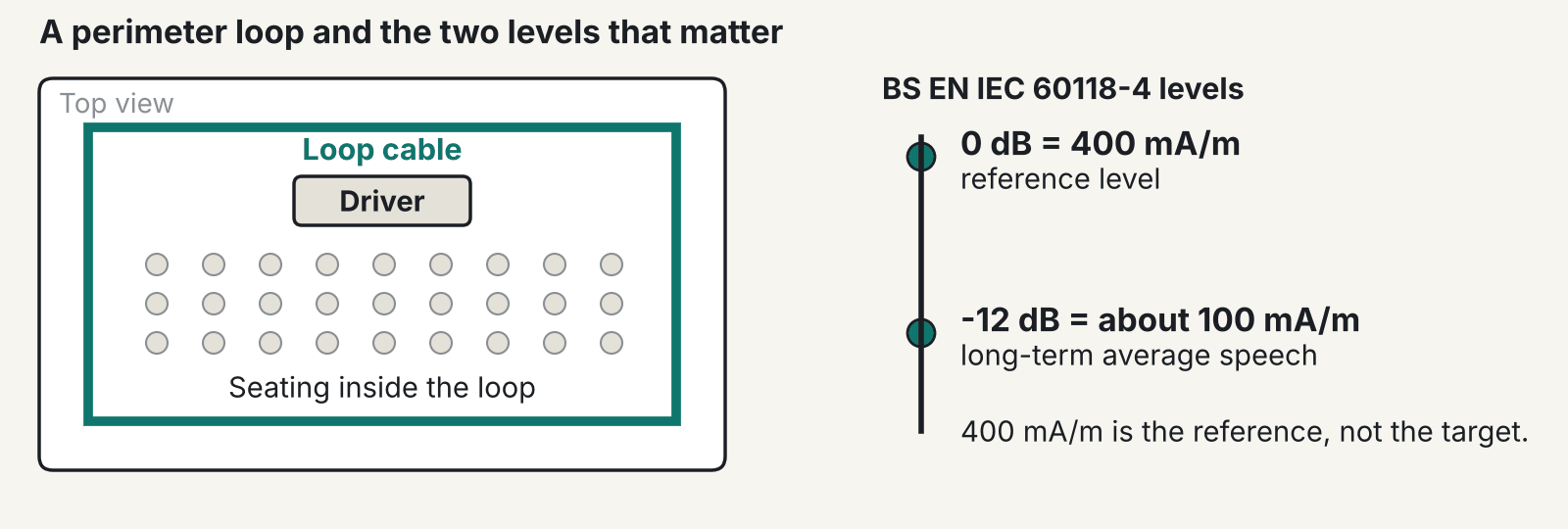
A perimeter loop and the two levels in BS EN IEC 60118-4: the 400 mA/m reference and the average speech level of about 100 mA/m. Illustrative only.
Hearing loop installation isn’t something the Equality Act 2010 spells out. Section 20 asks for reasonable steps to provide an auxiliary aid where a disabled person would otherwise be at a substantial disadvantage, and a loop is one common way to do that. What counts as reasonable depends on your building and your service.
This post is not legal advice. It sets out the statute wording we checked, the standard an installer should commission against, and what a good job looks like. We last checked the sources in October 2026.
What the Equality Act says about hearing loop installation
Section 20 sets out a duty made up of three requirements. The third is the one that matters here. Where a disabled person would, but for an auxiliary aid, be put at a substantial disadvantage, section 20(5) requires you to take such steps as it is reasonable to have to take to provide that aid. Section 20(11) adds that an auxiliary aid includes an auxiliary service.
Section 29 applies the duty to service providers, and section 29(7)(a) says so directly. Schedule 2 then says that for services, the reference to a disabled person in section 20(3), (4) or (5) is to disabled persons generally. In effect, you can’t wait for a named complaint before you think about it. That’s our reading, not the statute’s own phrase.
Paragraph 2(7) of the same schedule says a service provider needn’t take a step that would fundamentally alter the nature of the service or the nature of its trade or profession. The Act applies across Great Britain. It never uses the words “induction loop”, and no section prescribes a hearing loop. “Reasonable” gets judged case by case, so a village hall and a large auditorium will land in different places.
The Equality and Human Rights Commission publishes a statutory Code of Practice on services. A 2026 edition is now on GOV.UK, so check you’re reading the current one before you quote it to anyone.
Who a hearing loop helps, and where it falls short
A hearing loop installation helps people whose hearing aids or implants have a telecoil, and only those people. RNID says over 18 million adults in the UK are deaf, have hearing loss or tinnitus, and that figure includes tinnitus. It also estimates 2.4 million adults have hearing loss that makes most conversational speech hard to follow. Not all of them will have a telecoil, and not all of them will know how to switch it on.
The ABTT’s 2013 guide to hearing assistance in UK auditoria gives a fair summary of the trade-offs. Loops are comparatively easy to install, relatively low in cost and can be discreet. The downsides are electrical and magnetic noise, especially from lighting control equipment, audio quality that isn’t always good, and large or variable seating that is hard to cover. Infrared systems avoid the magnetic noise. They need line of sight, receivers, chargers and someone to manage them.
Bluetooth Auracast is the newer option. The Bluetooth SIG says loops and telecoils have long been the standard for assistive listening in public spaces, and that Auracast broadcast audio can send sound from PA systems and TVs straight to hearing aids, with supporting products now coming onto the market. We’d treat it as emerging and complementary. We aren’t giving dates, because we haven’t seen any we trust.
What BS EN IEC 60118-4 covers
The current designation we found is BS EN IEC 60118-4:2015+A1:2018, and BSI lists it as current, published 30 April 2018. We checked in October 2026 and found no newer edition. Its title is Electroacoustics, Hearing aids, Induction-loop systems for hearing aid purposes, System performance requirements.
The standard sets requirements for field strength in audio-frequency induction loops used with telecoil hearing aids. It also covers minimum frequency response, measurement methods, a check of magnetic background noise on site, the useful volume of the field and commissioning steps. It doesn’t cover loop driver amplifiers. Those fall under IEC 62489-1.
You’ll often see a “400 mA/m target” quoted. That’s a simplification. In the standard, 400 mA/m is the 0 dB reference. The long-term average speech level is about 100 mA/m, which is minus 12 dB against that reference. We haven’t quoted tolerances, background noise limits or measurement heights, because the secondary sources we read disagree. Read the standard or ask the installer to show you the figures they commissioned to.
What a good hearing loop installation includes
A good hearing loop installation starts with a survey, and a cable drum comes later. The installer should measure background magnetic interference with a field strength meter, look for metal in the floor and choose a loop type. A perimeter loop can spill a long way outside the room. A joint design guide from two loop manufacturers says up to four times the loop width. Phased array loops cut that spill, to about 1.2 m from the edge in that guide. It also says steel rebar or pan decking soaks up field at the top of the frequency range, and extra amplifier power won’t fix that.
Next comes the driver, matched to the loop and set up for any metal loss. Then cabling, kept clear of other cables. The same design guide gives 61 cm from parallel voice, data or mains wiring. Buried cable should be marked on the drawings.
Commissioning comes last, and it’s where jobs get skipped. The installer measures with a calibrated meter against BS EN IEC 60118-4, records the results and issues a certificate. Signs go up at each loop-served area so users know to switch to the telecoil setting. In our view, an installer who can’t show you the measured results hasn’t finished the job.
Where loops fail after handover
Most failures after a hearing loop installation are boring. The amplifier’s unplugged, or the source was never routed to it. Microphone gain was set for an empty, quiet room and nobody revisited it when the room filled. Someone fits new dimmers or screens after commissioning, and the interference changes. Then nobody can say what normal sounded like, because the test was never written down.
The fix is routine. Hearing Link guidance says a basic listening test should be done on a regular basis and before events, with a more thorough check normally done annually by a specialist loop supplier. If staff can’t say where the loop is and how to test it, you have a loop in name only. Fold the annual check into your AV maintenance contract so it doesn’t slip. Plan for the day it fails too. The ABTT guide says to tell staff and post notices when a loop is out of action before an event, so users aren’t left guessing at the door.
Questions to put to an installer
Before you sign, put these to the installer:
Which loop type are you proposing, and why? What will the hearing loop installation cover and what won’t it?
Will I get the measured results and a certificate at handover, with the standard and its edition named on it?
Who tests the loop, and how often?
What signs do you supply, and what should staff do when the loop fails before an event?
What happens if we change the room later?
Floors matter in any hearing loop installation. Our places of worship page notes that metal in floors complicates loops, and the same applies in many modern meeting spaces. For a real example, the induction hearing loop in our Scottish Fire and Rescue Service Cambuslang auditorium covers the whole auditorium.
See our Meeting Room AV page for the wider audio picture. We design and install from Glasgow, and we’ll tell you straight if a loop isn’t what your room needs.
The bottom line: The Act asks for reasonable steps and names no technology, so judge a hearing loop installation by what you can measure. Ask for readings against BS EN IEC 60118-4 at handover, then test it before every event.
Questions worth asking
FAQ
Is a hearing loop a legal requirement?
The Equality Act doesn’t mention hearing loops. It requires reasonable steps to provide an auxiliary aid where a disabled person would otherwise be at a substantial disadvantage, and what is reasonable depends on your premises and your service. For your own position, take legal advice. This post is not legal advice.
How much does hearing loop installation cost?
It depends on room size, loop type, metal in the floor and how many areas you need to cover. We haven’t got a sourced price to quote, so we won’t invent one. Ask for a quote that follows a survey.
How do I know if my hearing loop installation works?
Ask for the commissioning record that shows measured results against the standard. Staff should do a basic listening test regularly and before events, and a specialist should check it annually. If you have no test record, you don’t yet know.
Do hearing aids need a special setting for a loop?
Yes. The hearing aid needs a telecoil, switched on with the T setting or the equivalent programme. Without one, a loop does nothing for the wearer, which is why signs and staff awareness matter.
Are hearing loops being replaced by Bluetooth?
Not that we can see. The Bluetooth SIG describes Auracast as a way to send audio from PA systems, TVs and other sources direct to hearing aids, with supporting products now arriving. We’d treat it as complementary for now and give no dates.
Which standard should a hearing loop be tested against?
BS EN IEC 60118-4:2015+A1:2018 is the current edition we found when we checked in October 2026. It covers field strength, frequency response, measurement methods and commissioning. Loop driver amplifiers are covered by a different standard, IEC 62489-1.
Not sure if your loop works, or if you need one?
Tell us about the room and what you’ve got now, and we’ll give you a straight answer.
Meeting Room Booking System and Wireless Presentation: What to Check Before You Buy
Ghost bookings and failed screen sharing are the two meeting room complaints we hear most. Both come down to what sits behind the wall and on the network.
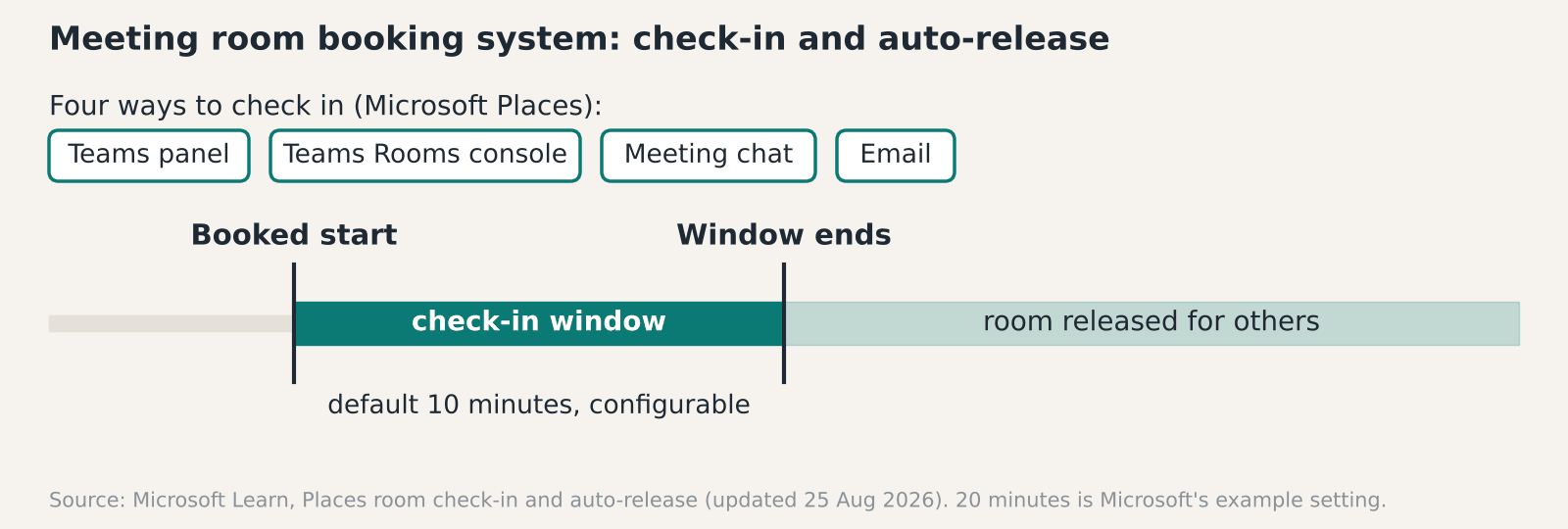
How a meeting room booking system releases an unclaimed room. The 10 minute window is the Microsoft Places default and can be changed.
A meeting room booking system earns its money by freeing rooms that nobody turned up for. Microsoft Places can release a booked room automatically if nobody checks in, and the default window is 10 minutes. That only works if each room has a way to check in, and the panel, licence and network behind it are in place.
How a meeting room booking system stops ghost bookings
It asks people to confirm they’ve arrived, then releases the room if they don’t. Microsoft’s documentation describes four ways to check in: the Teams panel at the door, the join button on a Teams Rooms console, the Teams meeting chat, or email. The release window defaults to 10 minutes and can be changed. Microsoft’s example sets 20 minutes through a setting called PostReservationMaxClaimTimeInMinutes.
Three details catch people out. Changes can take up to 48 hours to apply. The panel check-in needs a recent Teams panel app version, which Microsoft lists. And licensing matters: Teams Premium bought before 1 April 2026, or a space licence (Teams Rooms or Shared Space) on the room. The page was updated on 25 August 2026.
Microsoft recommends limiting auto-release to rooms that have a panel or a Teams Rooms device. That’s sound advice, since a room with no way to check in can only release itself on a guess. In our view 10 minutes is tight for a boardroom hosting external guests who sign in at reception, so lengthen the window there.
We haven’t found a verified figure for how many bookings go unclaimed, and vendor percentages in search results don’t come with methods. Measure your own: compare booked hours with occupancy for a month before you buy any meeting room booking system.
What a meeting room booking system needs behind the wall
A booking panel is a small networked computer, and it needs a data point, power over Ethernet and a place on the right VLAN. Our room booking systems page describes door and desk panels that sync with Microsoft 365 or Google Workspace, with check-in and auto-release for ghost bookings. It also covers occupancy sensors.
In our experience the cabling is where budgets slip. A panel beside the door needs a cable run to that exact spot. On a new build that’s a line on the containment drawing. In an occupied office it’s surface trunking or a ceiling void and a night visit. Ask for the data point locations on the quote, and for the licences and network work to be priced as separate lines.
Sensors add a second signal. A booking says someone intends to use the room. A sensor says someone is in it. Combined, they let you release a room that nobody has entered, and they give you honest utilisation data. Ask what the sensor reports and where that data goes. Find out who can see it, and whether the occupancy figures are anonymous counts or tied to named people in the calendar. That changes the privacy conversation with your staff.
Security and the Windows 10 question
Rooms with Teams Rooms devices come with their own identity rules. Microsoft’s guidance on conditional access says the management feature needs a Teams Rooms Pro licence and Entra ID P1, which is included. It says not to require interactive MFA for room resource accounts, and to exclude them from any policy that needs a person to sign in. It also says to apply Intune compliance to both devices and resource accounts, so read the full Microsoft guidance with your identity team.
If your room PCs still run Windows 10, that’s a bigger issue than the booking layer. Microsoft doesn’t support Teams Rooms on Windows devices placed on ESU, and builds 10.0.19045 or lower need Windows 11 or a replacement. We cover that in our note on the Windows 10 ESU cost for AV PCs. Check the room accounts too, since Microsoft’s guidance treats them separately from the devices. Fix the PCs first, then add the meeting room booking system on top.
Why wireless presentation fails on a managed network
It usually fails because discovery doesn’t cross the network boundary. One vendor documents AirPlay discovery as using mDNS on UDP port 5353 at 224.0.0.251. That vendor’s knowledge base, written for one receiver product, says multicast typically doesn’t cross VLANs without an mDNS reflector or Bonjour gateway. Our own wireless presentation page says the same about multicast discovery.
That vendor page lists the other usual causes. Access point client isolation has to be off. Multicast has to be allowed on the client SSID. Blocked ports can leave you with a black screen or audio-only mirroring. The symptom is usually the same: the laptop doesn’t see the room, and the person presenting blames the receiver when the fault sits on the network behind it.
The fix is a network job, so settle it at design stage. Decide where the receivers live, which VLAN guests and staff join, and who runs the reflector. We haven’t checked in detail how Miracast and Google Cast behave across your network, so test every protocol your people use before sign-off.
Guests, BYOD and keeping a wired fallback
Wireless presentation often gets bought alongside a meeting room booking system, since both touch the same rooms and the same network. People bring whatever they have. AirPlay, Miracast, Google Cast and USB-C all turn up. Our wireless presentation page covers all four, including guest sharing that doesn’t need the visitor to join your corporate network.
Treat the receiver as a networked device. It has an address, firmware and a management page, so it belongs on your asset list and your update schedule. If you hold Cyber Essentials, ask your assessor how it should be scoped. Our guide to Cyber Essentials and Cyber Essentials Plus explains the two levels.
A visitor’s laptop may run any of those four, and not every receiver supports all of them, so check the protocol list against the devices your own people carry. Keep an HDMI or USB-C cable on the table for the day wireless lets you down.
What to ask a supplier before you buy
Start with the calendar. Find out which one the system syncs with, and whether it needs Microsoft 365 or Google Workspace licences on top. Then ask for the check-in method in each room, and who sets the release window. Each panel needs a data point, PoE and a VLAN, so ask what it wants on the wall.
On the wireless side, ask how guests present without joining the staff network, which protocols are supported and who tests them on your network. Ask what support costs and who answers when a panel goes blank. Our meeting room AV team can sit in on those calls. Get the answers in writing and compare them side by side. A supplier who can’t say how check-in works in a given room hasn’t thought about that room yet. Ask to see a live installation on a network like yours, with a guest laptop on it.
The bottom line: Decide the check-in method for each room before you choose a meeting room booking system. Then test wireless presentation on your own network, with a cable still on the table.
Questions worth asking
FAQ
What is a ghost booking?
It’s a room reserved in the calendar that nobody uses. The room shows as busy, so other people can’t book it. Check-in with auto-release is the usual fix.
How long should a room be held before auto-release?
A meeting room booking system built on Microsoft Places defaults to 10 minutes, and you can change that. Microsoft’s example uses 20. Boardrooms with external guests may need longer than open meeting rooms.
Does a meeting room booking system need a panel outside every room?
Microsoft recommends limiting auto-release to rooms with a panel or a Teams Rooms device. Without one, there’s no obvious way to check in. Rooms without either can still be booked and measured.
Can guests share their screen without joining the corporate wifi?
Our wireless presentation page describes guest sharing that doesn’t need the visitor on your corporate network. How a particular unit does that varies, so ask the supplier to demonstrate it on your network.
Why can’t an iPhone find the wireless display?
Discovery for AirPlay uses multicast, and one vendor documents that it typically doesn’t cross VLANs without a reflector. Client isolation on the access point can also block it. Check both.
Do we still need an HDMI cable in the room?
Yes. Wireless sharing depends on the network and on the guest’s device. A fixed cable is the fallback that still works when either lets you down.
Ghost bookings or screen sharing driving you mad?
Tell us how many rooms you have and what’s going wrong, and we’ll tell you what to fix first.
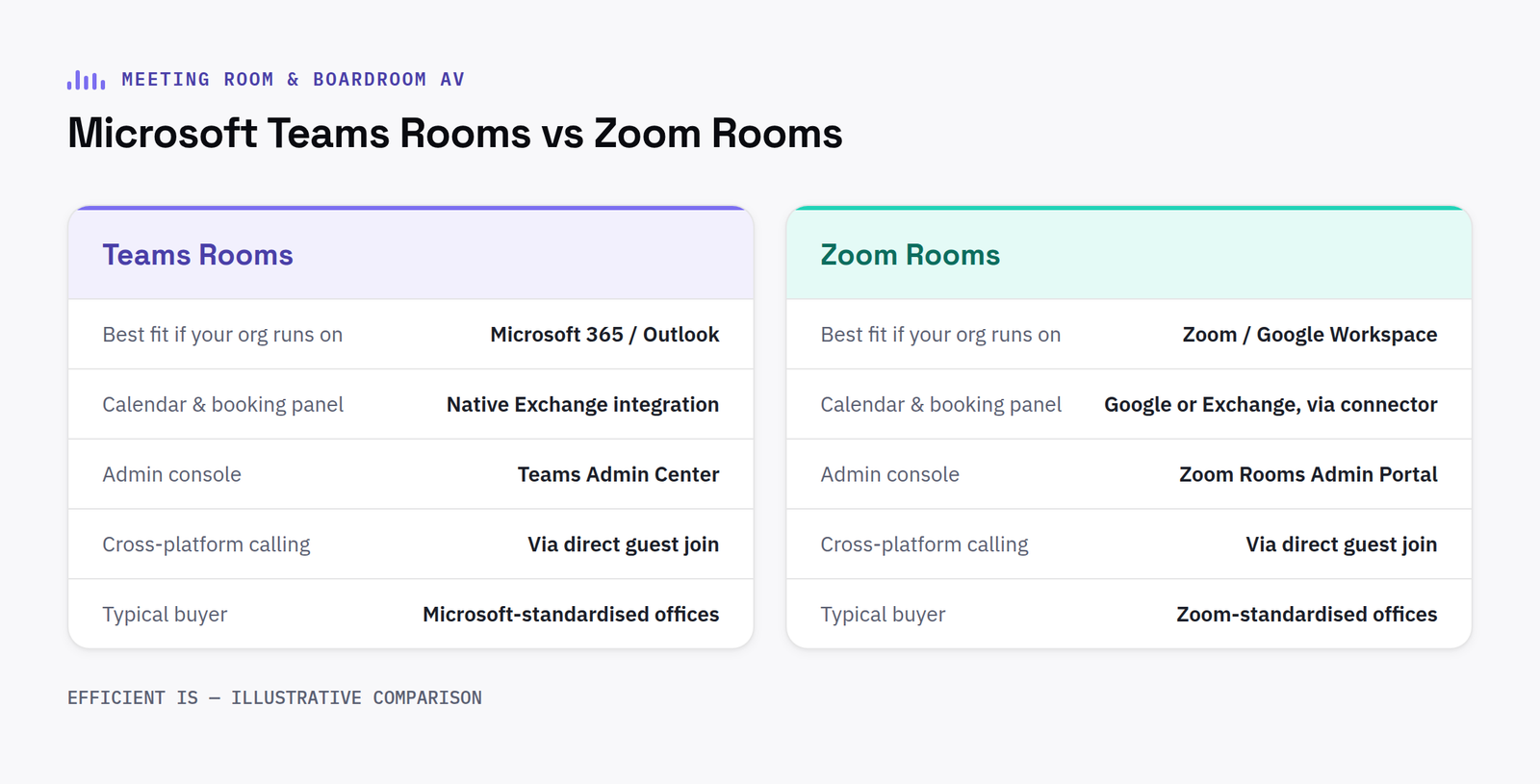
Teams Rooms or Zoom Rooms? The platform your company already uses usually decides it.
This decision looks like a technology choice. It’s actually an org-chart question, which platform does your business already run meetings on.
Why this is rarely a close call
If your organisation already runs on Microsoft 365, a certified Microsoft Teams Rooms system is almost always the right default, it integrates natively with the calendar, licensing and admin tools you already have. The same logic applies in reverse for organisations standardised on Zoom. Choosing the platform your staff don’t already use daily just adds a second login and a second set of habits to learn.
The bit that actually matters more: interoperability
Industry surveys now regularly put the share of meetings with at least one remote participant at 70% or more: and a meaningful share of those involve someone joining from a different platform than the room is built for. That’s why interoperability, not platform loyalty, has become the defining meeting-room AV priority: a well-specified room should let a Zoom-only external guest join a Teams-native meeting without anyone in the room noticing the difference.
Certified room hardware from Logitech, Yealink, Poly and others is increasingly built platform-agnostic for exactly this reason, the same physical camera and audio bar running Teams in one room and Zoom in the next, switched at the compute layer rather than the hardware.
Sizing the room correctly
Huddle rooms (2 to 6 people) generally need one all-in-one video bar and nothing more elaborate. Mid-size meeting rooms (6 to 14 people) benefit from a dedicated room PC or compute puck rather than relying on someone’s laptop. Larger boardrooms need multiple cameras or an auto-framing wide-angle system so remote participants aren’t staring at the back of someone’s head for an hour.
The bottom line: Match the room to the platform your organisation already runs on, specify hardware that stays interoperable for guests joining from elsewhere, and size the camera/audio setup to the room, not the other way round.
Questions worth asking
FAQ
Should we choose Microsoft Teams Rooms or Zoom Rooms?
In most cases, whichever platform your organisation already uses for daily meetings, the value is in native calendar and licensing integration, not the hardware itself.
What if guests join from a different platform than our room is set up for?
Well-specified modern room hardware is largely platform-agnostic at the hardware layer, so a Teams-native room can generally host a Zoom guest without anyone noticing a difference.
Certified hardware, and why the tier matters
Both Microsoft and Zoom operate certification programmes for room hardware, and not every device sold for meeting rooms carries a full certification. Certified hardware has been through the platform’s own compatibility and performance testing, giving a reasonable guarantee that camera framing, audio pickup and firmware updates will keep working reliably as the platform itself evolves. Uncertified or generically compatible hardware can still function, but any issues that surface later are harder to get support for, since neither the room hardware vendor nor the platform provider will necessarily take ownership of a fault outside their certified combinations.
What installation actually covers beyond the hardware
A proper meeting room AV installation is not just mounting a camera and a screen. It includes provisioning the room account correctly within the organisation’s tenant, confirming the network can support the bandwidth and quality of service a video call needs, and testing the room end to end with a real call before staff rely on it for the first time. Skipping this step is the most common reason a room that looks correctly installed still frustrates the first team that tries to use it.
Have a project in mind?
Tell us what you’re trying to fix and we’ll tell you honestly what’s realistic.
Most “broken” meeting rooms aren’t actually broken, they’re just badly specified
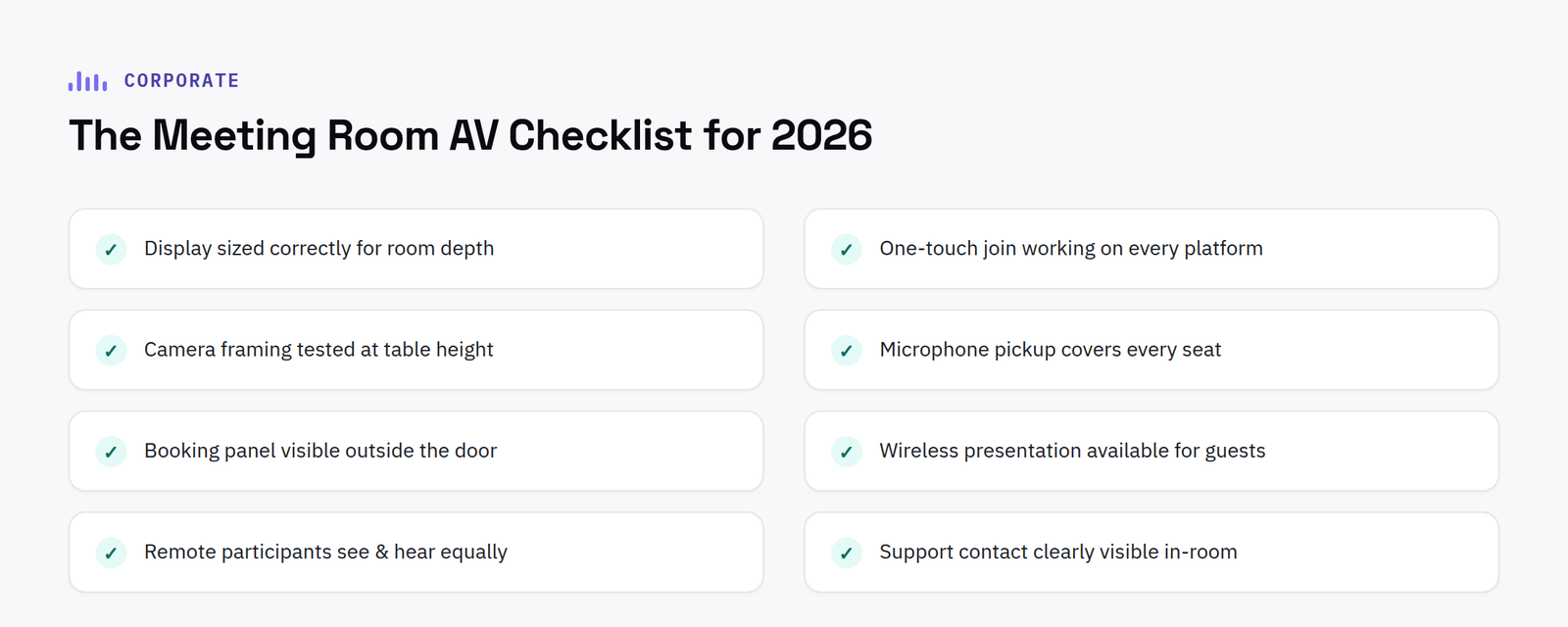
The most common complaint about meeting room AV isn’t a hardware failure. It’s friction, too many steps between walking in and actually starting the meeting.
With most enterprise meetings now including a remote participant, and a meaningful share of those joining from a different platform than the room is built for, interoperable hardware, able to run Teams, Zoom or Google Meet without a different physical setup each time, has become one of the defining priorities for corporate meeting room AV specification.
Room booking, properly integrated
A room-booking panel that doesn’t sync properly with the calendar system creates exactly the problem it’s meant to solve, double-bookings, rooms shown as free that aren’t, and staff losing trust in the system within weeks. Integration with Microsoft 365 or Google Workspace calendars should be tested thoroughly before rollout, not assumed to work out of the box.
Standardise across rooms, don’t bespoke each one
Organisations that standardise meeting room technology across room sizes and office locations see meaningfully better adoption and lower ongoing support overhead than those treating every room as a bespoke project. A huddle-room kit, a mid-size room kit and a boardroom kit, three configurations, consistently applied, beats a different bespoke setup in every room.
The bottom line: Prioritise one-touch join and cross-platform interoperability over any single feature, integrate room booking properly before rollout, and standardise configurations across room sizes rather than bespoking each room.
Questions worth asking
FAQ
Do you support multi-site corporate rollouts across the UK?
Yes, design and project management are handled centrally, with installation delivered by our engineers in Scotland or a vetted local partner, UK-wide.
Should we standardise meeting room AV across all our offices?
Generally yes, a small number of consistent room configurations (huddle, mid-size, boardroom) is easier to support and gets adopted faster than bespoke setups per room.
What often gets overlooked in the initial spec
Acoustic treatment is one of the most commonly overlooked elements in meeting room AV planning. A room with hard, reflective surfaces, glass walls, bare ceilings, can make even well-specified microphones and speakers sound poor to remote participants, regardless of how good the actual hardware is. A basic acoustic assessment alongside the AV specification, checking reverberation and background noise rather than assuming any room will sound fine once equipment is installed, avoids paying for good hardware that gets undermined by the room itself.
Cable management and future serviceability are worth planning for at design stage too, not left as an afterthought. Properly containerised, labelled cabling with accessible routes for future changes means adding a camera, replacing a display, or troubleshooting a fault later does not mean disrupting the room or its finishes. Rooms specified without this in mind often end up with cables run externally or hidden in ways that make any future change disproportionately disruptive.
Lighting control, ensuring cameras get consistent, flattering exposure across the day rather than only when natural light happens to be favourable, is a small addition at design stage that meaningfully improves how a room performs on video calls.
Testing the finished room with an actual remote participant, not just staff physically present, before declaring it complete catches issues that internal walkthroughs regularly miss, since it is only from the remote end that audio and camera framing problems actually become obvious.
Have a project in mind?
Tell us what you’re trying to fix and we’ll tell you honestly what’s realistic.
Find our work useful? Add us as a preferred source on Google.
We use cookies that are strictly necessary to run this site, and, only with your permission, analytics and advertising cookies to help us understand traffic and measure our marketing. See our Privacy Policy for details.