
MDT Rooms & Clinical Meeting AV: a room that starts first time and lets remote colleagues hear every voice.
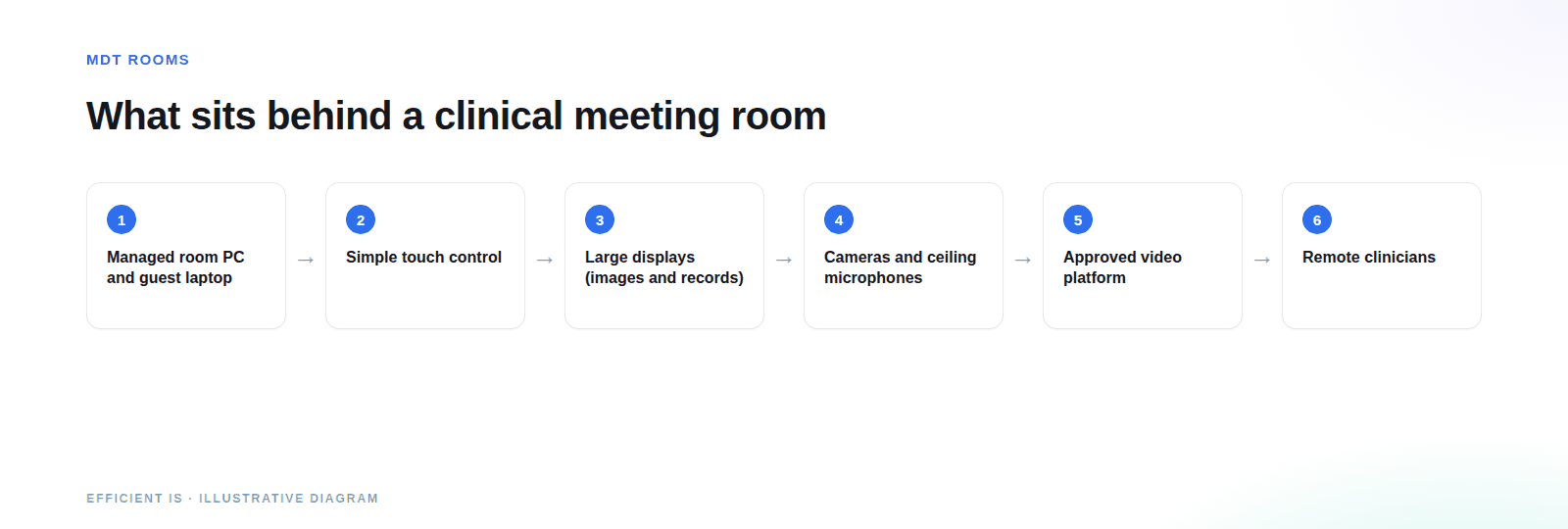
An MDT room needs big, clear screens for images and records, microphones that cope with quick overlapping discussion, and controls simple enough for a clinician with minutes to spare. Efficient IS designs and installs that AV for NHS and healthcare teams across the UK, working alongside your ICT and information governance staff.
Where MDT and clinical meeting rooms are used
Hospital MDT meetings
Regular case review meetings where specialists look at imaging, results and notes together and agree the next step for a patient. The room has to start on time, every week.
Cross-site and remote specialists
Video links between sites for case discussion and specialist input. It’s the same kit and approach as our meeting room and boardroom AV, with the audio and display choices made for clinical use.
Clinical education and team meetings
Case conferences, governance meetings and teaching sessions in NHS and healthcare buildings, where space is tight and booking is shared.
What should an MDT room do that a normal meeting room doesn’t?
A clinical meeting is short and packed, and the decisions matter. The room should get out of the way, and it has to treat patient information carefully.
Display images and records clearly
Imaging needs large, high-quality displays that everyone at the table can read, and often two or more sources on screen at once: the images alongside the record or results. We size and position screens for the furthest seat, not the nearest.
Hybrid attendance for clinicians
Specialists dial in from other sites and wards. A camera that shows the room, a second that frames the speaker or the screen, and a clean join into the video platform your trust already uses keep remote colleagues part of the conversation.
Audio clarity
Audio is where most rooms fall down. Clinical discussion is quick and people talk over each other, so the microphones need to cover every seat and the echo control has to be good enough for remote attendees to tell who said what.
Simple control for non-technical clinicians
One touch to start, one to end. A clinician with a few minutes between clinics shouldn’t have to remember a sequence or ring a technician. We’d always design the control panel for the person who uses the room least.
Information governance
Patient information on a shared screen or in a video call has to be treated carefully. The Caldicott Principles set out how health and social care organisations should use confidential information, including using only the minimum necessary and restricting access to those who need it.
We work with your NHS ICT and information governance teams from the start. We don’t claim any clinical or medical device compliance for these systems, and the formal sign-off sits with your organisation. Our job is to make the technical design easy for them to approve.
Sources, booking and display
Most MDT teams show material from a fixed room computer on the NHS network, and sometimes a visitor’s laptop. We plan for both: a managed room PC and controlled guest connections, including wireless presentation where your ICT team is happy with it, so nobody’s hunting for adaptors.
Where several teams share a room, room booking and a display outside the door stop clashes, and the booking can tell the room to be ready.
Why do MDT rooms stop being used?
In our experience, clinical meeting rooms fail for ordinary reasons, and most are avoidable.
Poor audio
Remote colleagues can’t hear the room, so the meeting drifts back to a phone on the table. Once clinicians stop trusting the audio, they stop using the system.
Awkward sources
If showing an image means finding an adaptor, logging in to a second machine and asking someone for help, the time pressure wins and people go back to squinting at one monitor.
Security left to the end
Unmanaged laptops plugged into the network, unclear who can see the screen and meetings joined by the wrong people. Each of those is an information governance problem waiting to be found.
What makes one clinical meeting room cost more than another?
Room size and attendance
Number of seats, screen size and how many people join remotely.
Sources and displays
The number of screens, and whether images come from a fixed PC, laptops or both.
Network and security approach
What your ICT team requires for connecting equipment, and any segmentation needed.
Number of rooms
A repeatable design across several rooms is cheaper per room and easier to support.
How an MDT room project runs
Discover
We sit down with the clinicians who use the room, ICT and information governance to agree what the room must do.
Design
A specification that fits your network and security rules, including network design for the room’s equipment where needed.
Install & commission
Delivered by our engineers in Scotland, or a vetted local partner, anywhere in the UK, and tested with a real call before handover.
Train & support
Short, practical training for regular users, plus support and maintenance so a fault doesn’t cancel a clinical meeting.
Fitting screens in working hospitals
NHS Tayside: Ward eWhiteboard Installs Across a Live Clinical Estate
Electronic ward whiteboards giving clinical staff point-of-care access to patient data, installed and maintained across NHS Tayside’s hospital estate, procured through Insight and fitted around live clinical activity.
Read the case studyThis wasn’t an MDT room. We cite it because installing screens that show patient data in working hospitals, scheduled around ward activity so care isn’t interrupted, is the same discipline an MDT room refit demands.
Where to look next
Meeting Room & Boardroom AV
See solution →Room Booking Systems
See solution →Wireless Presentation
See solution →Support & Maintenance
See solution →Simulation Suites
See solution →Lecture Theatres & Lecture Capture
See solution →Prefer to talk it through? Call 0845 095 3600 or email av@efficient-is.co.uk. We’ll give you a straight answer, not a sales script.
MDT Rooms & Clinical Meeting AV: Answered Plainly
What is an MDT room?
MDT stands for multi-disciplinary team, so it’s the room where clinicians from different specialities sit down together and agree a patient’s next step. The AV has to put images and records on big screens and bring remote colleagues in clearly.
Can clinicians join an MDT meeting remotely?
They can. The room uses the video platform your organisation already approves, with cameras and microphones arranged so remote attendees see the room and hear everyone. Whether a platform is allowed for clinical discussion is a decision for your ICT and information governance teams.
Is your MDT room AV a medical device or clinically certified?
No, and we don’t claim it is. It’s meeting room AV. We work with your NHS ICT and information governance teams on security and approval, and the sign-off stays with your organisation.
How do you keep patient information secure on screen?
By limiting what connects to the room, using managed equipment and agreeing access with your ICT team. The Caldicott Principles are a useful guide: show only what’s necessary, to those who need it.
Can a room booking system work with an MDT room?
It works well. A booking panel at the door shows who has the room and stops double-bookings, and it can integrate with your calendar platform. See our room booking systems page.
Can you upgrade an existing MDT room rather than start again?
Usually. A survey will show whether the screens, cabling and room computer can stay, and what’s causing the problem. Poor audio is the commonest culprit and the cheapest big improvement.
Planning a clinical meeting room?
Tell us who meets, what they need to see and who needs to join remotely. We’ll tell you what’s realistic.












Find our work useful? Add us as a preferred source on Google.