
Reception AV for Atriums & Foyers: screens you can read in the glare and staff can update themselves
Reception AV means the screens, video walls, sign-in displays and speakers a visitor meets in a lobby, atrium or foyer. Efficient IS, a Glasgow AV and IT integrator, designs and installs them. Most reception schemes go wrong on glare and stale content, so we plan for both from the first survey.
Where reception AV goes
Corporate headquarters and offices
A video wall or LED feature behind the desk, a welcome screen for today’s visitors and a directory for the floors above. It’s the first thing a client sees. See our corporate work.
NHS and healthcare reception
Waiting areas where screens carry queue and appointment messaging, practice information and directions, and where hardware has to survive constant cleaning. We cover this in more detail for NHS and healthcare sites.
Councils and public buildings
Service counters, customer contact centres and civic foyers, where the questions are mostly where to go and how long it’ll be. A good fit for local government buildings.
What makes a good reception video wall or atrium display?
Start from the viewing distance and the light, not the screen size. A display that looks superb on a showroom floor can disappoint in a glass-fronted lobby.
Video walls and LED
A tiled LCD video wall suits viewing distances of roughly 1.5 to 4 metres, with visible bezel lines as the trade-off. Direct-view LED gives a bezel-free image and works at greater distances and larger sizes, at a higher cost per square metre. A double-height atrium usually points to LED.
Welcome screens and sign-in
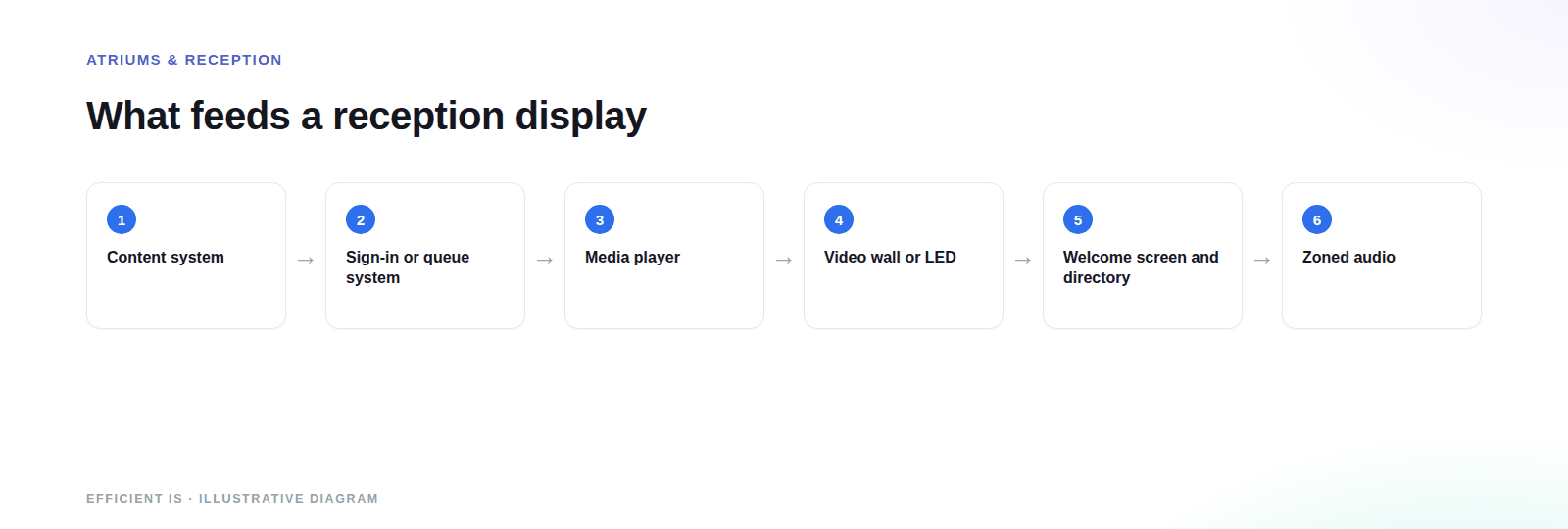
A screen showing today’s visitors and their hosts, fed from a sign-in system, saves reception staff typing names onto a board. It ties in with building access systems, so a visitor signed in at the desk is known to the system when they reach the door.
Wayfinding and directories
Floor directories, room lists and route guidance, driven by the same digital signage content system as everything else, so a tenant change is updated once. Where you also run room booking, free rooms can show on the directory.
Brand and corporate messaging
Brand film, company news, awards and values, scheduled by time of day. Everyone sees this screen, so keep it short and readable from the door. Last year’s awards still running in June is the usual failure.
Daylight and glare
Atriums are bright, and standard indoor displays are far dimmer than a sunlit foyer needs. Survey at different times of day, including when the sun is on the glass. Position screens at right angles to the glazing where you can, choose high-brightness panels or LED for walls that face the light, and use anti-glare finishes.
A light sensor that dims the screen as the sun goes down avoids dazzle in the evening. The brightness figure on a data sheet means little until it’s checked against the glass that’s actually there.
Sound and ambient audio
Hard floors, glass and height make atriums reverberant, so speech from a screen turns to mush while music sounds fine. Zoned ceiling speakers give even, quiet coverage, and a processor can raise the level where the room gets noisy.
Plan the audio when you plan the screens. Adding speakers after the ceiling has gone in is the expensive way to find out you need them.
How do queue and appointment messages work in an NHS or public sector reception?
In a busy waiting area the screen’s job is to answer what staff get asked all day: where do I go, how long will it be, and what happens next.
Queue and appointment messaging
Screens show now-serving numbers, appointment call-forward, estimated waits and which counter or room to go to. The data comes from the queue or appointment system, so staff aren’t updating a screen as well as running a desk.
Readable by everyone
Large type, high contrast and plain language, with the most important message first. Provide subtitles for any audio and multiple languages where your population needs them. Check accessibility in the room, not on a laptop.
Built to be wiped down
In clinical and counter areas we specify sealed bezels with no gap for fluid or debris to collect, IP54 or better hardware where splashes are likely, and touch surfaces that survive repeated alcohol wipes.
How do you keep reception content fresh without calling a technician?
One content system, owned by your team
Reception content is managed from a simple dashboard by the person who owns the message, whether that’s reception, marketing or facilities. Templates lock the layout and branding so a quick edit can’t break the screen. We train your staff at handover.
Scheduling and live data
Messages run on a schedule, so the welcome message changes at lunchtime and the event banner switches itself off. Where it makes sense, feeds from calendars, sign-in or queue systems keep the screen current without anyone touching it.
Emergency override
The same screens that carry day-to-day content can usually be set up to carry urgent messages as well. If your premises falls under Martyn’s Law, specify for both at the start.
One point on sign-in: visitor names and company details are personal data, so decide what the welcome screen shows and how long records are kept. The ICO’s storage limitation principle is blunt about it: you must not keep personal data for longer than you need it.
What affects the price of reception AV
Reception jobs vary a lot, because the building does much of the deciding.
Display type and size
LED costs more than LCD per square metre. In a double-height space, add structural support and specialist access.
Ambient light and brightness
The more glass, the brighter the panel you need. A bright atrium usually means LED.
Structure and mounting
Walls, feature panels and ceilings each need their own fixings, and some need an engineer’s sign-off.
Audio
Zoned speakers, processing and ceiling work add scope that’s easy to forget at the start.
Content system and integrations
Sign-in, queue and calendar integrations take configuration time, and a content system needs training and templates.
Working around the building
A busy reception can’t close, so expect out-of-hours installation and protected routes through the public area, and the extra time that brings.
Prefer to talk it through? Call 0845 095 3600 or email av@efficient-is.co.uk, we’ll give you a straight answer, not a sales script.
How a reception project runs
Assess
A survey of the space at different times of day: light, viewing distances, structure, power and data.
Design
Display type and size, audio zones, content templates and integrations, agreed with your facilities and IT teams.
Install & commission
Fitted out of hours where needed, calibrated for the room’s light and tested end to end. Delivered by our engineers in Scotland, or a vetted local partner, anywhere in the UK.
Handover & support
Staff trained to edit the content themselves, with optional support and maintenance for the hardware.
Reception AV: common questions
Should a reception area use an LED wall or an LCD video wall?
Mostly a matter of distance and size. LCD walls suit viewing from roughly 1.5 to 4 metres and cost less, but show bezel lines. LED is bezel-free and works at longer distances and bigger sizes, at a higher cost. A tall atrium usually points to LED; a modest lobby usually doesn’t need it.
How do we stop glare on a reception screen?
Visit at the worst time of day, usually when low sun is on the glass, and look at what the screen picks up. Then angle it away from direct reflections, use high-brightness panels or LED on walls that face the light, and ask for anti-glare finishes. Auto-dimming stops it dazzling in the evening.
Can a welcome screen link to our visitor sign-in?
It can. A sign-in system can feed a welcome display showing today’s visitors and hosts, and notify the host when someone arrives. We design it with the door entry, so one visitor record serves both.
Can reception screens show queue and appointment messages?
As long as your queue or appointment system can export the data, yes. Screens can show now-serving numbers, call-forward messages and estimated waits, but what appears depends on what the system gives us, and we check that at the start.
Who updates the content day to day?
Your own people, from a simple dashboard. Templates lock the layout and branding, so whoever you nominate can change a message without breaking the screen. We train them at handover, and you’d only call us for a hardware fault.
Does a reception AV scheme need audio?
Usually, and it’s the part people forget. Atriums are reverberant, so speech from a screen can be hard to follow. Zoned ceiling speakers and a processor give even coverage, and planning them alongside the screens is much cheaper than adding them later.
Planning a reception or atrium refit?
Tell us the space, the light and who has to manage it.












Find our work useful? Add us as a preferred source on Google.