
Room Booking Systems & Meeting Room Displays: see which rooms are free and get back the ones that only look booked
If your meeting rooms look booked but sit empty, a room booking system fixes that: a live status panel at every door, kept in step with your Microsoft 365 or Google Workspace calendar, so people can see, book and release rooms on the spot. Efficient IS, a Glasgow AV and IT integrator, supplies the panels and the network behind them.
Where room booking panels are used
Hybrid offices
When there are fewer desks and rooms than people on a busy Tuesday, a booking system is the difference between a calm floor and an argument over a huddle room. This is the most common request from corporate offices.
Councils and public buildings
Committee rooms, interview rooms and shared meeting space used by several teams and visiting partners, where a clear status at the door stops staff knocking to ask who’s in. Typical for local government estates.
Campuses and multi-tenant buildings
Shared rooms booked by different departments or tenants, used by visitors who don’t know the building. A panel at the door and a directory in reception do the job of a receptionist who isn’t always there.
What does a meeting room booking system actually include?
Three parts, and they only work well together: a display at the door or desk, a calendar connection behind it, and optionally sensors that tell the system whether anyone is really in the room.
Door displays and room panels
A touchscreen beside the door shows the room’s status at a glance, normally with an LED indicator for busy or free and the day’s agenda underneath. Anyone can walk up, see what’s free and book the next slot.
Desk and flexible-space panels
The same idea scaled down for hot desks, bookable bays and shared equipment, where a small desk panel or a QR code does the job.
Calendar integration
Each room is set up as a bookable resource in your calendar platform, so a booking made in Outlook, Google Calendar or on the panel itself lands in the same place. Panels are configured to sync with Microsoft 365, Google Workspace and most of the major platforms. Google Workspace calls these calendar resources, and Microsoft’s Teams panels work the same way inside a Teams estate.
Ghost bookings and no-show release
A ghost booking is a room that’s reserved but empty. Check-in is the fix: when the meeting starts, the panel asks the organiser to confirm, and if nobody does within a grace period you set, the booking is cancelled and the room goes back to the pool. Microsoft describes the same principle for Teams panels, where a reserved room is released for others if it isn’t being used.
Set the grace period sensibly: too short and you cancel the meeting whose organiser is still waiting for the lift. People can also release a room early or extend a booking from the panel.
Occupancy sensors and utilisation reporting
Booking data tells you what was reserved. Sensors tell you what was used. Ceiling or wall sensors detect presence or count people, and the gap between the two is where the savings are: the eight-person room booked daily for two people, the room that’s always reserved and never entered.
Most room sensors count people rather than identify them, but tell staff what’s installed and speak to your data protection lead first. They’re far easier to specify at the start than to retrofit.
How does it tie into wayfinding and Teams Rooms?
Wayfinding for visitors
A directory screen in reception or on each floor can show which rooms are free and where they are, using the same calendar data as the door panels. It’s the same technology as digital signage, and one content system can drive both.
Teams Rooms and Zoom Rooms
If the room has a Teams Rooms or Zoom Rooms system, the panel outside and the console inside should agree about who has the room. They share a calendar entry, so they do, provided the room accounts are set up correctly. We design the booking layer with the meeting room AV so one-touch join works and the status at the door matches the meeting inside.
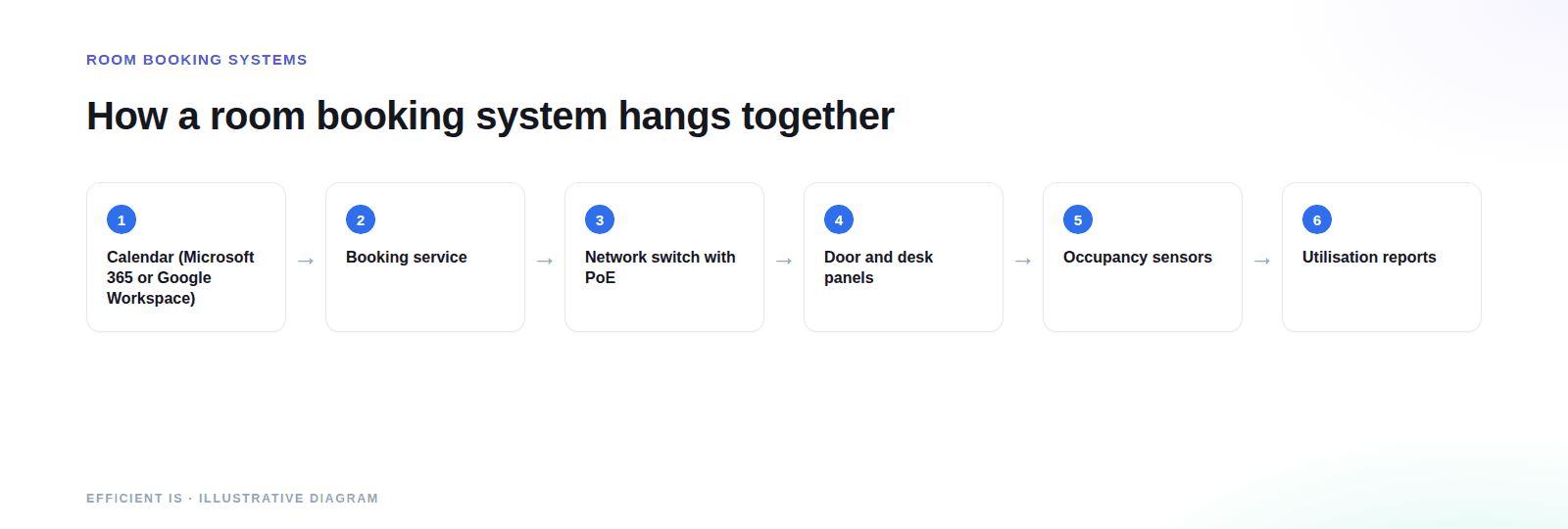
Why is a room booking panel often a network project?
A panel looks like a tablet on a wall. In practice it’s a network device that needs a cable, power, an address and permission to reach a cloud service, at a spot in the building where nobody planned a data point.
A data point at every door
Most panels take power and data over a single Power over Ethernet cable, so you need a live network port beside each door. Corridors rarely have one. Adding them is a job for structured cabling, ideally before the walls are decorated.
Switch ports and PoE budget
Every panel draws from the switch’s PoE budget, and sensors can too. Microsoft is clear that Teams panels need PoE and a network connection and says to work with your IT team. Forty panels on a switch sized for phones and access points is how panels end up rebooting at ten in the morning. We check port count, PoE class and total budget in network design.
VLANs, DHCP and firewall rules
Panels should sit on their own VLAN, get addresses reliably and reach only the booking service they need. That’s routine for a network team and awkward for a firm that only does AV, which is why we pair the panel install with network installation.
What affects the price of a room booking system
We don’t quote from a price list, because the panels are the smaller part of the job. These are the things that move the number.
Number and type of panels
Door panels, desk panels and directory screens are priced differently.
Cabling at each door
A spare port beside the door is cheap. A cable run is usually the biggest single variable.
Switch capacity and PoE
Existing switches either have the ports and budget or they don’t.
Sensors and reporting
Optional hardware, mounting and a dashboard. Many sites add them in a second phase.
Calendar platform and licences
Some platforms charge per device or room for features such as auto-release.
Installation access
Occupied buildings and out-of-hours working add time.
Prefer to talk it through? Call 0845 095 3600 or email av@efficient-is.co.uk, we’ll give you a straight answer, not a sales script.
How a room booking project runs
Assess
A walk through the rooms, your calendar setup and a network readiness check.
Design
Panel types per room, cabling routes, switch changes, and a decision on sensors now or later.
Install & commission
Panels mounted and configured, then tested with real bookings, including check-in and release, before we call it done. Delivered by our engineers in Scotland, or a vetted local partner, anywhere in the UK.
Room Booking Systems: Answered Plainly
Does a room booking system work with Microsoft 365 and Google Workspace?
It does. We configure panels to sync with Microsoft 365, Google Workspace and most of the major calendar platforms. A booking made in the calendar appears on the panel, and one made on the panel appears in the calendar. We check how your rooms are set up before we choose hardware.
What is a ghost booking and how do you stop it?
It’s a room that’s booked but empty. The fix is check-in and auto-release: the panel asks for confirmation when the meeting starts and frees the room if nobody responds within the grace period you set. On platforms that support it, occupancy sensors can confirm presence without anyone touching the panel.
Do we need occupancy sensors?
Not to start with. Panels alone fix double-booking and the ‘who’s in there’ problem. Add sensors when you want proof of real usage, or release without a button press.
Will the panels work alongside our Teams Rooms?
They’ll agree, because the panel and the room system share the room’s calendar entry. What goes wrong is room accounts and licences, which is why we set those up with the AV from the start.
Is a booking panel a data protection issue?
It can be. Panels can show organiser names and meeting titles, so decide what the door should display. People-counting sensors carry less risk than anything that identifies individuals, but tell staff what’s installed and involve your data protection lead before fitting them.
Planning room booking for your building?
Tell us how many rooms and which calendar platform you use.












Find our work useful? Add us as a preferred source on Google.