
Windows 10 ESU Cost Doubles in Year Two: What It Means for Your AV PCs
The Windows 10 ESU cost doubles in year two. The PCs most likely to be forgotten are the ones behind your meeting rooms, lecterns and signage screens.
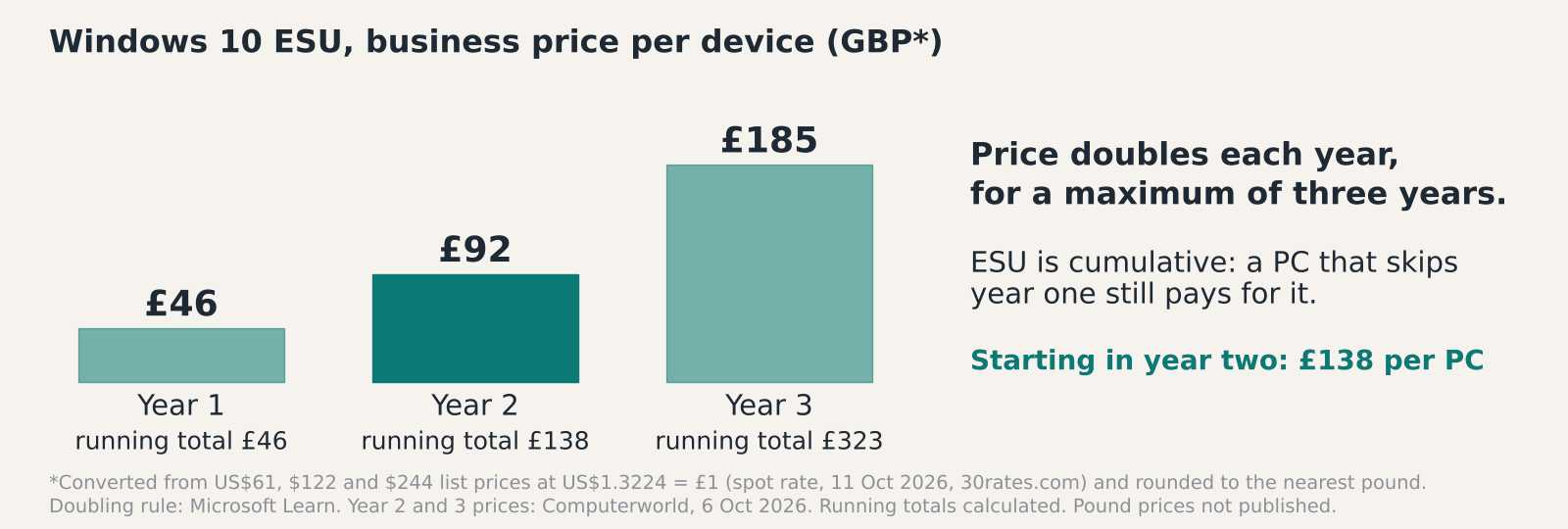
The Windows 10 ESU cost for a business is $61 per device in year one (about £46), and Microsoft says the price doubles each year for a maximum of three years. Year two therefore comes to $122 (about £92), and a PC that skipped year one has to pay for both.
These are US dollar list prices. We have converted them to pounds at US$1.3224 to £1, the spot rate on 11 October 2026, so ask your licensing partner for the real pounds figure.
What changed: as of 8 October 2026, year one of commercial ESU is nearly over. A reseller blog puts the end of year one coverage at 13 October 2026, so year two pricing applies from mid-October. Microsoft’s page doesn’t give that date, so confirm it before you plan around it. We checked every source below on 8 October 2026.
What the Windows 10 ESU cost looks like in year two
Computerworld reported on 6 October 2026 that year two is $122 (about £92) per device and year three is $244 (about £185). ESU is cumulative. Buying year two means paying for year one as well, so a PC that skipped year one costs $183 (about £138) to cover, according to one US reseller’s price page. That catch-up is the sting. Any PC you add to ESU now pays for a year it didn’t use, and the Windows 10 ESU cost for those machines starts at about £138 rather than about £92.
Try it on a sample estate. Say 40 AV PCs never joined year one. That’s 40 PCs at $183, or $7,320 (about £5,535), before tax. A single PC covered for all three years costs $427 (61 plus 122 plus 244), or about £323. Both sums are our arithmetic, converted at the same rate, for illustration only.
Microsoft’s page sets two limits. The PC must run Windows 10 version 22H2, and you must buy at least one licence. You can’t buy a part-year. Licences come through the Microsoft Volume Licensing Program, so the quote that counts is the one from your own licensing partner.
Which AV PCs are still on Windows 10?
Probably more than your asset register says. In our experience the PCs behind AV fall between IT and facilities, and nobody owns their patching. A corridor signage player that’s run untouched since install is the classic case.
Start with the obvious ones: meeting-room PCs, lectern PCs in lecture theatres, signage players, control-room workstations and council chamber control PCs. Our meeting room AV and digital signage work often sits on top of these.
Then go and look. Ask whoever installed each system for a room list, then check the PCs themselves. Run winver, or pull the build number from your management tool. Microsoft’s Teams Rooms page treats build 10.0.19045 or lower as Windows 10 that needs action. Some lectern touch panels and capture units are ordinary Windows machines with a sticker on the front, so check those too. For each one, record the room, the make and age of the PC, what it runs and who owns it.
Why Teams Rooms on Windows can’t use ESU
Microsoft’s Teams Rooms lifecycle page says Teams Rooms on Windows will not support devices placed on ESU. Windows 10 support for these rooms ended on 14 October 2025. To keep getting Teams Rooms and Pro Management support, a device on build 10.0.19045 or lower has to move to Windows 11 or be replaced. The page was last updated on 19 August 2026, and you can read it at Microsoft Learn.
Some certified room devices can’t upgrade at all, so those need replacing. Surface Hub v1 and 2S units on Windows 10 Team lost the Teams Rooms app on the same date.
So the first question for any room is whether it’s a Teams Rooms device. If it is, ESU isn’t on the table. Paying about £92 a year to keep a Teams Rooms PC patched gets you a set-up Microsoft won’t support. In our view that’s a bad trade, and the money is better spent towards the replacement. We haven’t checked how other room platforms treat ESU, so ask your vendor in writing.
Upgrade, replace or pay for ESU?
Decide device by device, because the answer changes with the job. Most estates end up using all three routes.
Upgrade when the PC is on 22H2 and the maker confirms Windows 11 support. Test the room’s control, capture and signage software on a spare first, then schedule the live room out of hours. Replace when the hardware can’t move, when it’s a Teams Rooms device that can’t upgrade, or when a cheap player isn’t worth the labour. Pay for ESU only on PCs that aren’t running Teams Rooms, have a firm retirement date and carry software that can’t move yet. Give every ESU year an end date. The price only goes up.
Replacement hardware has its own pricing pressure. We cover that in our note on AV equipment price rises. The short version: get quotes early. Our hardware procurement and staging service builds, images and tests replacement PCs before they reach site, which keeps the live-room visit short.
The free consumer extension won’t help an organisation. BleepingComputer reported on 25 June 2026 that Microsoft quietly extended consumer ESU to 12 October 2027, but it excludes domain-joined and MDM-managed devices. Plenty of older guides still quote October 2026.
Where unsupported AV PCs hit Cyber Essentials
An unsupported PC on your network is a Cyber Essentials problem, even when it looks like AV kit. URM Consulting’s summary of the 2026 changes says the Danzell question set has been live since 27 April 2026. It also says systems must be supported at the certificate issue date for Cyber Essentials Plus, and that the 14-day patching questions are now an automatic fail.
Cyber Essentials doesn’t name AV devices anywhere, but a Windows PC on your network is still a Windows PC. What we haven’t found is a source that says whether a PC covered by ESU counts as supported at assessment. Ask your certification body before you rely on it. If you hold or plan to hold the certificate, our Cyber Essentials and Cyber Essentials Plus guide explains what each level tests.
Signage players and room PCs are easy to leave off the scope list. Add them now, each with a named owner and a patch route, so nobody finds them on assessment day.
A short plan for the next fortnight
Keep it small. Build the list of AV PCs this week, using the details above. Split it into Teams Rooms devices and everything else. Then email your licensing partner for a pounds figure for the Windows 10 ESU cost in year two on any PCs you plan to keep on ESU. Ask in the same email what the year one catch-up costs.
Get replacement quotes at the same time, with the validity period written on them. Decide which rooms can lose a day, and book them. Public sector buyers should check their procurement route before ordering anything.
If you don’t know how many Windows 10 AV PCs you have, that’s the first job. It means walking round the building.
See our Meeting Room AV, Digital Signage and Hardware Procurement and Staging pages.
FAQ
What is the Windows 10 ESU cost per device?
Microsoft lists $61 per device for year one (about £46), doubling each year for up to three years. Computerworld puts year two at $122 (about £92) and year three at $244 (about £185). Those are US dollar prices converted at US$1.3224 to £1, the spot rate on 11 October 2026, and we haven’t found a published pound price.
Can I buy year two without year one?
Only by paying for both. ESU is cumulative, so a PC that skipped year one pays $61 plus $122, which is $183, or about £138. Partial periods aren’t sold, so that figure is the real year two Windows 10 ESU cost for a late joiner.
Does ESU work for Teams Rooms on Windows?
No. Microsoft’s Teams Rooms lifecycle page says Teams Rooms on Windows will not support devices placed on ESU. Devices on build 10.0.19045 or lower need Windows 11 or a replacement.
Does the free consumer ESU extension cover office PCs?
Almost certainly not. The extension to 12 October 2027 is for consumer devices and excludes domain-joined or MDM-managed machines. A business PC needs the paid route.
How long can an organisation pay for ESU?
Three years at most, according to Microsoft’s page. Year one is the first of those three, so plan for a hard stop at the end of year three. After that a Windows 10 PC gets no security updates from Microsoft.
Should I replace every Windows 10 AV PC now?
Not necessarily. Upgrade the ones that meet Windows 11 requirements and test well, and replace the ones that can’t move. Keep ESU for the few with a firm retirement date, and set each PC’s Windows 10 ESU cost against a replacement quote. Start with the Teams Rooms devices, because ESU isn’t an option for them.
Not sure how many Windows 10 PCs are hiding in your AV?
Send us your room list and we’ll tell you which PCs need action and which can wait.











