
Simulation Suites & Clinical Training AV: recordings clear enough to debrief from.
A simulation suite needs cameras, microphones and recording that let trainers run a scenario, watch it from another room and replay the key moments afterwards. Efficient IS specifies and installs that AV for NHS boards, universities and emergency services training teams across the UK.
Where simulation suites are used
NHS boards & healthcare education
Clinical skills and simulation centres where teams rehearse emergencies, handovers and communication under pressure. See our NHS and healthcare work.
Universities teaching nursing & medicine
Simulated wards, consulting rooms and theatres used by large cohorts on a tight timetable, where recordings are marked, reviewed and sometimes assessed. See universities.
Fire & police training
Command exercises, assessment rooms and scenario spaces where behaviour and decisions are reviewed afterwards. See fire and rescue and police and justice.
What does a simulation suite AV system include?
The test is simple. Can an instructor run a scenario, flag the moments that matter and replay them in the debrief without going near a laptop? Everything below serves that.
Multi-camera capture
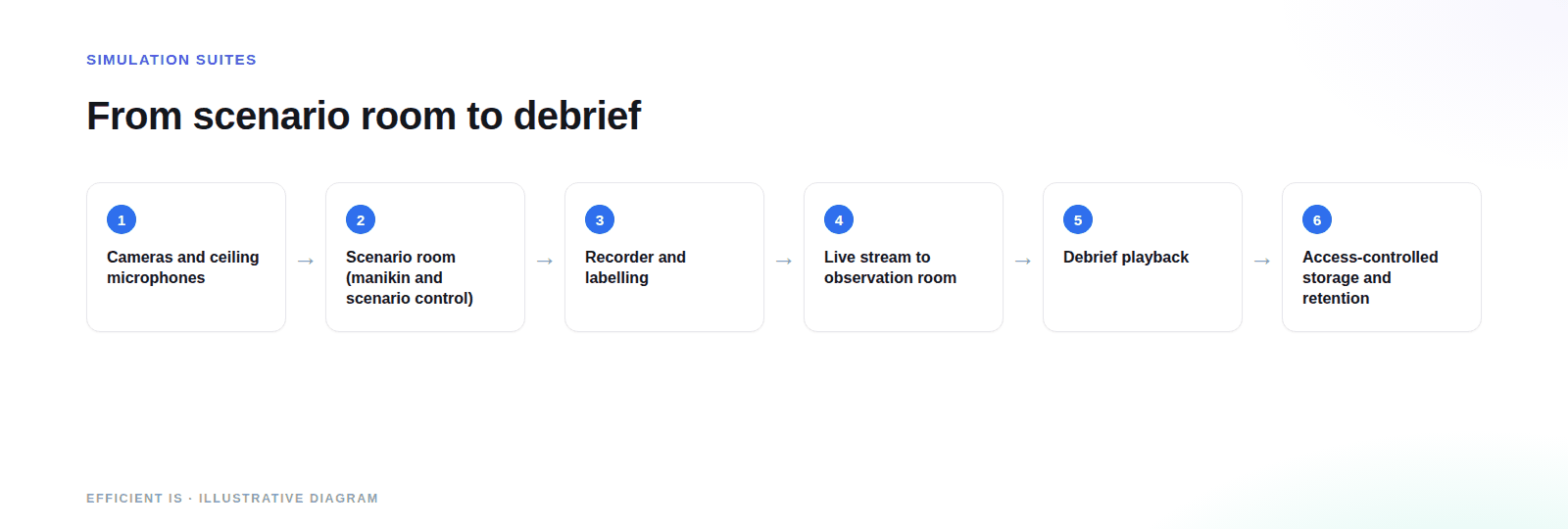
Usually a wide view of the room plus one or more close angles on the patient or the point of action. Fixed or pan-tilt-zoom cameras can be ceiling mounted, out of the way of the scenario and out of reach of enthusiastic learners.
Ceiling microphones
Learners move, turn away and talk over each other, so a single table microphone won’t do. Beamforming ceiling microphones cover the whole floor and keep speech intelligible, which is what makes a recording worth replaying.
Observation & debrief rooms
Observers watch live in a control or observation room, or a larger group watches remotely. Debrief rooms need a display, good audio and a simple way to jump to a flagged moment, so the discussion stays on the learning.
Scenario recording & playback
One-touch start and stop, clear labelling of who, which room and which scenario, and playback that synchronises every angle with the audio. Markers added during the session save a lot of scrubbing later.
Live streaming to observers
A scenario can be streamed to a nearby room, another building or a remote assessor. We design the network path and the encoding so the stream doesn’t stall during a busy session, and so the people watching see and hear what the people in the room do.
The same approach underpins the national remote-assessor streaming at the SFRS Incident Command Centre, covered below. For a single small room with observers next door, a full streaming set-up is overkill.
Working with manikin and scenario control systems
The manikin and its scenario control software usually come from a specialist simulation supplier, and your educators will have a view on which. We specify and integrate with them: agreeing where the control computer sits, what needs to appear in the recording and how the network and audio are arranged around it.
Integration depth varies by product, so we confirm what’s possible with your chosen system during design, not on install day.
How do you handle recordings of people in training?
A recording of a scenario is personal data: it contains faces, voices and, often, performance judgements. UK GDPR applies, and the Information Commissioner’s Office (ICO) is the regulator.
Telling people
Learners and staff should know before they walk in that sessions are recorded, for what purpose and who will see them. Notices at the door and in the course paperwork belong in the design from day one.
Who can watch
Access should follow role: the instructor, the assessor, perhaps the learner. We set up user permissions and storage so recordings aren’t sitting on a shared drive that anyone in the department can open.
How long you keep it
The ICO’s guidance on storage limitation says you shouldn’t keep personal data longer than you need it. We build in retention settings and deletion so your policy can actually be applied.
We’re not your data protection officer and this isn’t legal advice. We work with your IT, information governance and DPO teams so the technical design matches the decisions they make, including whether recordings live on your own servers or in a cloud service.
Why do simulation suites fail to get used?
Audio you can’t hear
A recording nobody can understand is a recording nobody replays. Poor microphone coverage is the commonest complaint we hear about existing suites.
Too many steps to start
If starting a session takes a technician, it won’t happen on a busy teaching day. One-touch control, with the AV tied to the room’s booking or scenario, is what gets the room used.
Footage no one can find
Recordings with no labelling, no search and no retention rules turn into a storage problem and a data protection one. Naming and metadata are cheap to design in and expensive to retrofit.
What makes one simulation suite cost more than another?
Rooms and angles
The number of simulation rooms and the cameras and microphones in each.
Observation and streaming
How many observers, where they sit and whether anyone watches remotely.
Recording platform and storage
On-premises or cloud, how much footage you keep and for how long.
Network and integration
Cabling, network capacity and how closely the AV works with scenario control.
From discovery sessions to instructor training
Discover
Sessions with educators, ICT and information governance before we specify anything, so the design follows your teaching workflow.
Design
Camera and microphone layouts, network and storage design, and a specification you can build from or put out to tender.
Install & commission
Delivered by our engineers in Scotland, or a vetted local partner, anywhere in the UK. Every angle and microphone is tested with a mock scenario before handover.
Train & support
Hands-on training for instructors and ongoing support and maintenance for a room that has to work on teaching days.
A similar problem in an emergency services setting
Scottish Fire and Rescue Service: Commanding the Room
The national Incident Command Centre was rebuilt around the assessor’s workflow: consistent audio across every assessment pod, automated camera tracking, one-touch recording and national remote-assessor streaming.
Read the case studyIt isn’t a clinical simulation suite, but the AV problem is the same: beamforming ceiling microphones, dual-lens PTZ cameras and hardware-based recording in every pod, the Incident Command Room and the Plenary observation space.
Where to look next
Meeting Room & Boardroom AV
See solution →Interactive Classrooms
See solution →Lecture Theatres & Lecture Capture
See solution →Support & Maintenance
See solution →MDT Rooms
See solution →Control Rooms
See solution →Prefer to talk it through? Call 0845 095 3600 or email av@efficient-is.co.uk. We’ll give you a straight answer, not a sales script.
Simulation Suites & Clinical Training AV: Answered Plainly
What AV does a simulation suite need?
At the least, cameras covering the scenario area, ceiling microphones that pick up everyone, a way to record and label sessions and a display with decent audio for the debrief. Bigger suites add an observation room, live streaming and a link to the scenario control system.
Can you integrate with our manikin and scenario control system?
We specify and integrate with the systems your educators already use. How deep that goes depends on the product, so we check what’s possible with your supplier during design and tell you plainly where it stops.
Do recordings of simulation sessions fall under UK GDPR?
Yes, they do. Footage and audio of identifiable people is personal data, and the ICO expects you to keep it only as long as necessary. Your DPO decides purpose, notices and retention; we design the system so those decisions can be applied.
Can observers watch a scenario live from another room or building?
They can. Streaming over your network lets observers or remote assessors see and hear the session as it happens. We check network capacity at design stage, because that’s where live streams usually struggle.
Can you fit a suite into an existing room?
Usually. Ceiling-mounted cameras and microphones suit existing rooms well, and a survey will show whether the cabling and network need work. We’d rather find that out before quoting than after.
Do you work with universities as well as NHS boards?
We do both, and fire and police training teams too. Universities usually want many identical rooms running to a timetable, so dependability and simple control matter most.
Planning a simulation suite?
Tell us the rooms, the cohort size and who reviews the recordings. We’ll tell you what’s realistic.












Find our work useful? Add us as a preferred source on Google.