Estate Agent Window Display Screens: Brightness, Planning and Listings
Estate Agent Window Display Screens: Brightness, Planning and Listings
Daylight wins against an ordinary screen every time. Here are the brightness figures, the planning questions and the feed question most agents forget to ask.
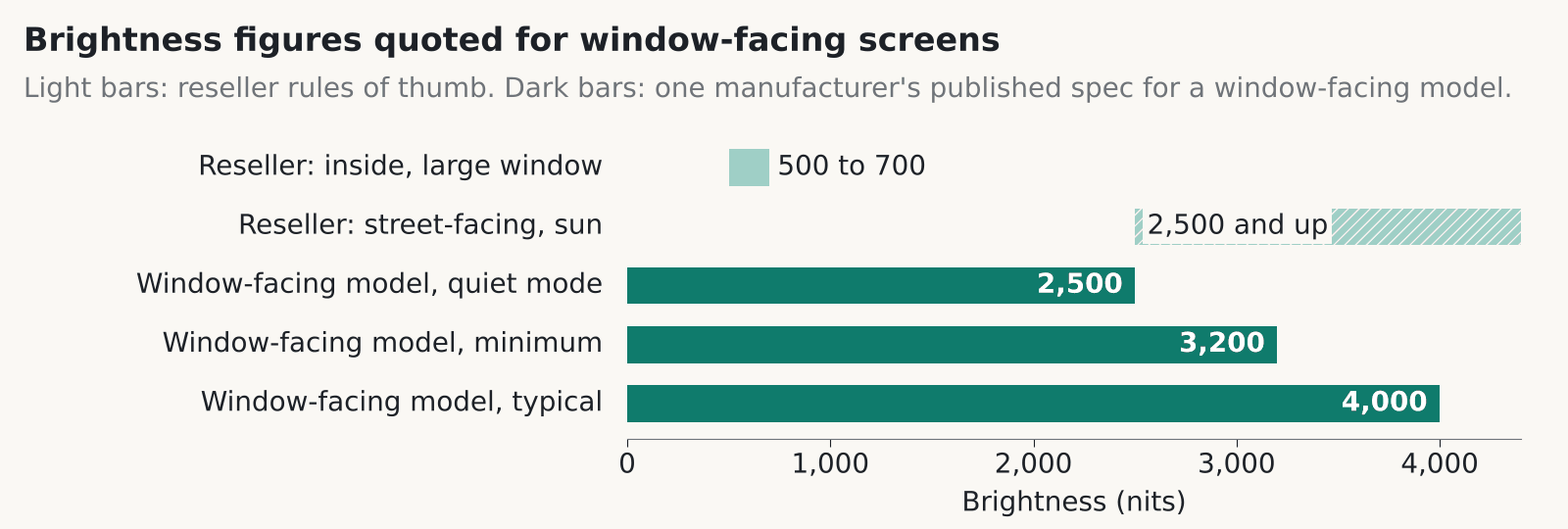
An estate agent window display has to beat daylight coming through glass, and an ordinary indoor screen won’t. It washes out. As one example, one manufacturer’s published specification rates a window-facing model at 4,000 nits typical, and reseller guidance puts street-facing screens in sun at 2,500 nits or more.
How bright should an estate agent window display be?
Brightness is measured in nits, and the number you need depends on where the sun hits the glass. One reseller’s guide, which is a rule of thumb and not a standard, suggests at least 500 nits and ideally 700 near a large window indoors. For screens facing the street in sun it suggests about 2,500 nits or more. Dedicated window-facing displays are sold in that 2,500 nit class and above.
The published figures for that window-facing model show what the top end looks like. It’s rated at 4,000 nits typical and 3,200 minimum, with a Quiet Mode at 2,500 nits and a built-in sensor that adjusts brightness. It runs 24 hours a day and has a fan and a temperature sensor. Operating range is 0 to 30 degrees C in direct sunlight, or 0 to 40 without it.
Brightness costs power and noise. That model draws 375 W typical and 400 W maximum, which by our arithmetic is about 9 kWh a day if it runs flat out around the clock. The fan is audible, and the manufacturer’s own specification shows fan noise rising with brightness. That matters more on a quiet frontage in the evening than on a busy high street at noon.
In our experience the south-facing window, with a low winter sun, is the one that decides the spec. Find out which hours the glare hits and size for those.
Do you need planning permission for an estate agent window display?
In England, an internally lit estate agent window display behind the glass generally falls under deemed consent, but that is a reading of the regulations and not legal advice. The Town and Country Planning (Control of Advertisements) (England) Regulations 2007 exempt indoor advertisements in Schedule 1, Class I only if they aren’t illuminated and sit more than 1 metre from an external window or opening.
Schedule 3, Class 12 gives deemed consent for advertisements inside buildings. Schedule 3 on legislation.gov.uk carries the text. A 2019 Planning Resource answer reads Class 12 as covering illuminated ones and those within a metre of a window, subject to standard conditions and to the authority’s discontinuance power for amenity or public danger. That is a secondary source.
The brightness limits for illuminated signs on business premises are about signs on the premises. We haven’t found anything saying they apply to a screen inside the glass, so we don’t quote them here.
Scotland has its own regime, the Town and Country Planning (Control of Advertisements) (Scotland) Regulations 1984. We couldn’t confirm how it treats an illuminated estate agent window display inside the glass. East Dunbartonshire’s non-statutory guidance says digital adverts “will be unacceptable in historic settings in almost all circumstances”, and acceptable elsewhere if road safety and character aren’t harmed. That’s one council, and others will differ. Speak to your planning authority before you buy, and ask about listed building and conservation area rules while you’re there.
What should an estate agent window display show?
Keep the content simple. Show one property at a time, with a large photo and a price and address that can be read from the pavement. Add a QR code to the full listing. That’s our view of what passers-by use, and one vendor sells the same idea.
Keep transitions plain. CAP Code section 4.7 covers flickering images that could trigger photosensitive epilepsy, and the ASA and CAP recommend testing flashing ads. Their news item doesn’t name digital out-of-home screens, but a fast strobing transition on a street-facing screen is a bad idea for any reason. Use a slow fade.
Glare hits the content as well as the glass. Pale text on a mid-grey background vanishes in sun. Dark text on white, or white on a deep colour, holds up better. Check the template on the screen in the window, in daylight, before you sign it off.
Our digital signage content management guide covers who edits the content and how it reaches the screen.
Listing feeds and what happens when they fail
Every estate agent window display with live listings depends on a feed. A listing feed pulls properties from your system onto the screen so nobody retypes them. One UK vendor said in August 2025 that its window displays connect to the agency’s own website, update listings automatically, show sold and let status and give each property a QR code. Those are the vendor’s claims, and we’ve seen no data behind them.
We couldn’t verify how the major property portals’ feeds work with third-party display systems, so ask the supplier. Find out which system the screen reads from and how often it refreshes. Then ask who can override a listing in a hurry, say when a sale falls through at 4pm on a Friday.
The question we’d press hardest is the failure one: what does the screen show when the feed drops? A frozen sold property on your estate agent window display, or a blank panel, does more harm than no screen at all. We’d skip any set-up that has no fallback playlist and no alert to a named person.
Reception and foyer screens have the same glare problem
A reception or foyer screen faces the same glare indoors, and the first step is the same: survey before you buy. Our atriums and reception AV page recommends glare surveys before you choose a display. Glass roofs and big windows move the light through the day, so look at the space in the morning and the late afternoon.
Auto-dimming is worth having. A sensor that lowers brightness as the light fades stops the screen glowing like a lamp in an evening lobby. Our estate agents page mentions ambient light sensors for window displays for the same reason.
Viewing distance decides between LCD and LED. People who stand close to a reception screen want fine pixels and few visible seams, and the sums are in our video wall pixel pitch guide. A tall, echoey atrium also needs zoned audio, because one loud speaker bounces around the room and none of it is intelligible. Whoever runs the desk should be able to update the content without calling us.
Fitting and servicing an estate agent window display
Plan the power, data and airflow in the window bay before the screen arrives. In our experience this is where jobs slip, because a shop window was never built to hold a 24/7 display. Put a power socket and a data point inside the bay. Leave a gap behind the screen for the fan to move air, and think about how someone reaches the back to service it.
Ask about heat before you sign. That model’s published 30 degrees C limit in direct sunlight is a real constraint for a south-facing window in summer, with a screen and the sun both warming the same pocket of air. Ask the supplier how the screen copes if the window bay goes above its rated limit.
Then agree the installation window. In our experience most agents can’t have the shopfront blocked in business hours, so out-of-hours work is normal.
See our Estate Agents and Digital Signage pages for how we approach these jobs.
FAQ
How many nits does an estate agent window display need?
One reseller’s rule of thumb is at least 500 nits and ideally 700 near a large window indoors, and about 2,500 nits or more for a screen facing the street in sun. It isn’t a standard. The one manufacturer’s window-facing model we checked is rated 4,000 nits typical in its published specification.
Do I need planning permission for a screen in my shop window?
In England, an internally lit estate agent window display generally falls under deemed consent for indoor advertisements, though that is a reading of the 2007 Regulations and not legal advice. Scotland has separate rules and we couldn’t confirm how they treat window screens. Ask your local planning authority before you buy.
Can an estate agent window display update from my property system?
Some vendors say so. One UK vendor, for example, said in 2025 that its displays update listings automatically from the agency’s site. Ask where the data comes from, how often it refreshes and what shows if the link fails.
Is flashing content allowed on an estate agent window display?
Avoid it. CAP Code section 4.7 covers flickering images that could trigger photosensitive epilepsy, and the ASA and CAP recommend testing flashing ads. Slow fades between properties look better anyway.
What happens to a window screen in direct sun?
It gets hot. One manufacturer’s window-facing model is rated for 0 to 30 degrees C in direct sunlight (0 to 40 without it) and has a fan and a temperature sensor. Ask the supplier for the rating of the exact model you’re quoted.
Are reception screens different from window screens?
The glare problem is the same, but the viewing distance is shorter and the audience stays longer. That pushes you towards finer pixels and auto-dimming. Do a glare survey before you choose.
Planning a window or reception screen?
Tell us about the shopfront or foyer, which way it faces and what you want on show. We’ll give you a straight answer on brightness, power and fitting.