
Video Wall Pixel Pitch: How Close Can People Stand?
Start from the nearest viewer. Here’s the sum, and the places where the usual rules of thumb let you down.
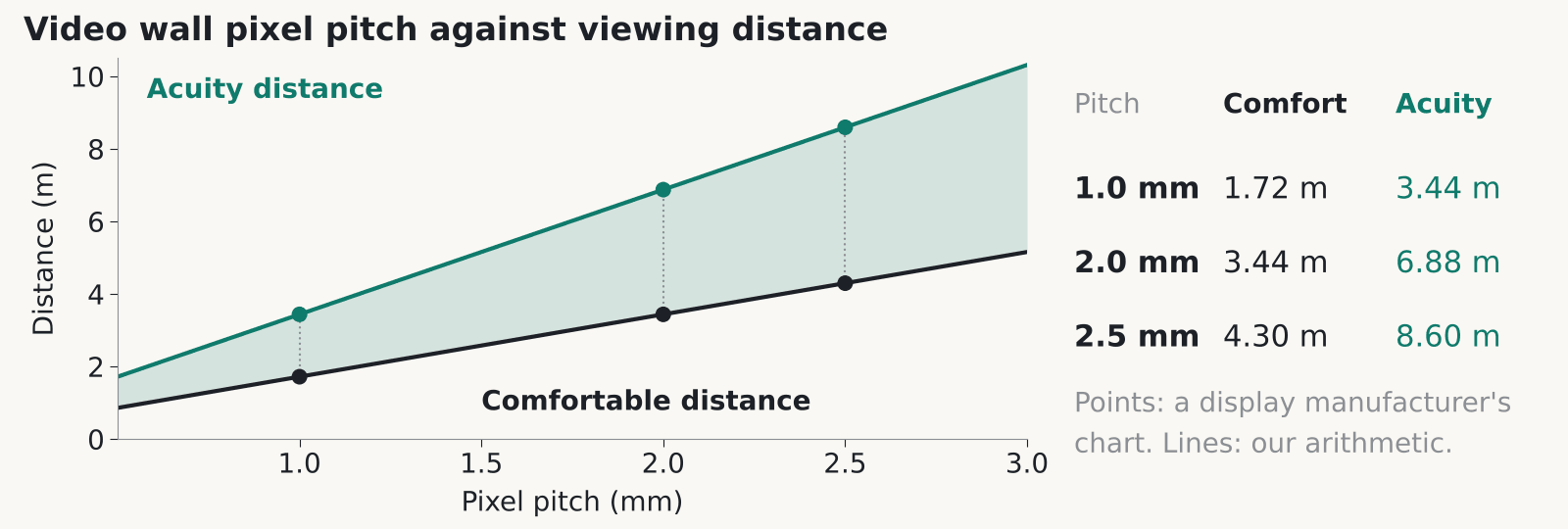
The video wall pixel pitch you pick decides how close people can stand before the picture breaks into dots. one manufacturer’s viewing distance guide puts the point where a 2 mm wall stops showing single pixels at about 6.9 m, with roughly 3.4 m as a comfortable distance. Below are the sums, and what to ask a supplier.
What video wall pixel pitch means in millimetres
Measure from the centre of one LED pixel to the centre of the next and you have the pitch, in millimetres. A smaller number packs more pixels into each square metre. That guide describes fine pitch products as running from about 0.6 mm to 2.5 mm, which is where most indoor walls sit.
The numbers climb fast. By our arithmetic, a 1.0 mm wall carries 1,000,000 pixels per square metre, a 2.0 mm wall 250,000 and a 2.5 mm wall 160,000. Go from 2.5 mm to 1.5 mm and you get about 2.8 times the pixels in the same area. In our experience the quote follows the pixel count, because each pixel needs its own LED and a share of the driver and processing hardware behind it.
Video wall pixel pitch isn’t resolution. Resolution is the pixel count of the finished wall: 3.2 m wide at 2.0 mm pitch gives 1,600 pixels across. Whether that lines up with a standard 1920 x 1080 picture depends on cabinet sizes. Get the exact pixel dimensions of the wall you’re being quoted, in writing.
How video wall pixel pitch sets viewing distance
The guide gives two distances for every pitch. The acuity distance is where a person with normal eyesight can no longer pick out single pixels. Multiply the pitch in millimetres by 3,438 to get it (3,438 is one arcminute of eyesight turned into a distance, and that conversion is our arithmetic). The chart reads 3.44 m for 1.0 mm, 6.88 m for 2.0 mm and 8.60 m for 2.5 mm.
The comfortable distance is about half of that. It lists 1.72 m for 1.0 mm, 3.44 m for 2.0 mm and 4.30 m for 2.5 mm. Closer than that, the pixel structure gets easier to spot, especially on flat colour and small text. For other pitches the same maths applies. A 1.5 mm wall works out at 5.16 m and 2.58 m (calculated).
So a 2 mm wall suits a lobby where visitors stand 4 m or more away. It’s a poor fit for a briefing room where the presenter stands next to the screen.
Why the rules of thumb disagree
Manufacturers quote very different rules, so ask which one your supplier is using. An invidis article from 2017 found that for a 2 mm wall the advice ran from about 6 ft to 20 ft. One manufacturer quoted 1 m per millimetre of pitch, another about 3.5 ft per millimetre and a third about 8 ft per millimetre. The piece is old, so treat the figures as dated. That suppliers disagree is the useful part.
The guide’s own shortcut is the 10x rule. Take the pitch in millimetres, multiply by 10, and read the answer as feet. For 2 mm that gives 20 ft, about 6.1 m, which sits close to the acuity figure above.
Our guess is that the rules answer different questions: one asks where the image first looks smooth, another where extra resolution stops being visible. The sources don’t say so. Either way, put it in the tender. Ask for the minimum viewing distance at the pitch they’ve quoted, which rule it comes from, and a sample at your real distance with your real content.
Choosing video wall pixel pitch from the nearest viewer
Measure from the wall to the nearest place anyone will regularly stand or sit. That one figure drives your video wall pixel pitch. The back row of a boardroom hardly matters. The person who walks up to point at a chart does.
Divide that distance in metres by 1.72 and you get the largest pitch, in millimetres, that still sits at the guide’s comfortable distance (our arithmetic). A visitor queue 3.5 m away points to about 2.0 mm. Somebody standing 2.5 m from the wall points to about 1.5 mm.
Content matters too. Spreadsheets and maps show pixel structure sooner than a brand film does, and people read them up close, so we’d usually drop at least one pitch step for those. A moving loop in a lobby forgives a coarser pitch. Offices tend to sit at the finer end because staff and visitors both get close. Our post on LED video walls in offices and reception covers where they earn their place.
Our view: don’t buy the finest pitch the budget allows. Pixels finer than your nearest viewer can resolve are wasted money, and that money would buy a bigger wall at a coarser pitch.
Video wall pixel pitch on LCD walls
On a tiled LCD wall the pitch question mostly goes away, because the pixels are already fine. A 55 inch Full HD panel works out at roughly 0.63 mm (calculated: about 1,218 mm of width across 1,920 pixels). Up close, what people notice is the seam between panels.
A 2018 brochure from three display makers puts tiled LCD bezels at 1 to 2 mm and says direct-view LED has none. That’s vendor material, so check current spec sheets. A thin black line doesn’t disappear, and across a table it can cut through a face or a line of text.
If your wall will be read from a metre or two away, LCD is worth pricing. In our experience the bezel gap on a data sheet can differ from the gap you see once the mounts are on, so ask to measure a mock-up of the actual tiles.
A mock-up settles the video wall pixel pitch argument in your own boardroom too. For the money side, see our LCD or LED cost guide.
Service access and image retention
Ask how each module is serviced before you haggle over the next pitch step. The same three-maker brochure says direct-view LED offers front or rear service and hot-swappable power modules. Those are vendor claims. Rear service needs space behind the wall, and a wall built flat onto a plain partition may not have any. Ask for the clearance the supplier needs, in writing.
Retention is the other thing to read up on. One display maker explains that image retention comes from a static image left on screen for long periods, and recommends sleep or power management, a screensaver and moving content. It also says retention isn’t considered a product defect. That’s the maker’s wording for its own displays, and other makers’ terms may differ.
If the wall will show one static dashboard or logo around the clock, read the warranty terms before you sign. We’ve left out power draw and lifetime hours because we couldn’t verify any figures. Get both from the supplier in writing.
See our Video Walls and Corporate pages for how we plan these installs.
FAQ
What video wall pixel pitch do I need for a 3 metre viewing distance?
About 1.5 to 2 mm. The guide lists 3.44 m as the comfortable distance for a 2.0 mm wall, so 3 m sits just inside it and 1.5 mm gives you more margin. Ask to see your own content on a sample at 3 m before you decide.
Does a smaller video wall pixel pitch always look better?
Only up to a point. Once your nearest viewer is beyond the acuity distance, finer pixels can’t be seen. You still pay for them, and for the processing behind them.
Is the 10x rule accurate?
It’s one manufacturer’s rule: pitch in millimetres times 10 gives a rough distance in feet. For 2 mm that is 20 ft, close to that guide’s acuity figure of 6.88 m. Use it to sanity-check a quote, then get the real minimum distance from the supplier’s spec.
What is the pixel pitch of an LCD video wall?
Roughly 0.63 mm for a 55 inch Full HD panel, by our arithmetic. The number to ask about is the bezel, which a 2018 three-maker brochure puts at 1 to 2 mm for tiled LCD.
Can image retention affect my warranty?
It can. One maker says retention caused by a static image left on screen isn’t considered a product defect. Check each maker’s terms before you specify a wall that will show fixed content 24 hours a day.
Choosing a pitch for a real room?
Tell us where people will stand and what the wall will show. We’ll give you a straight answer on pitch, from a Glasgow team that fits these walls.











