
Digital Signage CMS, Explained Properly
A content management system is the difference between a screen you have to physically visit to change, and a screen you can update from your phone in under a minute, and it is worth understanding before you compare a single quote.
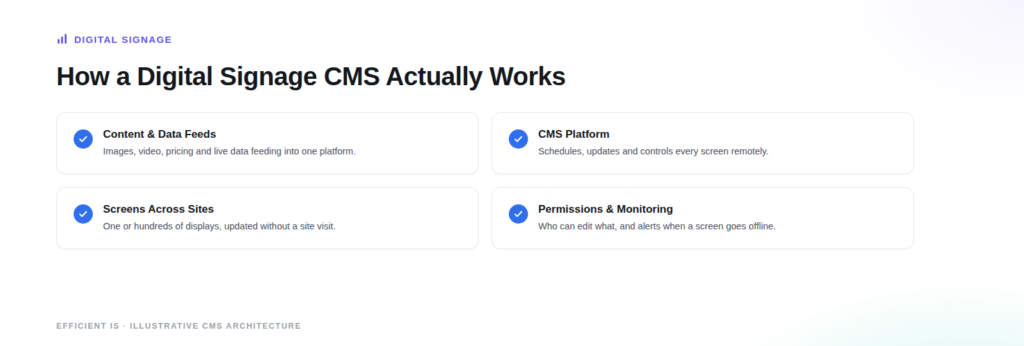
A digital signage content management system, often just called a CMS in this context, is not the same thing as a website CMS like WordPress. It is the software layer that lets you schedule, update and control what appears on one screen or hundreds of screens across multiple sites, remotely, without physically visiting any of them. For a single screen showing a fixed image or video on a loop, you genuinely do not need one, loading a file onto a USB stick is enough. The moment you want to update pricing, run different content on different screens, or manage more than one site, a CMS stops being a nice to have and starts being the thing that makes the whole network workable. For a deeper look at the category, AVIXA’s Digital Signage Program is a useful starting point, run by the trade association for the wider AV industry.
What a CMS actually does
At a basic level, a CMS lets you schedule content to appear at specific times, build playlists that rotate automatically, and push an update to every screen in a network at once rather than visiting each one. At a more advanced level, it adds templates that let non technical staff update specific fields, such as a price or an offer, without touching the design; user permissions, so a single retailer inside a shopping centre can update their own screen without being able to touch anyone else’s; and integration with live data feeds, for anything from weather to stock levels to a live departures board. Which of these you actually need depends entirely on how many screens you have and how often the content genuinely changes, not on what the most advanced platform on the market can technically do.
The real options on the market
Platforms broadly fall into three categories. Cloud based subscription platforms are the most common choice for most businesses today, run entirely online with no server to maintain on site. Manufacturer bundled software comes included with some commercial display hardware and is often a sensible choice for a single site with modest needs, since it avoids an extra subscription entirely. Open source and self hosted platforms exist too, giving full control at the cost of needing someone in house to maintain the software yourself. None of these is universally right, and a brand agnostic integrator should be recommending based on your actual screen count and content needs, not steering you toward whichever platform they happen to resell.
How charging and support models actually work
Subscription licensing, usually charged per screen per month or per year, is now the dominant model across the industry, reflecting a wider shift toward software as a service across technology generally rather than something unique to digital signage. A perpetual, one off licence still exists with some platforms, trading a larger upfront cost for no ongoing subscription fee, which can suit a business that wants to avoid a recurring bill and is confident the system will not need frequent change. Support itself is usually sold separately from the licence, in tiers: basic remote monitoring that flags when a screen goes offline, through to a full service level agreement with guaranteed response times and proactive maintenance. It is worth treating support as its own decision rather than assuming it is automatically included, since this is where the real difference between suppliers often shows up, not in the headline software price.
What to actually ask a supplier
Before comparing quotes, it is worth asking exactly how many screens the subscription actually covers, what happens to your content and historical data if you ever want to switch platforms, and what the support tier genuinely includes rather than just its name. A platform that looks cheaper on the headline per screen price can end up more expensive once you add the support tier that actually matches what you need.
See our Digital Signage page for real pricing context across different screen counts, or our Get an Estimate page for a ballpark on any solution.
FAQ
Do I need a CMS if I only have one screen?
Not necessarily. If it is showing a fixed image or video on a loop, loading the file onto a USB stick is genuinely enough. A CMS earns its cost the moment you want to update content remotely, such as changing pricing or a special offer, without a physical visit or a call out.
Is a CMS the same thing as a website content management system?
No, and this is a common point of confusion. A digital signage CMS controls what appears on physical screens, scheduling and updating content across one or many displays. It has nothing to do with website platforms like WordPress, even though both share the term content management system.
Is subscription pricing the only option, or can we buy a licence outright?
Subscription pricing, usually charged per screen per month or year, is the dominant model across the industry today, in line with the wider shift toward software as a service generally. A smaller number of platforms still offer a perpetual, one off licence instead, which suits a business that wants to avoid an ongoing bill and does not expect to need frequent changes.
Does support come included with the CMS licence?
Not always, and it is worth checking specifically rather than assuming. Support is commonly sold in separate tiers, from basic remote monitoring that flags an offline screen through to a full service level agreement with guaranteed response times, and this is often where the genuine difference between suppliers shows up rather than in the core software price.
Not sure which CMS actually fits your screens?
Tell us how many screens and sites you have and we’ll tell you honestly what’s worth it.











