Deprecated: Using null as an array offset is deprecated, use an empty string instead in /home/u519450251/domains/efficient-is.co.uk/public_html/wp-includes/functions.php on line 1194 Video Walls Archives | Efficient ISSkip to main content
Video wall maintenance gets decided at design stage, long before anything breaks. Pick front or rear service, keep spare modules from the same batch, work out how engineers will reach the top row and plan a recalibration after every module swap. With those settled, a dead panel means a short visit and the room stays open.
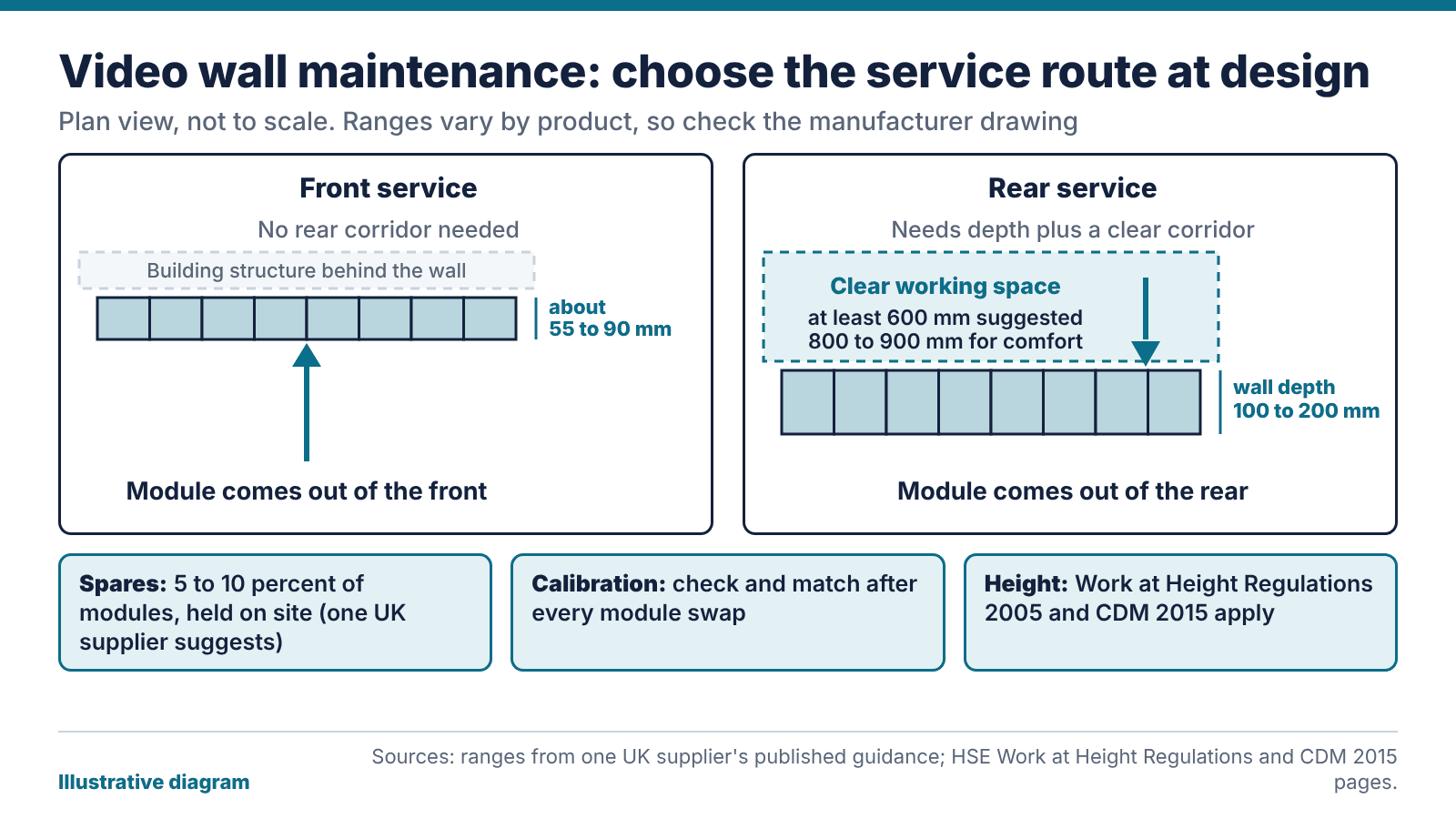
Illustrative diagram: front and rear service access for video wall maintenance, using ranges from one UK supplier’s guidance. Figures vary by product, so check the drawing.
Video wall maintenance starts at the design stage
The service method is set when the wall is designed, and changing it later means rebuilding the structure. With front service, an engineer removes a module from the viewing side. With rear service, they work from behind the wall. The choice affects floor area, wall depth and who can do the job.
One UK supplier’s guidance suggests front-service LED walls can sit as shallow as roughly 55 to 90 mm and need no rear corridor. Rear service needs wall depth, put at 100 to 200 mm, plus clear working space behind it, with at least 600 mm suggested and 800 to 900 mm for comfort. Treat those as indicative. Figures vary by product, so ask for the manufacturer’s drawing for the actual wall.
A wall on a corridor, or on a partition with a tenant behind it, may have no room for a rear corridor. A wall in a plant-room-style control space may well have it. So the room often settles the question before anyone states a preference.
Our view: choose the method for the person who’ll do the job in three years’ time, not the person signing off the drawings. Ask who will maintain the wall, what access equipment they’ll bring and whether they can reach every module without working at height.
Working at height and who is responsible
A tall wall means someone might need to reach the top rows. The HSE’s page on the Work at Height Regulations 2005 says the aim is to prevent death and injury from falls. The duties fall on employers and on anyone who controls work at height, which includes facilities managers and building owners who hire contractors. Work has to be planned, supervised and carried out by competent people using suitable equipment. Lower-risk, simple tasks need less planning.
The design stage matters here too. Under the Construction (Design and Management) Regulations 2015, designers must eliminate foreseeable health and safety risks where possible and reduce or control those that remain. The HSE’s guidance for designers says their decisions affect the people who use a building and those who maintain it. CDM applies to construction projects, so whether it covers your install depends on the project, and your principal designer can confirm.
For video wall maintenance, the practical reading is this. If a module swap can happen at floor level, from a platform or from a tilt-out frame, you cut the risk before anyone has to plan around it. Where that isn’t possible, write the access method down now. The first fault is a bad time to invent one.
How many spares does video wall maintenance need?
The same supplier suggests holding 5 to 10 percent of the module count as spares. On a wall of 100 modules, that’s five to ten. It’s a guide, and your own figure depends on how hard a replacement would be to source and how much downtime you can accept.
Keep spares from the same production batch as the wall, because modules from different batches can look different side by side. Hold the small parts as well: power supplies, receiver cards, data cables and the controller parts that would stop the wall working. Store the lot on site, labelled and dry, with one person responsible for counting it.
For LCD walls the logic is the same with panels and brackets. A spare panel is only useful if you can fit it, so check that the mounts let a single panel come out without disturbing its neighbours.
Ask the supplier how long they’ll keep the part range available, because a spare you can’t replace after you use it is a one-time fix. Put spares in the quote before the first fault.
Video wall maintenance after a module swap: calibration
LED modules can drift with age, so a new module beside an older neighbour may show a different brightness or colour, even from the same product line. The same supplier recommends calibrating at installation and periodically afterwards, with batch-matched modules.
After a swap, run through this:
Display a full white and a full grey test pattern, and look for patches.
Compare the new module with its neighbours at the usual viewing distance.
Apply the stored calibration settings, or recalibrate the module to match the wall.
Record the date, the module position and the settings used.
Ask at handover who holds the calibration data. If it sits on the installer’s laptop, you can’t repeat the job without them. Store it somewhere you can reach and list it in the handover pack.
Many faults on a video wall are dull: a loose cable, a failed power supply, a module that has lost its settings, a controller that needs a restart. Routine video wall maintenance should catch them before an audience does. We’d do a monthly look at the wall with test patterns, a check of cooling and filters where fitted, and a copy of the controller configuration stored away from the controller.
A general maintenance contract that says nothing about access equipment, working at height or calibration leaves the awkward parts of the job unpriced. Read our guide to AV maintenance contracts for response times and how to read an SLA, then add the wall-specific questions: who brings the access equipment, who holds the spares and what the calibration plan is.
The bottom line: for any wall, new or old, find out three things: how an engineer reaches the top module, where the batch-matched spares are kept and who holds the calibration data. If nobody can say, that’s your first maintenance job.
FAQ
What is the difference between front and rear service on a video wall?
Front service means modules come off from the viewing side, so the wall can be shallow and needs no rear corridor. Rear service means engineers work behind the wall, which needs depth and clear working space. The choice is fixed at design.
How many spare modules should we keep for video wall maintenance?
One UK supplier’s guidance suggests 5 to 10 percent of the module count. Your figure depends on the cost of downtime and how quickly a part can be sourced. Keep spares from the same batch as the wall.
Does video wall maintenance include recalibrating after a repair?
Recalibrate whenever a module has been replaced. A new module can differ in brightness or colour from its aged neighbours. Compare it against test patterns and apply or recreate the stored settings.
Do the Work at Height Regulations apply to a video wall?
They apply wherever an employer or the person in control of the work has to reach a high module. The work needs planning and competent people with suitable equipment. Designing for floor-level access cuts the risk.
Who is responsible for video wall maintenance?
Your contract decides who does the repair. The person who controls the premises still has duties under work at height rules. Write down who does what, including who brings the access equipment.
How often should video wall maintenance checks happen?
We’d do a short monthly look with test patterns and a deeper annual check of cabling, power and settings. Walls in 24-hour control rooms may need a tighter routine agreed with the supplier.
HMCTS now plans to refresh its courtrooms on a rolling 10-year cycle, because ageing audio and video kit fails and hearings suffer. Any council, police force, tribunal or NHS trust with hearing rooms can copy the idea. A courtroom AV upgrade then becomes four jobs: list what you have, cost its whole life, work in batches and settle support first.
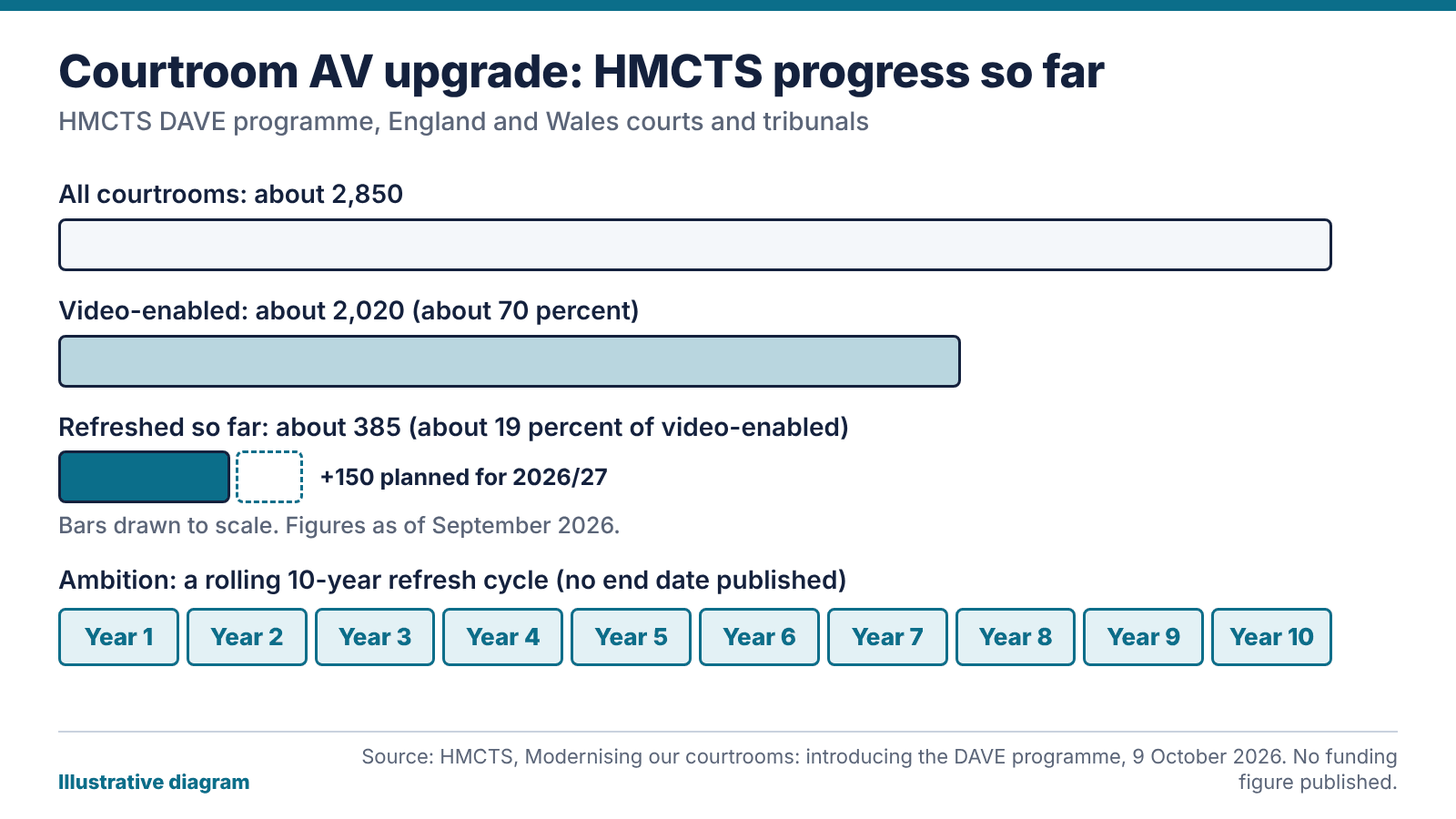
Illustrative diagram: how far the courtroom AV upgrade programme has got, using the figures HMCTS published on 9 October 2026. Source: HMCTS.
What changed: as of 15 October 2026, HMCTS has said (in a post dated 9 October) that about 385 courtrooms have been refreshed under its DAVE programme, 150 more are planned for 2026/27, and the ambition is a rolling 10-year refresh cycle. The post gives no budget, end date or supplier.
What HMCTS has said about its courtroom AV upgrade
DAVE stands for Digital Audio-Visual Evolution. In its own post on the programme, HMCTS puts the estate at around 2,850 courtrooms, with roughly 2,020 of them video-enabled, which is about 70 percent. About 385 have had new kit so far. That makes DAVE installs about 19 percent of the video-enabled estate.
Another 150 courtrooms are planned for 2026/27, and delivery is spreading into Civil and Family work and the Tribunals. HMCTS also mentions a target of around 80 percent video enablement.
It gives reasons. Much of the existing equipment has been in place for years and is nearing the end of its life, so it’s more likely to fail. When systems fail, HMCTS says, hearings can be disrupted, “leading to delays and increased costs”. Evidence also arrives as video, photographs and audio now, and remote and hybrid hearings have grown.
The kit list is ordinary AV: modern screens, better microphones and speakers, cameras for remote participants and a way to present digital evidence.
Does this courtroom AV upgrade reach Scottish courts?
No. HMCTS runs courts and tribunals in England and Wales, and its post mentions only non-devolved tribunals in Scotland. Scottish courts are devolved and run separately, so nothing in the post says DAVE pays for a single Scottish courtroom.
We’re a Glasgow company, so that was the first thing we checked. If you manage hearing rooms in Scotland, treat DAVE as a public benchmark and look elsewhere for funding. Ask whoever runs your estate which budget line a refresh would come from, because the programme’s scope follows the HMCTS remit and goes no wider.
Outside the justice system the position is the same. A council chamber, a police training room or a tribunal suite has no claim on the programme. What you can take from it is the argument. A large public body has said in print that old AV causes disruption, and its answer is a repeating cycle. You can cite that in a business case.
What lasts ten years in a hearing room
The parts age at different speeds. We’d expect screens and cabling to see out a decade. Cameras and the PCs behind them often won’t, because the software loses support first. The NCSC puts it bluntly: the only fully effective way to deal with an obsolete product is to stop using it, and paid extended support “should not be seen as a long term alternative to full migration”. Both points are in the NCSC guidance on obsolete products.
A rolling cycle spreads the work. Run 40 rooms on a 10-year cycle and that’s four rooms a year. That’s our own arithmetic, but it shows why a steady courtroom AV upgrade programme is easier to fund and staff than replacing all 40 rooms in one panicked summer.
Our view: 10 years is the most you should plan for. Budget to touch the PCs and control software sooner, and carry the cabling and mounts into the next cycle.
Audit the rooms and cost their whole life
You can’t schedule a refresh for kit you haven’t listed. Walk every hearing room, meeting room and training room. Record what’s installed, how old it is, what runs it, who owns it and what the supplier says about support dates. Then ask staff which rooms get cancelled or moved when something breaks. Those are candidates for the first batch, and they may not match the order on the asset register.
For justice work, add the questions that matter on the day. Can the room play the evidence formats you receive? Can a remote witness hear clearly and be seen clearly? Our police and justice sector page explains how we approach secure and restricted estates, and our pages for councils and the NHS cover the same audit for chambers, tribunal suites and clinical review rooms.
Then cost each room from the day it goes in to the day it’s stripped out: equipment, installation, licences, training, support and removal. Fabric that outlasts the cycle, such as containment and power, goes in a long-life budget. Anything with firmware or an operating system goes in a shorter one. One spreadsheet with room, age, owner, support end date and last fault is enough to start.
Phase the courtroom AV upgrade and expect approvals to take months
HMCTS is working through its estate a batch at a time. Do the same. Start with a pilot room, fix what it teaches you, then roll the design out in batches timed around sitting days, term dates or meeting cycles.
On a secure network the install can be the short part. In our justice-sector wireless AV case study, getting a device approved for a secure judicial network took months, and the installation took days. Put approval on the plan with a named owner from day one, or the first batch of your courtroom AV upgrade will slip. Tell the clerks and ushers which room is out of action and when, and what they’ll use in the meantime. A pilot room doubles as the reference: every later room copies its settings and labels.
Standardise as you go. Use the same layout, the same control screen and the same handover in every room, so a clerk or usher who has learned one room can run the rest.
Who answers when a screen won’t wake up?
A hearing that stops because a screen won’t start turns into an adjournment, and nobody asks how new the hardware was. HMCTS ties old kit to disruption and extra cost, and the same logic applies to your support arrangement. Even a well planned courtroom AV upgrade needs someone on call once it’s live.
Decide who attends, how quickly, and what’s held on site as spares. Check whether the contract covers parts, whether the clock starts when you log the fault or when an engineer acknowledges it, and who tests the room after every change. Ask what happens if the first fix doesn’t work. Our guide to AV maintenance contracts goes through those questions, and our support and maintenance team will read a draft contract for you.
Train the people who open the room as well. A one-page card on the wall with how to start a hearing and who to phone when it won’t start will head off some call-outs.
The bottom line: a courtroom AV upgrade runs smoother in batches, with a room register and a support contract in place before the first screen goes up. HMCTS’s 10-year cycle is a benchmark worth quoting, but nothing in its post suggests the funding reaches Scotland.
FAQ
What is the HMCTS DAVE programme?
DAVE is the Digital Audio-Visual Evolution programme, which refreshes audio-visual kit in HMCTS courtrooms. HMCTS reports about 385 courtrooms completed as of September 2026, with 150 planned for 2026/27.
Does a courtroom AV upgrade under DAVE cover Scottish courts?
HMCTS runs courts and tribunals in England and Wales, and its post only mentions non-devolved tribunals in Scotland. Scottish courts are devolved, so nothing in the post says DAVE funds one. Ask the body that runs the court you’re asking about.
How often should courtroom AV be replaced?
Plan on 10 years at most. HMCTS’s stated ambition is a rolling 10-year refresh cycle, and individual parts age faster. Expect to revisit PCs and control software before screens or cabling.
What does a courtroom AV upgrade include?
Modern screens, better microphones and speakers, cameras for remote participants and systems for presenting digital evidence, according to HMCTS. Behind those sit the cabling and network, the control and recording systems and the support arrangement. A good survey covers all of them.
Can councils and NHS trusts use the same approach?
Yes, though the funding is different. Auditing rooms, costing the whole life, working in batches and planning support all carry over to council chambers, tribunal suites and clinical review rooms. Start with a one-sheet register of every room.
Why does software support matter in a courtroom AV upgrade?
A screen can run for years, but the PC or controller behind it may lose security updates long before it breaks. The NCSC advises that the safest course with out-of-support technology is to stop using it, and that paid extended support only buys time.
Control Room Upgrade: How to Replace Legacy AV While the Room Stays Live
You can’t switch a control room off for a fortnight. So the new system gets built beside the old one, and the old one stays until operators say otherwise.
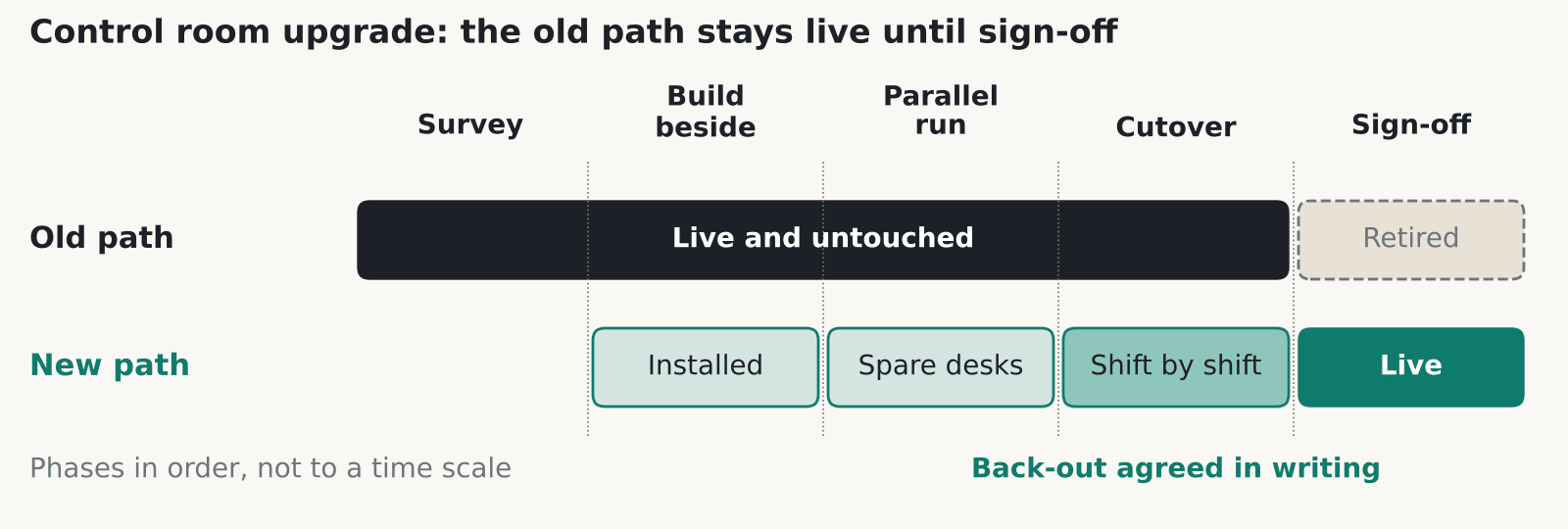
A phased control room upgrade. The old signal path stays intact until the new one is signed off by operators. Phases are shown in order, not to a time scale.
A control room upgrade has to happen around live operations, so the new system runs beside the old one until operators have signed it off. Plan for a survey, a parallel run, a staged cutover, a written back-out plan and training on every shift, nights included. Wall design is a separate subject, and our police control room video wall post covers it.
Survey what’s really in the room first
The first job in any control room upgrade is a list of everything that exists, because the drawings are usually wrong. Write down every source (CCTV, ANPR, CAD, GIS, broadcast feeds, workstation PCs), every display and every cable run, plus who owns each one.
In our experience a legacy DVI or KVM estate hides undocumented splitters, adapters and EDID quirks. EDID is the data a screen sends to say which resolutions it accepts, and old kit often depends on it in odd ways. Ask the operators what they actually use. They’ll know which input has been flaky for years.
Survey the building as well. Check whether you can reach the ceiling void or the floor void out of hours, where power comes from and whether there’s a UPS. The new head-end, which is the rack of controllers and switching behind the wall, may need more power and cooling than the old one had.
How a control room upgrade runs in parallel
A parallel control room upgrade builds the new signal path alongside the old one and leaves the old one untouched. Install the new controllers and cabling. Test them on spare operator positions, or on a position taken out of rotation for a planned period. Then move users across one position or one shift at a time.
The old path stays physically intact until sign-off. That sounds wasteful. It’s also what lets you say yes to a back-out at 3am. We’d skip a weekend big-bang cutover unless the room has a genuine quiet period and a rehearsed way back.
Our control rooms page describes four linked systems in a room: the display wall, the operator desks, the signal path and voice comms. It also describes duplicated signal paths and controllers, a UPS with an optional generator, and phased refits that keep the room running. Plan the sequence around those four, because each has to be moved without breaking the others.
If the wall itself is changing, our video walls page covers the display side.
Cutover and back-out in writing
Agree in writing what back-out means for your control room upgrade. Name who decides, and set the time by which they must decide. Without that, a failed cutover turns into an argument at the worst hour. The back-out time matters most. If the decision point is 2am and the old path takes an hour to restore, you need to know that before you start.
Do each step in the quietest agreed period, such as a night or a planned exercise, and keep a reduced-capability fallback running through it. That can be as simple as direct monitors on the busiest positions.
Write the plan down as a short table: step, owner, start time, point of no return, back-out action and time to restore. Share it with the shift supervisors as well as the project team. If only the engineers understand the plan, it will stall the first time an incident lands mid-cutover.
Hold spares on site for anything with a long lead time, such as controller cards, power supplies and a spare display. Agree who owns them. Moving one shift at a time also limits the damage, because a fault hits one shift’s worth of people.
Commissioning and training that operators can sign
Commissioning a control room upgrade means testing every source on every layout, and then testing failure. Pull a cable. Drop a controller input. Remove power to one PSU. Record what happens each time.
Get operators to sign the layouts they’ll use. Engineers can sign off the specification, but only operators know whether a layout works at 4am with three incidents running.
Leave time for faults. Commissioning squeezed to hit a date usually lands the problems on live shifts. Agree before the work starts that testing carries on until the failure tests pass, and put snagging on the handover list with a named owner and a date. Tell operators in plain terms what has changed, including any layout presets that moved, because muscle memory catches people out fast.
Training should be short and role-based, delivered at the console and repeated across shifts, including nights. Leave a one-page quick reference at each position. Then hand over documentation: cable schedules, source lists, IP addresses and the back-out plan you used. Without it, the next person starts the survey again from scratch.
Which standards apply to a control room upgrade
ISO 11064 is a multi-part ergonomics series for control centres, and it isn’t an AV standard. The ANSI webstore lists seven parts: principles for design, arrangement of control suites, room layout, workstation layout and dimensions, displays and controls, environmental requirements and evaluation. Part 6, on the environment, mentions upgrading and refurbishment in its scope. We haven’t seen figures from any part for viewing distance or lighting, so we don’t quote any.
Glare is a legal duty in Great Britain. The Display Screen Equipment Regulations 1992 say a screen should be free of reflective glare and reflections liable to cause discomfort, and that workstations should have no direct glare and no distracting reflections. The HSE’s DSE page applies this to people who use a screen daily for continuous periods of an hour or more, and says employers must do a workstation assessment and provide an eye test on request. A new wall changes the light in the room, so reassess.
AVIXA’s V202.01 covers display size and viewing positions. We name it without an edition year because the page showed two. BS 7958:2015 covers CCTV management and operation, so check the current edition with BSI.
BS EN 50518 applies only if your room is an alarm receiving centre. The NSI notice says the 2019 edition replaced the earlier three-part series. Police, fire and council CCTV rooms aren’t alarm receiving centres by default.
Where a control room upgrade goes wrong
In our experience most failures in a control room upgrade come from small things nobody tested, and the same ones come up again and again. Old gear depends on EDID or resolution behaviour that the new controller doesn’t copy. Audio and radio integration gets forgotten, because the project was labelled “video”. HDCP, the copy protection on some sources, blocks a feed nobody tried. The ceiling void can’t be reached out of hours. The UPS was sized for the old head-end.
One procurement note. CCS agreement RM6225, which covered AV technical consultancy and commissioning, ran from 1 March 2021 to 28 February 2026 and has expired. The Government Commercial Agency page says there’s no replacement DPS and that many of its services are covered by RM6116 Network Services 3, lot 4b, which runs to 17 July 2027. Check with your procurement team whether that lot fits your scope.
The bottom line: Build the new path beside the old one, write the back-out plan before the first cutover, and let operators sign the layouts they will actually use.
Questions worth asking
FAQ
How do you do a control room upgrade without shutting the room down?
You run old and new in parallel. The new signal path and controllers go in beside the old ones, get tested on spare positions and then take over one position or one shift at a time. The old path stays in place until operators sign off.
What should a control room upgrade survey cover?
Every source, display and cable run, and who owns each one. That includes CCTV, ANPR, CAD, GIS, broadcast feeds and workstation PCs. Ask operators too, because they know which inputs misbehave.
Does ISO 11064 apply to a control room upgrade?
It covers control centre ergonomics: layout, workstations, displays and controls, environment and evaluation. It’s an ergonomics series, so use it as a design reference, and check any figure you’re quoted against the standard’s own text.
Is there a legal duty on glare in a control room?
In Great Britain the Display Screen Equipment Regulations 1992 require screens free of reflective glare and reflections liable to cause discomfort. HSE says employers must carry out DSE workstation assessments for regular users. A new wall can change reflections, so reassess after the work.
When does BS EN 50518 matter?
Only if your room is a monitoring and alarm receiving centre. The standard defines two categories of centre, one for security-related connections and one for fire, social and lone-worker alarms. Police, fire and council CCTV rooms aren’t covered by default.
Can I still buy through CCS RM6225?
No. It expired on 28 February 2026. The GCA page points to RM6116 Network Services 3, lot 4b, live until 17 July 2027, for many related services. Ask your procurement team whether it suits your scope.
Planning a control room refresh?
Tell us what’s in the room now and when it can’t go down. We’ll give you a straight answer on how to phase it, from a Glasgow team used to live rooms.
Video Wall Pixel Pitch: How Close Can People Stand?
Start from the nearest viewer. Here’s the sum, and the places where the usual rules of thumb let you down.
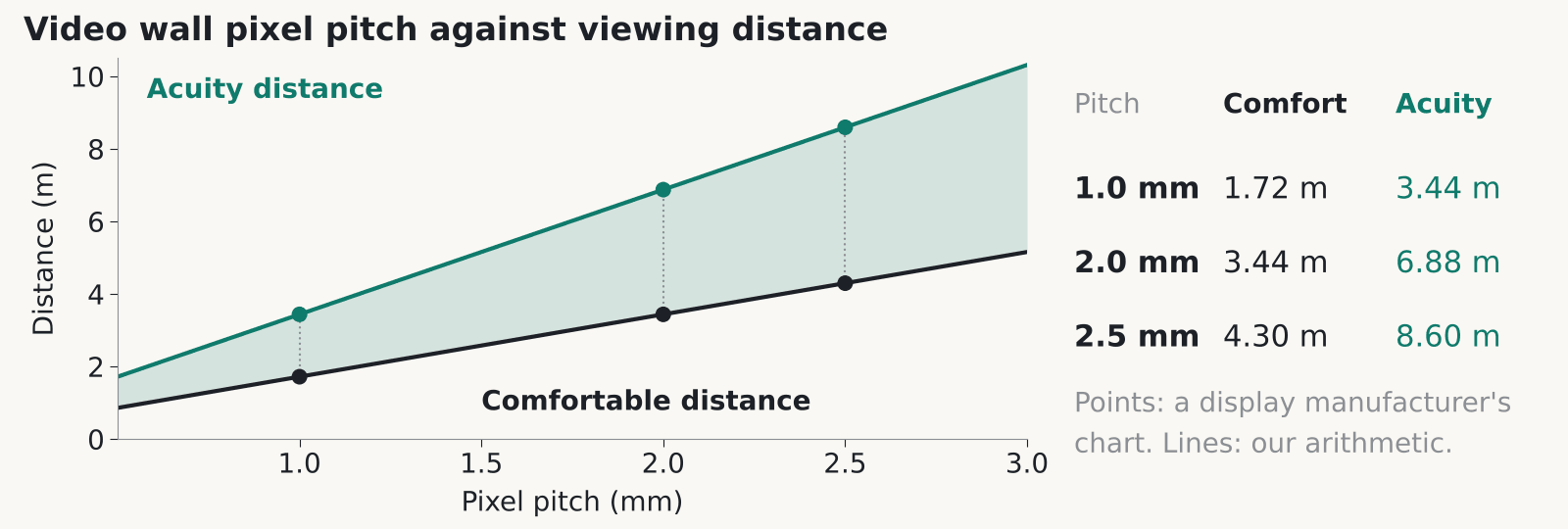
A display manufacturer’s published comfortable and acuity distances for fine pitch walls. Points at 1.0, 2.0 and 2.5 mm are from the chart, the lines between them are our arithmetic.
The video wall pixel pitch you pick decides how close people can stand before the picture breaks into dots. one manufacturer’s viewing distance guide puts the point where a 2 mm wall stops showing single pixels at about 6.9 m, with roughly 3.4 m as a comfortable distance. Below are the sums, and what to ask a supplier.
What video wall pixel pitch means in millimetres
Measure from the centre of one LED pixel to the centre of the next and you have the pitch, in millimetres. A smaller number packs more pixels into each square metre. That guide describes fine pitch products as running from about 0.6 mm to 2.5 mm, which is where most indoor walls sit.
The numbers climb fast. By our arithmetic, a 1.0 mm wall carries 1,000,000 pixels per square metre, a 2.0 mm wall 250,000 and a 2.5 mm wall 160,000. Go from 2.5 mm to 1.5 mm and you get about 2.8 times the pixels in the same area. In our experience the quote follows the pixel count, because each pixel needs its own LED and a share of the driver and processing hardware behind it.
Video wall pixel pitch isn’t resolution. Resolution is the pixel count of the finished wall: 3.2 m wide at 2.0 mm pitch gives 1,600 pixels across. Whether that lines up with a standard 1920 x 1080 picture depends on cabinet sizes. Get the exact pixel dimensions of the wall you’re being quoted, in writing.
How video wall pixel pitch sets viewing distance
The guide gives two distances for every pitch. The acuity distance is where a person with normal eyesight can no longer pick out single pixels. Multiply the pitch in millimetres by 3,438 to get it (3,438 is one arcminute of eyesight turned into a distance, and that conversion is our arithmetic). The chart reads 3.44 m for 1.0 mm, 6.88 m for 2.0 mm and 8.60 m for 2.5 mm.
The comfortable distance is about half of that. It lists 1.72 m for 1.0 mm, 3.44 m for 2.0 mm and 4.30 m for 2.5 mm. Closer than that, the pixel structure gets easier to spot, especially on flat colour and small text. For other pitches the same maths applies. A 1.5 mm wall works out at 5.16 m and 2.58 m (calculated).
So a 2 mm wall suits a lobby where visitors stand 4 m or more away. It’s a poor fit for a briefing room where the presenter stands next to the screen.
Why the rules of thumb disagree
Manufacturers quote very different rules, so ask which one your supplier is using. An invidis article from 2017 found that for a 2 mm wall the advice ran from about 6 ft to 20 ft. One manufacturer quoted 1 m per millimetre of pitch, another about 3.5 ft per millimetre and a third about 8 ft per millimetre. The piece is old, so treat the figures as dated. That suppliers disagree is the useful part.
The guide’s own shortcut is the 10x rule. Take the pitch in millimetres, multiply by 10, and read the answer as feet. For 2 mm that gives 20 ft, about 6.1 m, which sits close to the acuity figure above.
Our guess is that the rules answer different questions: one asks where the image first looks smooth, another where extra resolution stops being visible. The sources don’t say so. Either way, put it in the tender. Ask for the minimum viewing distance at the pitch they’ve quoted, which rule it comes from, and a sample at your real distance with your real content.
Choosing video wall pixel pitch from the nearest viewer
Measure from the wall to the nearest place anyone will regularly stand or sit. That one figure drives your video wall pixel pitch. The back row of a boardroom hardly matters. The person who walks up to point at a chart does.
Divide that distance in metres by 1.72 and you get the largest pitch, in millimetres, that still sits at the guide’s comfortable distance (our arithmetic). A visitor queue 3.5 m away points to about 2.0 mm. Somebody standing 2.5 m from the wall points to about 1.5 mm.
Content matters too. Spreadsheets and maps show pixel structure sooner than a brand film does, and people read them up close, so we’d usually drop at least one pitch step for those. A moving loop in a lobby forgives a coarser pitch. Offices tend to sit at the finer end because staff and visitors both get close. Our post on LED video walls in offices and reception covers where they earn their place.
Our view: don’t buy the finest pitch the budget allows. Pixels finer than your nearest viewer can resolve are wasted money, and that money would buy a bigger wall at a coarser pitch.
Video wall pixel pitch on LCD walls
On a tiled LCD wall the pitch question mostly goes away, because the pixels are already fine. A 55 inch Full HD panel works out at roughly 0.63 mm (calculated: about 1,218 mm of width across 1,920 pixels). Up close, what people notice is the seam between panels.
A 2018 brochure from three display makers puts tiled LCD bezels at 1 to 2 mm and says direct-view LED has none. That’s vendor material, so check current spec sheets. A thin black line doesn’t disappear, and across a table it can cut through a face or a line of text.
If your wall will be read from a metre or two away, LCD is worth pricing. In our experience the bezel gap on a data sheet can differ from the gap you see once the mounts are on, so ask to measure a mock-up of the actual tiles.
A mock-up settles the video wall pixel pitch argument in your own boardroom too. For the money side, see our LCD or LED cost guide.
Service access and image retention
Ask how each module is serviced before you haggle over the next pitch step. The same three-maker brochure says direct-view LED offers front or rear service and hot-swappable power modules. Those are vendor claims. Rear service needs space behind the wall, and a wall built flat onto a plain partition may not have any. Ask for the clearance the supplier needs, in writing.
Retention is the other thing to read up on. One display maker explains that image retention comes from a static image left on screen for long periods, and recommends sleep or power management, a screensaver and moving content. It also says retention isn’t considered a product defect. That’s the maker’s wording for its own displays, and other makers’ terms may differ.
If the wall will show one static dashboard or logo around the clock, read the warranty terms before you sign. We’ve left out power draw and lifetime hours because we couldn’t verify any figures. Get both from the supplier in writing.
The bottom line: Measure the nearest viewer, divide by 1.72 to get a video wall pixel pitch ceiling in millimetres, and make the supplier show a sample at that distance with your own content.
Questions worth asking
FAQ
What video wall pixel pitch do I need for a 3 metre viewing distance?
About 1.5 to 2 mm. The guide lists 3.44 m as the comfortable distance for a 2.0 mm wall, so 3 m sits just inside it and 1.5 mm gives you more margin. Ask to see your own content on a sample at 3 m before you decide.
Does a smaller video wall pixel pitch always look better?
Only up to a point. Once your nearest viewer is beyond the acuity distance, finer pixels can’t be seen. You still pay for them, and for the processing behind them.
Is the 10x rule accurate?
It’s one manufacturer’s rule: pitch in millimetres times 10 gives a rough distance in feet. For 2 mm that is 20 ft, close to that guide’s acuity figure of 6.88 m. Use it to sanity-check a quote, then get the real minimum distance from the supplier’s spec.
What is the pixel pitch of an LCD video wall?
Roughly 0.63 mm for a 55 inch Full HD panel, by our arithmetic. The number to ask about is the bezel, which a 2018 three-maker brochure puts at 1 to 2 mm for tiled LCD.
Can image retention affect my warranty?
It can. One maker says retention caused by a static image left on screen isn’t considered a product defect. Check each maker’s terms before you specify a wall that will show fixed content 24 hours a day.
Choosing a pitch for a real room?
Tell us where people will stand and what the wall will show. We’ll give you a straight answer on pitch, from a Glasgow team that fits these walls.
Bringing Offices Alive: What LED Video Walls Actually Do for a Workplace
An LED video wall in reception does more than fill an empty surface, it is one of the few single investments that changes how a visitor, a candidate and your own staff feel about the building in the first thirty seconds.
Getting people back into the office has become a genuine workplace priority, not just a management preference, and the physical office itself is part of how that argument gets made. CBRE’s own commentary on the hybrid workplace argues plainly that the office is more important than ever precisely because it has to earn its place against the convenience of working from home, and JLL’s annual fit out costs guide tracks exactly the kind of investment companies are now making in their space as a result. A reception or breakout area with a genuinely good video wall is a small but visible part of that argument.
Where video walls actually earn their place
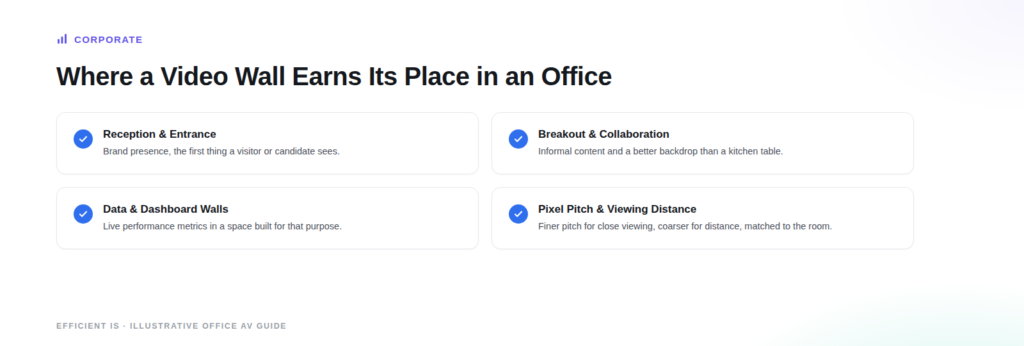
Three locations consistently make sense for a direct view LED wall in an office. Reception and entrance areas use a wall for brand presence and a first impression, often the single most visible piece of technology in the building. Breakout and collaboration spaces use a wall for informal content, team dashboards, or simply a better backdrop for the kind of space staff are being asked to choose over their kitchen table. Larger organisations also use a dedicated data or dashboard wall, showing live performance metrics or operational data, usually in a space built specifically for that purpose rather than a general social area.
The technology and who makes it
Direct view LED has become the default choice for anywhere a wall needs to look genuinely good up close, rather than an LCD video wall with visible bezels between panels. Samsung, LG, Absen, Unilumin and Planar all supply LED wall technology actively used in UK corporate installations, each with strengths in particular pixel pitches and panel formats, which is exactly why staying brand agnostic through procurement matters: the right panel for a reception wall viewed from three metres away is not the right panel for a boardroom wall viewed from one metre away.
What this means for a fit out budget
LED wall cost is driven mainly by physical size and pixel pitch, the distance between individual LEDs, since a finer pitch needed for close viewing costs more per square metre than a coarser pitch suited to a wall people only see from a distance. This is exactly the kind of line item JLL’s fit out guide tracks as part of the wider category of technology and finishes spend in a modern office project, and it is worth scoping early in a fit out rather than as a late addition, since cabling, structural fixing and content management all need to be planned into the build rather than retrofitted afterward.
The bottom line: a video wall earns its place in an office when it has a specific job, reception branding, a breakout space upgrade, or live operational data, not as a general decorative upgrade. Direct view LED is now the standard technology for anywhere viewed up close, and because several manufacturers compete in this space, the right specification depends on the room and viewing distance, not one default product.
Questions worth asking
FAQ
Where in an office does a video wall actually make sense?
Reception and entrance areas for brand presence, breakout and collaboration spaces for informal content and a better backdrop, and dedicated data or dashboard walls for live operational metrics in larger organisations. Each of these is a specific job the wall is doing, which is the difference between a worthwhile investment and decoration.
What drives the cost of an LED video wall?
Mainly the physical size and the pixel pitch, meaning the distance between individual LEDs. A finer pitch needed for close up viewing, such as a reception desk, costs more per square metre than a coarser pitch suited to a wall people view from further away, such as above a lobby seating area.
Is this something to plan into a wider office fit out, or can it be added afterward?
It is much better planned in from the start. Cabling, structural fixing and content management all need to be built into the project rather than retrofitted, and fit out guides from firms like JLL already treat this kind of technology spend as a standard line item in a modern office project.
Does it matter which manufacturer we use?
It matters less which single brand and more that the panel is matched to the room. Samsung, LG, Absen, Unilumin and Planar are all genuinely used in UK corporate installations, each suited to slightly different pixel pitches and viewing distances, which is why a brand agnostic specification process is worth insisting on.
Thinking about your reception or breakout space?
Tell us what you’re trying to fix and we’ll tell you honestly what’s realistic.
LCD or direct-view LED, which video wall actually fits your budget?
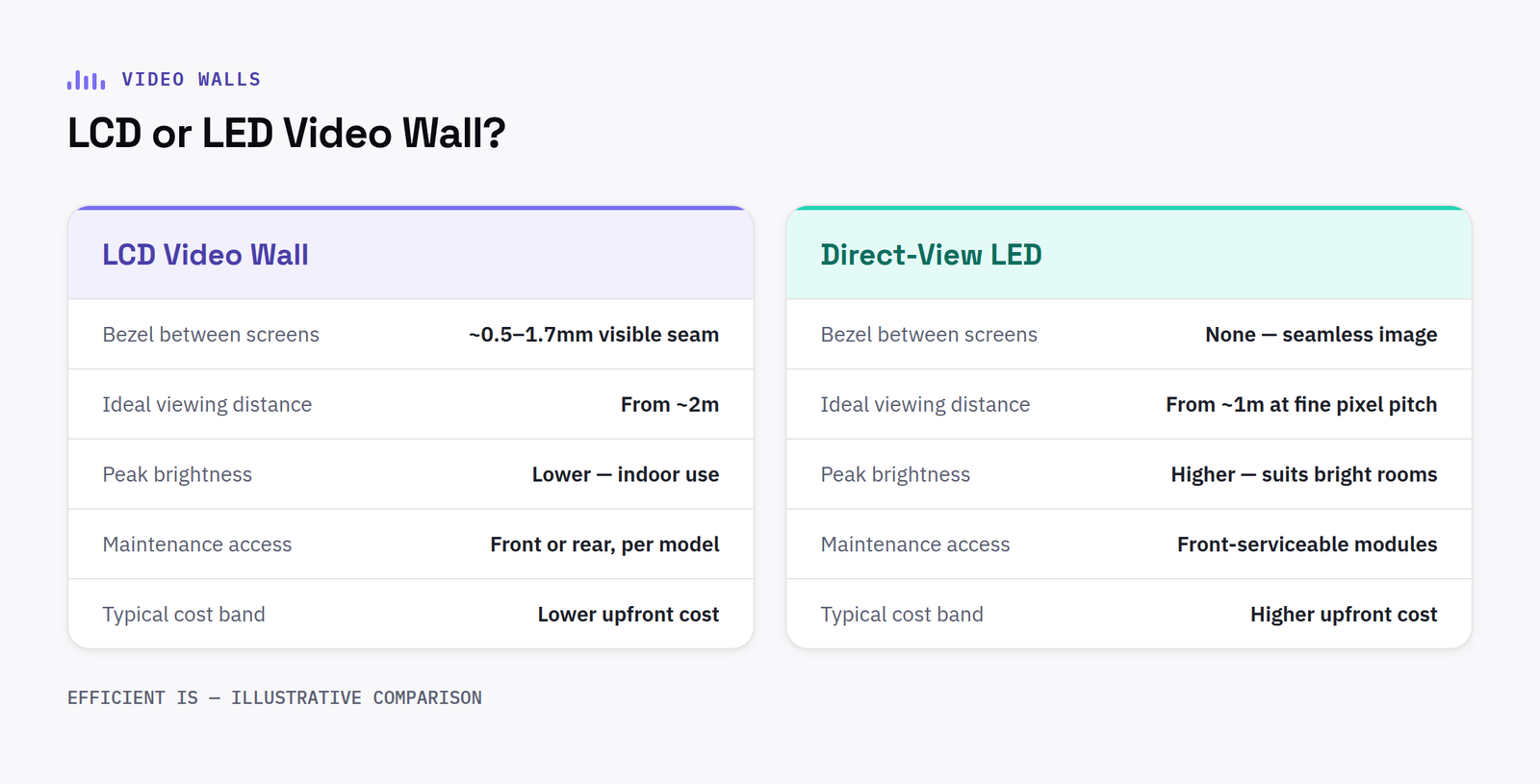
Both technologies produce a large-format video wall. The decision that actually matters is which one fits your room, your viewing distance and your budget, not which one looks more impressive in a spec sheet.
That seamlessness is the whole reason DV-LED costs more per square metre. You’re paying for a fundamentally different manufacturing process, not a marginally better screen.
Where each one wins
LCD wins on cost and is more than sharp enough at viewing distances under 3 to 4 metres, the range that covers most receptions, meeting rooms and control room desks. Direct-view LED earns its premium at longer viewing distances, larger sizes, or where a visible bezel genuinely isn’t acceptable, a brand wall behind reception, a large control room where operators sit further back, or anywhere the wall needs to flex to non-standard shapes and sizes.
Pixel pitch, the distance in millimetres between LED pixels, is where most UK buyers overspend. A finer pitch costs significantly more per square metre, but if nobody’s ever viewing the wall from inside the distance that pitch is designed for, you’re paying for resolution nobody can see.
What it actually costs
As a rough planning guide (UK, supplied and installed, excluding VAT): a small 2×2 or 3×3 LCD video wall typically starts from £6,000 to £12,000. Direct-view LED for indoor use generally starts from around £2,000 to £2,200 per square metre for standard pitch, rising sharply for fine-pitch panels used at close viewing distances or outdoor-rated, high-brightness panels.
Total cost of ownership matters more than the sticker price. DV-LED uses meaningfully less power than LCD at equivalent brightness, because only the pixels that are lit draw power, over a multi-year deployment running long hours daily, that difference is real money back.
The bottom line: If your viewing distance is under 3 to 4m and budget is the primary constraint, LCD is the sensible default. If the wall needs to be seamless, very large, or viewed from further back, direct-view LED earns its cost, just make sure the pixel pitch is matched to the actual viewing distance, not the biggest number on the spec sheet.
Questions worth asking
FAQ
How much does a video wall cost in Scotland?
A small LCD video wall typically starts from £6,000 to £12,000 supplied and installed. Direct-view LED starts from around £2,000 to £2,200 per square metre for indoor, standard-pitch panels, rising for fine-pitch or outdoor-rated displays.
Do I need direct-view LED, or will LCD do?
If your typical viewing distance is under 3 to 4 metres, a well-specified LCD video wall will look sharp and costs meaningfully less. Direct-view LED is worth the premium for longer viewing distances, larger walls, or where a visible bezel isn’t acceptable.
Structural and installation considerations
Both technologies need proper structural thought before installation, not just a wall bracket. A large LCD or direct view LED wall is genuinely heavy, and the wall or freestanding frame it hangs from needs to be specified for that load, not just assumed capable of it. Direct view LED in particular generates real heat across a large surface, so ventilation and airflow behind the wall matter as much as the mounting itself, especially in an enclosed reception or boardroom setting where the wall is built into existing joinery. Getting a structural engineer or the installer to confirm the fixing point can genuinely take the weight, rather than assuming a stud wall or plasterboard partition is adequate, is a five minute check worth doing before any screen is ordered.
Have a project in mind?
Tell us what you’re trying to fix and we’ll tell you honestly what’s realistic.
A control room video wall lives or dies on reliability, not resolution
Control room video walls run continuously, for years, in front of operators making time-critical decisions. That changes almost every design assumption compared to a reception or boardroom wall.
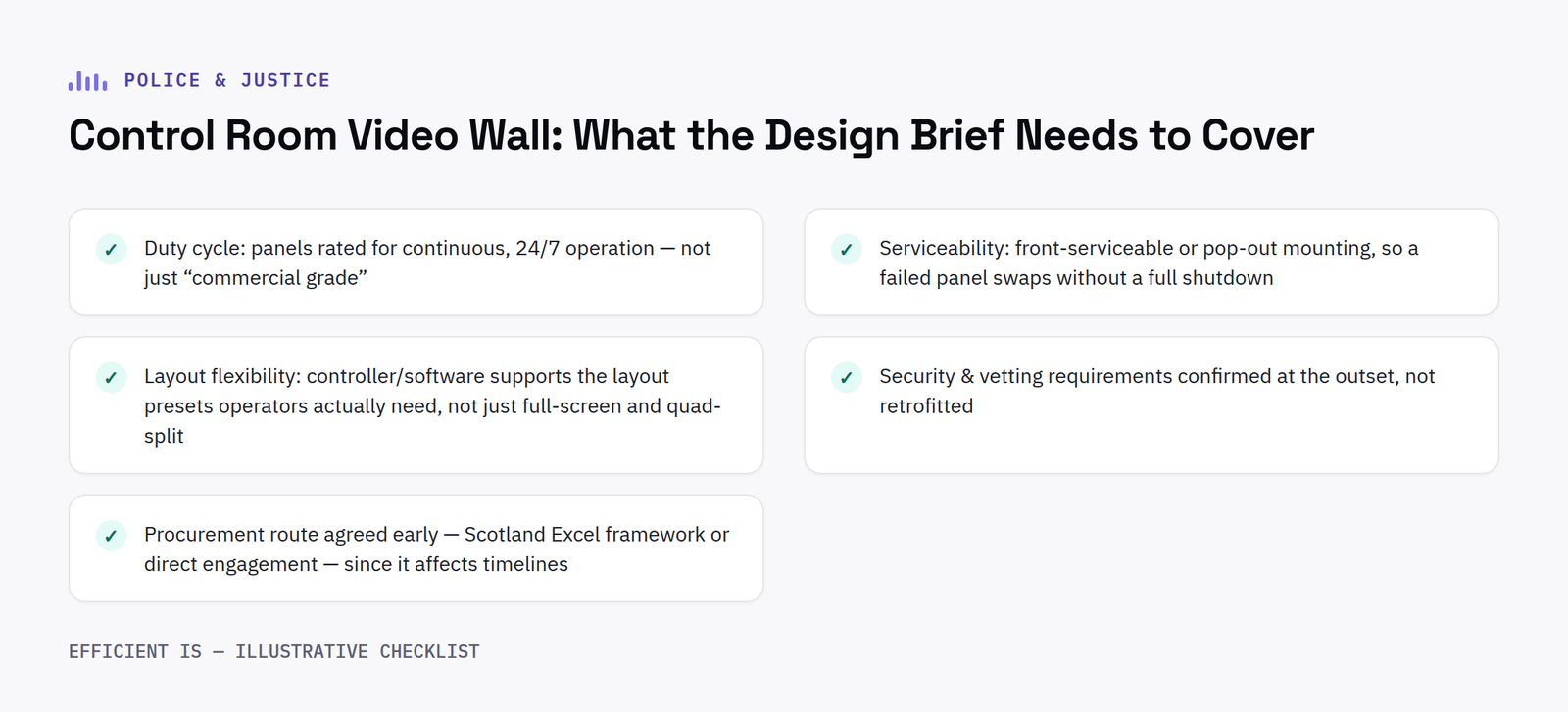
Duty cycle is the design brief
Most video wall panels are rated for a defined number of hours of daily use, plenty for a boardroom, potentially marginal for a control room that runs genuinely 24/7. Specifying panels rated for continuous operation, not just “commercial grade” in general terms, is the single most important decision in a control room video wall project.
Serviceability without downtime
A panel failure in a live control room isn’t a maintenance ticket, it’s an operational gap. Front-serviceable or pop-out mounting, so a failed panel can be swapped without dismantling the whole wall or powering anything else down, is worth specifying explicitly rather than assuming.
Layout flexibility for changing incidents
The content on a control room wall needs to reconfigure fast, a single incident might need one camera feed full-screen one moment and a sixteen-way grid the next. This is a controller and software question as much as a hardware one: check the video wall controller supports the layout presets your operators actually need, not just full-screen and a basic quad-split.
Procurement route
Public sector security and vetting requirements apply throughout a police or justice AV project, and should be confirmed at the outset rather than retrofitted. Procurement is typically available either through the Scotland Excel framework for Scottish forces and justice bodies, or direct engagement, both routes should be considered before design work starts, since the route can affect timelines.
The bottom line: Specify for continuous duty cycle and front-serviceability first, resolution and pixel pitch are secondary decisions once reliability is locked down.
Questions worth asking
FAQ
How reliable do control room video walls need to be?
Specified for continuous, 24/7 operational use as the primary design requirement, not general “commercial grade” panels rated for standard business hours.
Can a single panel be replaced without shutting down the whole video wall?
Yes, if front-serviceable or pop-out mounting is specified at the design stage, this should be an explicit requirement, not an assumption.
Specifying redundancy properly
A control room cannot simply go dark because a single power supply or signal path failed. Redundant power feeds into the wall, and ideally a backed up UPS supply, are worth specifying from the outset rather than treated as an optional extra. On the signal side, a redundant video wall controller or at minimum a documented failover process, so operators are never left without any picture at all while a fault is diagnosed, matters as much as the physical panels themselves.
Commissioning and testing before go live
A control room video wall should be burnt in and tested under realistic conditions before operators rely on it for live incidents, not simply switched on and handed over. That means running the full expected duty cycle for a sustained period, testing every camera feed and layout preset the operators will actually use, and confirming panel to panel colour and brightness matching across the whole wall. Faults found during a proper commissioning period are far cheaper to fix than the same fault discovered mid incident once the room has gone live.
Cabling and connectivity behind the wall deserve the same attention as the panels themselves. Running spare, clearly labelled cable paths at installation time, rather than exactly the number needed on day one, makes it far easier to add a camera feed or an extra input later without pulling the wall apart to do it. Labelling matters as much as capacity. An unlabelled cable run behind a live control room wall is a problem for whoever has to trace it during a future fault.
Have a project in mind?
Tell us what you’re trying to fix and we’ll tell you honestly what’s realistic.
Find our work useful? Add us as a preferred source on Google.
We use cookies that are strictly necessary to run this site, and, only with your permission, analytics and advertising cookies to help us understand traffic and measure our marketing. See our Privacy Policy for details.