
Video wall maintenance gets decided at design stage, long before anything breaks. Pick front or rear service, keep spare modules from the same batch, work out how engineers will reach the top row and plan a recalibration after every module swap. With those settled, a dead panel means a short visit and the room stays open.
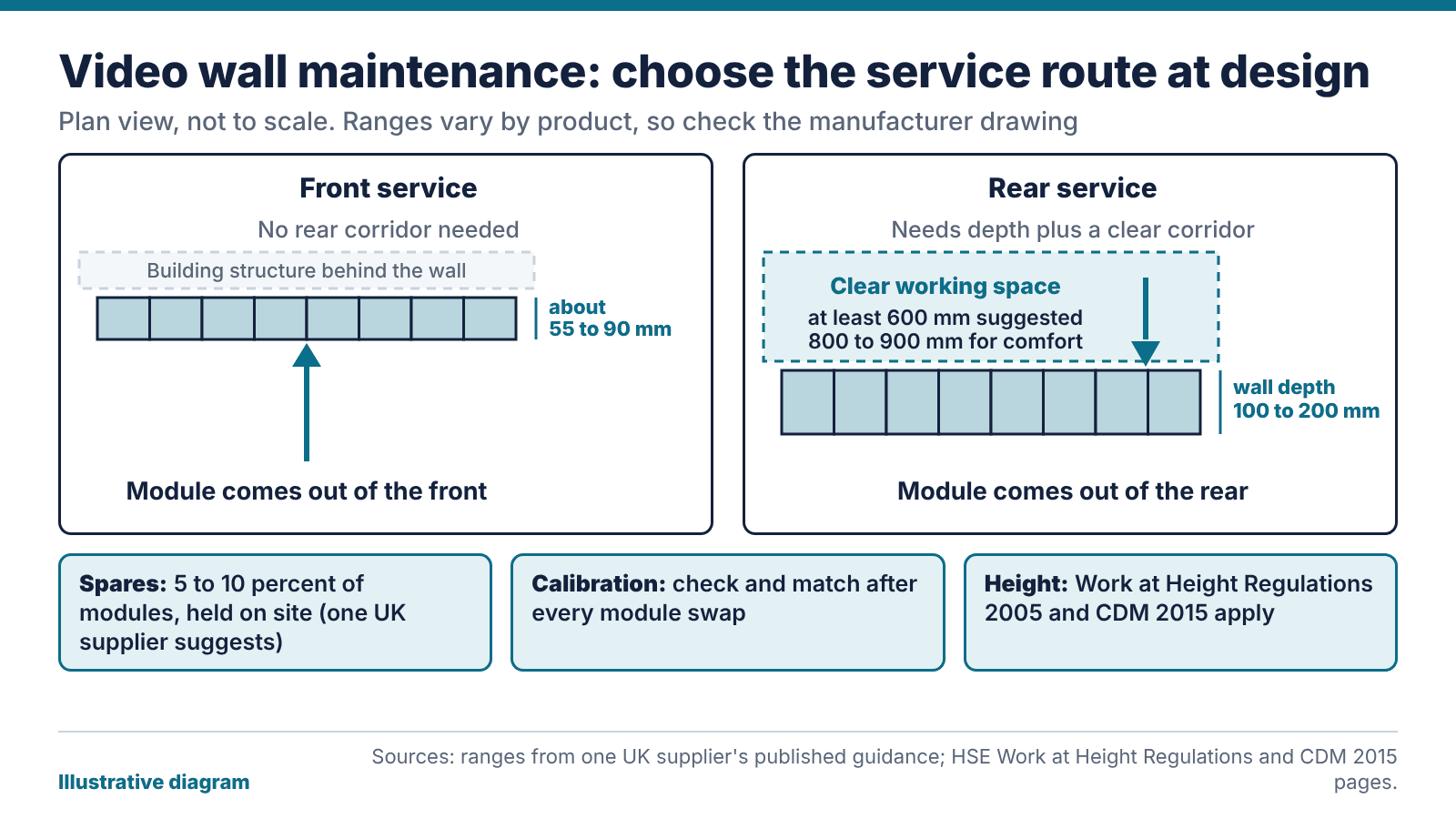
Video wall maintenance starts at the design stage
The service method is set when the wall is designed, and changing it later means rebuilding the structure. With front service, an engineer removes a module from the viewing side. With rear service, they work from behind the wall. The choice affects floor area, wall depth and who can do the job.
One UK supplier’s guidance suggests front-service LED walls can sit as shallow as roughly 55 to 90 mm and need no rear corridor. Rear service needs wall depth, put at 100 to 200 mm, plus clear working space behind it, with at least 600 mm suggested and 800 to 900 mm for comfort. Treat those as indicative. Figures vary by product, so ask for the manufacturer’s drawing for the actual wall.
A wall on a corridor, or on a partition with a tenant behind it, may have no room for a rear corridor. A wall in a plant-room-style control space may well have it. So the room often settles the question before anyone states a preference.
Our view: choose the method for the person who’ll do the job in three years’ time, not the person signing off the drawings. Ask who will maintain the wall, what access equipment they’ll bring and whether they can reach every module without working at height.
Working at height and who is responsible
A tall wall means someone might need to reach the top rows. The HSE’s page on the Work at Height Regulations 2005 says the aim is to prevent death and injury from falls. The duties fall on employers and on anyone who controls work at height, which includes facilities managers and building owners who hire contractors. Work has to be planned, supervised and carried out by competent people using suitable equipment. Lower-risk, simple tasks need less planning.
The design stage matters here too. Under the Construction (Design and Management) Regulations 2015, designers must eliminate foreseeable health and safety risks where possible and reduce or control those that remain. The HSE’s guidance for designers says their decisions affect the people who use a building and those who maintain it. CDM applies to construction projects, so whether it covers your install depends on the project, and your principal designer can confirm.
For video wall maintenance, the practical reading is this. If a module swap can happen at floor level, from a platform or from a tilt-out frame, you cut the risk before anyone has to plan around it. Where that isn’t possible, write the access method down now. The first fault is a bad time to invent one.
How many spares does video wall maintenance need?
The same supplier suggests holding 5 to 10 percent of the module count as spares. On a wall of 100 modules, that’s five to ten. It’s a guide, and your own figure depends on how hard a replacement would be to source and how much downtime you can accept.
Keep spares from the same production batch as the wall, because modules from different batches can look different side by side. Hold the small parts as well: power supplies, receiver cards, data cables and the controller parts that would stop the wall working. Store the lot on site, labelled and dry, with one person responsible for counting it.
For LCD walls the logic is the same with panels and brackets. A spare panel is only useful if you can fit it, so check that the mounts let a single panel come out without disturbing its neighbours.
Ask the supplier how long they’ll keep the part range available, because a spare you can’t replace after you use it is a one-time fix. Put spares in the quote before the first fault.
Video wall maintenance after a module swap: calibration
LED modules can drift with age, so a new module beside an older neighbour may show a different brightness or colour, even from the same product line. The same supplier recommends calibrating at installation and periodically afterwards, with batch-matched modules.
After a swap, run through this:
- Display a full white and a full grey test pattern, and look for patches.
- Compare the new module with its neighbours at the usual viewing distance.
- Apply the stored calibration settings, or recalibrate the module to match the wall.
- Record the date, the module position and the settings used.
Ask at handover who holds the calibration data. If it sits on the installer’s laptop, you can’t repeat the job without them. Store it somewhere you can reach and list it in the handover pack.
In a control room the wall is watched all shift, so a visible patch matters more. Our post on upgrading a control room while it stays live covers how to schedule that work.
Routine checks and what the contract should say
Many faults on a video wall are dull: a loose cable, a failed power supply, a module that has lost its settings, a controller that needs a restart. Routine video wall maintenance should catch them before an audience does. We’d do a monthly look at the wall with test patterns, a check of cooling and filters where fitted, and a copy of the controller configuration stored away from the controller.
A general maintenance contract that says nothing about access equipment, working at height or calibration leaves the awkward parts of the job unpriced. Read our guide to AV maintenance contracts for response times and how to read an SLA, then add the wall-specific questions: who brings the access equipment, who holds the spares and what the calibration plan is.
If you want us to look at an existing wall, our support and maintenance service can survey it and report on access, spares and calibration. For planning a new one, see our video wall solutions.
The bottom line: for any wall, new or old, find out three things: how an engineer reaches the top module, where the batch-matched spares are kept and who holds the calibration data. If nobody can say, that’s your first maintenance job.
FAQ
What is the difference between front and rear service on a video wall?
Front service means modules come off from the viewing side, so the wall can be shallow and needs no rear corridor. Rear service means engineers work behind the wall, which needs depth and clear working space. The choice is fixed at design.
How many spare modules should we keep for video wall maintenance?
One UK supplier’s guidance suggests 5 to 10 percent of the module count. Your figure depends on the cost of downtime and how quickly a part can be sourced. Keep spares from the same batch as the wall.
Does video wall maintenance include recalibrating after a repair?
Recalibrate whenever a module has been replaced. A new module can differ in brightness or colour from its aged neighbours. Compare it against test patterns and apply or recreate the stored settings.
Do the Work at Height Regulations apply to a video wall?
They apply wherever an employer or the person in control of the work has to reach a high module. The work needs planning and competent people with suitable equipment. Designing for floor-level access cuts the risk.
Who is responsible for video wall maintenance?
Your contract decides who does the repair. The person who controls the premises still has duties under work at height rules. Write down who does what, including who brings the access equipment.
How often should video wall maintenance checks happen?
We’d do a short monthly look with test patterns and a deeper annual check of cabling, power and settings. Walls in 24-hour control rooms may need a tighter routine agreed with the supplier.











