Estate Agent Window Display Screens: Brightness, Planning and Listings

Estate Agent Window Display Screens: Brightness, Planning and Listings

Daylight wins against an ordinary screen every time. Here are the brightness figures, the planning questions and the feed question most agents forget to ask.
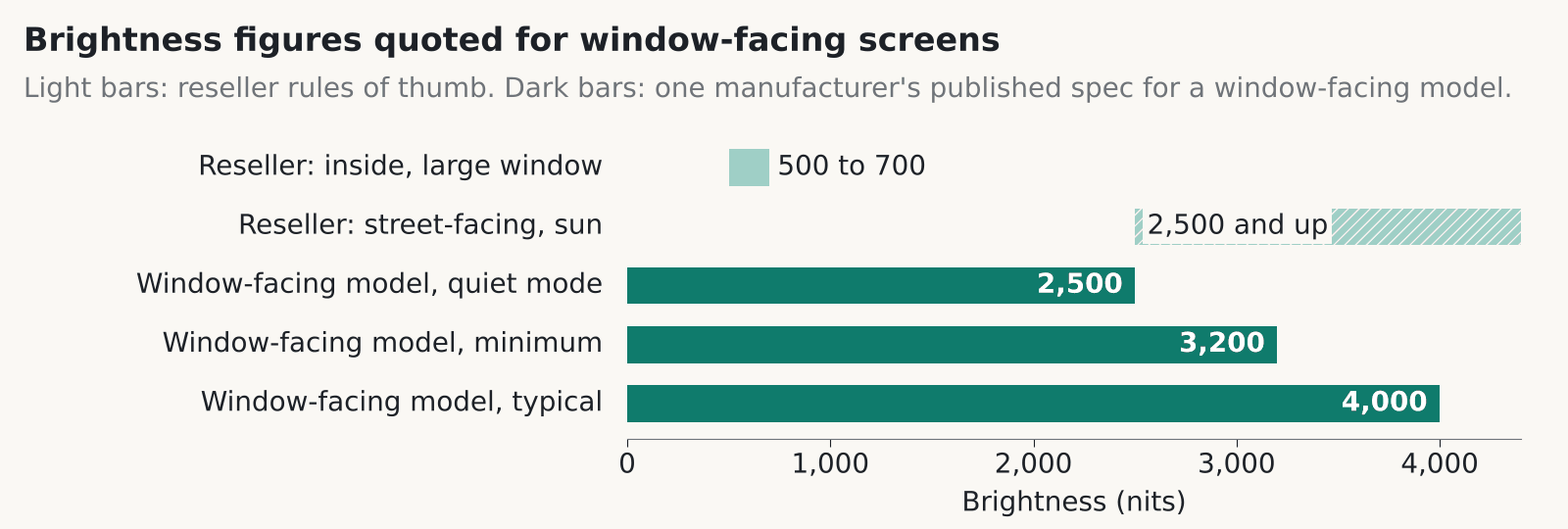
Illustrative diagram: brightness figures quoted for an estate agent window display, from reseller guidance of 500 to 700 nits near a window to 4,000 nits typical on one manufacturer's window-facing model
Brightness figures quoted for window-facing screens. The 500 to 2,500 nit ranges are reseller rules of thumb, not a standard. The 4,000 nit figure is one manufacturer’s published specification for a window-facing model.

An estate agent window display has to beat daylight coming through glass, and an ordinary indoor screen won’t. It washes out. As one example, one manufacturer’s published specification rates a window-facing model at 4,000 nits typical, and reseller guidance puts street-facing screens in sun at 2,500 nits or more.

How bright should an estate agent window display be?

Brightness is measured in nits, and the number you need depends on where the sun hits the glass. One reseller’s guide, which is a rule of thumb and not a standard, suggests at least 500 nits and ideally 700 near a large window indoors. For screens facing the street in sun it suggests about 2,500 nits or more. Dedicated window-facing displays are sold in that 2,500 nit class and above.

The published figures for that window-facing model show what the top end looks like. It’s rated at 4,000 nits typical and 3,200 minimum, with a Quiet Mode at 2,500 nits and a built-in sensor that adjusts brightness. It runs 24 hours a day and has a fan and a temperature sensor. Operating range is 0 to 30 degrees C in direct sunlight, or 0 to 40 without it.

Brightness costs power and noise. That model draws 375 W typical and 400 W maximum, which by our arithmetic is about 9 kWh a day if it runs flat out around the clock. The fan is audible, and the manufacturer’s own specification shows fan noise rising with brightness. That matters more on a quiet frontage in the evening than on a busy high street at noon.

In our experience the south-facing window, with a low winter sun, is the one that decides the spec. Find out which hours the glare hits and size for those.

Do you need planning permission for an estate agent window display?

In England, an internally lit estate agent window display behind the glass generally falls under deemed consent, but that is a reading of the regulations and not legal advice. The Town and Country Planning (Control of Advertisements) (England) Regulations 2007 exempt indoor advertisements in Schedule 1, Class I only if they aren’t illuminated and sit more than 1 metre from an external window or opening.

Schedule 3, Class 12 gives deemed consent for advertisements inside buildings. Schedule 3 on legislation.gov.uk carries the text. A 2019 Planning Resource answer reads Class 12 as covering illuminated ones and those within a metre of a window, subject to standard conditions and to the authority’s discontinuance power for amenity or public danger. That is a secondary source.

The brightness limits for illuminated signs on business premises are about signs on the premises. We haven’t found anything saying they apply to a screen inside the glass, so we don’t quote them here.

Scotland has its own regime, the Town and Country Planning (Control of Advertisements) (Scotland) Regulations 1984. We couldn’t confirm how it treats an illuminated estate agent window display inside the glass. East Dunbartonshire’s non-statutory guidance says digital adverts “will be unacceptable in historic settings in almost all circumstances”, and acceptable elsewhere if road safety and character aren’t harmed. That’s one council, and others will differ. Speak to your planning authority before you buy, and ask about listed building and conservation area rules while you’re there.

What should an estate agent window display show?

Keep the content simple. Show one property at a time, with a large photo and a price and address that can be read from the pavement. Add a QR code to the full listing. That’s our view of what passers-by use, and one vendor sells the same idea.

Keep transitions plain. CAP Code section 4.7 covers flickering images that could trigger photosensitive epilepsy, and the ASA and CAP recommend testing flashing ads. Their news item doesn’t name digital out-of-home screens, but a fast strobing transition on a street-facing screen is a bad idea for any reason. Use a slow fade.

Glare hits the content as well as the glass. Pale text on a mid-grey background vanishes in sun. Dark text on white, or white on a deep colour, holds up better. Check the template on the screen in the window, in daylight, before you sign it off.

Our digital signage content management guide covers who edits the content and how it reaches the screen.

Listing feeds and what happens when they fail

Every estate agent window display with live listings depends on a feed. A listing feed pulls properties from your system onto the screen so nobody retypes them. One UK vendor said in August 2025 that its window displays connect to the agency’s own website, update listings automatically, show sold and let status and give each property a QR code. Those are the vendor’s claims, and we’ve seen no data behind them.

We couldn’t verify how the major property portals’ feeds work with third-party display systems, so ask the supplier. Find out which system the screen reads from and how often it refreshes. Then ask who can override a listing in a hurry, say when a sale falls through at 4pm on a Friday.

The question we’d press hardest is the failure one: what does the screen show when the feed drops? A frozen sold property on your estate agent window display, or a blank panel, does more harm than no screen at all. We’d skip any set-up that has no fallback playlist and no alert to a named person.

Reception and foyer screens have the same glare problem

A reception or foyer screen faces the same glare indoors, and the first step is the same: survey before you buy. Our atriums and reception AV page recommends glare surveys before you choose a display. Glass roofs and big windows move the light through the day, so look at the space in the morning and the late afternoon.

Auto-dimming is worth having. A sensor that lowers brightness as the light fades stops the screen glowing like a lamp in an evening lobby. Our estate agents page mentions ambient light sensors for window displays for the same reason.

Viewing distance decides between LCD and LED. People who stand close to a reception screen want fine pixels and few visible seams, and the sums are in our video wall pixel pitch guide. A tall, echoey atrium also needs zoned audio, because one loud speaker bounces around the room and none of it is intelligible. Whoever runs the desk should be able to update the content without calling us.

Fitting and servicing an estate agent window display

Plan the power, data and airflow in the window bay before the screen arrives. In our experience this is where jobs slip, because a shop window was never built to hold a 24/7 display. Put a power socket and a data point inside the bay. Leave a gap behind the screen for the fan to move air, and think about how someone reaches the back to service it.

Ask about heat before you sign. That model’s published 30 degrees C limit in direct sunlight is a real constraint for a south-facing window in summer, with a screen and the sun both warming the same pocket of air. Ask the supplier how the screen copes if the window bay goes above its rated limit.

Then agree the installation window. In our experience most agents can’t have the shopfront blocked in business hours, so out-of-hours work is normal.

See our Estate Agents and Digital Signage pages for how we approach these jobs.

The bottom line: Size your estate agent window display for the worst hour of sun on the glass, check planning with your own authority, and make the supplier show what the screen does when the listing feed fails.
Questions worth asking

FAQ

How many nits does an estate agent window display need?

One reseller’s rule of thumb is at least 500 nits and ideally 700 near a large window indoors, and about 2,500 nits or more for a screen facing the street in sun. It isn’t a standard. The one manufacturer’s window-facing model we checked is rated 4,000 nits typical in its published specification.

Do I need planning permission for a screen in my shop window?

In England, an internally lit estate agent window display generally falls under deemed consent for indoor advertisements, though that is a reading of the 2007 Regulations and not legal advice. Scotland has separate rules and we couldn’t confirm how they treat window screens. Ask your local planning authority before you buy.

Can an estate agent window display update from my property system?

Some vendors say so. One UK vendor, for example, said in 2025 that its displays update listings automatically from the agency’s site. Ask where the data comes from, how often it refreshes and what shows if the link fails.

Is flashing content allowed on an estate agent window display?

Avoid it. CAP Code section 4.7 covers flickering images that could trigger photosensitive epilepsy, and the ASA and CAP recommend testing flashing ads. Slow fades between properties look better anyway.

What happens to a window screen in direct sun?

It gets hot. One manufacturer’s window-facing model is rated for 0 to 30 degrees C in direct sunlight (0 to 40 without it) and has a fan and a temperature sensor. Ask the supplier for the rating of the exact model you’re quoted.

Are reception screens different from window screens?

The glare problem is the same, but the viewing distance is shorter and the audience stays longer. That pushes you towards finer pixels and auto-dimming. Do a glare survey before you choose.

Planning a window or reception screen?

Tell us about the shopfront or foyer, which way it faces and what you want on show. We’ll give you a straight answer on brightness, power and fitting.
📞 0845 095 3600   ✉ av@efficient-is.co.uk

Book a discovery call

AV in Retail and Shopping Centres: Beyond a Single Screen

AV in Retail and Shopping Centres: Beyond a Single Screen

A single price board solves a shop’s problem, but a shopping centre is solving a different one entirely, guiding thousands of people a day around a space they have never been in before, while generating advertising revenue from the same screens.

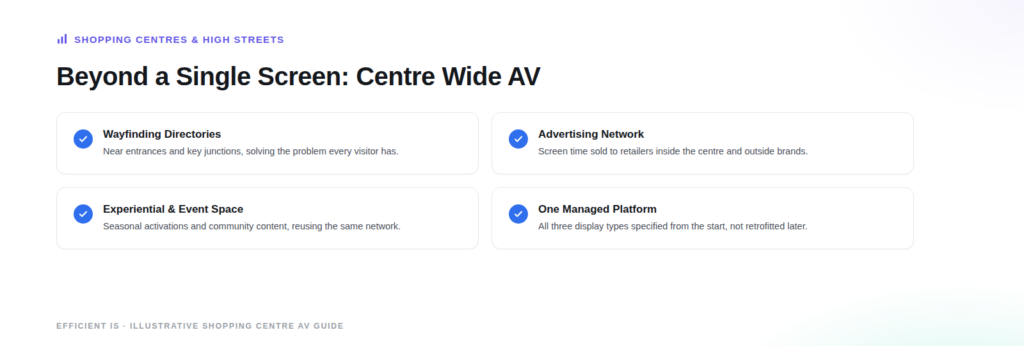
Illustrative diagram: AV beyond a single screen in a shopping centre, covering wayfinding, the advertising network, experiential space and one managed platform.

The gap between a shop’s digital signage needs and a shopping centre’s is really a gap in scale and purpose, not technology. We have already covered what works for a single independent shop, salon or clinic in our companion piece on digital signage for independent businesses. A shopping centre faces a genuinely different set of problems: visitors who do not know the layout, dozens of individual retailers who all want visibility, and an owner who often wants the screen network to generate its own advertising income rather than purely being a cost.

Wayfinding comes first

The single most common reason a shopping centre invests in digital signage is wayfinding: directory screens near entrances and at key junctions that show visitors where they actually are and how to reach a specific shop, toilet or exit. This sounds simple but genuinely reduces visitor frustration in large or oddly laid out centres, and it is usually the first screen category installed, before anything more ambitious, because it solves a problem every single visitor has regardless of which shops they are there to visit.

Centre wide advertising networks

Once a wayfinding network exists, many centres extend it into a genuine advertising asset, selling screen time to retailers inside the centre and to outside brands, turning what started as a visitor service into a revenue line. The UK out of home advertising sector, tracked by the industry body Outsmart, reported its highest ever annual revenue in 2025 with digital screens accounting for the clear majority of that spend, and shopping centre screen networks are a meaningful part of that wider digital out of home category rather than a separate thing entirely.

Experiential and event space

The third category is less common but genuinely effective where it is used well: a larger format screen or a dedicated space used for seasonal events, brand activations or community content, giving the centre something to offer beyond retail alone. This tends to come later, once the core wayfinding and advertising infrastructure already exists, since it usually reuses the same network and content management system rather than needing an entirely separate setup.

What this means for procurement

A centre wide network needs to be managed centrally even though individual retailers may want some control over their own content, which makes the content management platform choice as important as the screens themselves. It also needs to be planned for multiple display types from the start, directory screens, advertising panels and any experiential installation, since retrofitting a second, incompatible system later is far more expensive than specifying for all three uses up front.

See our Retail and Restaurant Screens page, or our Digital Signage page for the content management side of a multi screen network.

The bottom line: a shopping centre’s AV needs start with wayfinding, which solves a problem every visitor has, then commonly extend into an advertising network that can generate its own revenue, and sometimes into dedicated experiential space. All three should sit on one centrally managed platform specified from the start, rather than being added as separate, incompatible systems over time.
Questions worth asking

FAQ

What is the first thing a shopping centre should invest in, if budget is limited?

Wayfinding. Directory screens near entrances and at key junctions solve the problem every single visitor has, finding their way around an unfamiliar space, and they are usually the first category installed before anything more ambitious like an advertising network.

Can a shopping centre’s digital signage network actually make money, rather than just being a cost?

Yes, and many UK centres already do this by selling screen time to both retailers inside the centre and outside brands. The wider UK out of home advertising sector reported its highest ever annual revenue in 2025 according to Outsmart, with digital screens making up the clear majority of that spend.

Is this different from what an individual shop needs?

It is a difference of scale and purpose rather than technology. An individual shop is usually solving one specific job, like an often changing price list or a window display. A shopping centre is managing wayfinding for thousands of unfamiliar visitors a day, often across dozens of individual retailers, which needs centralised content management from day one.

Should wayfinding, advertising and any event screens be separate systems?

No, this is worth planning for up front rather than retrofitting later. Specifying one centrally managed content platform that can handle all three display types from the start is significantly cheaper than adding a second, incompatible system once the first one already exists.

Managing a retail space or shopping centre?

Tell us what you’re trying to fix and we’ll tell you honestly what’s realistic.

📞 0845 095 3600  ·  ✉ av@efficient-is.co.uk

Book a discovery call

Are self-serve kiosks in small-business worth it?

Retail · 3 min read

Self-Serve Kiosks for Small Independent Businesses: Are They Worth It?

The kiosk statistics doing the rounds are real, but they come from restaurant and hospitality research, mostly at a scale bigger than a single independent counter. Here’s the honest version of what they mean for a small business.

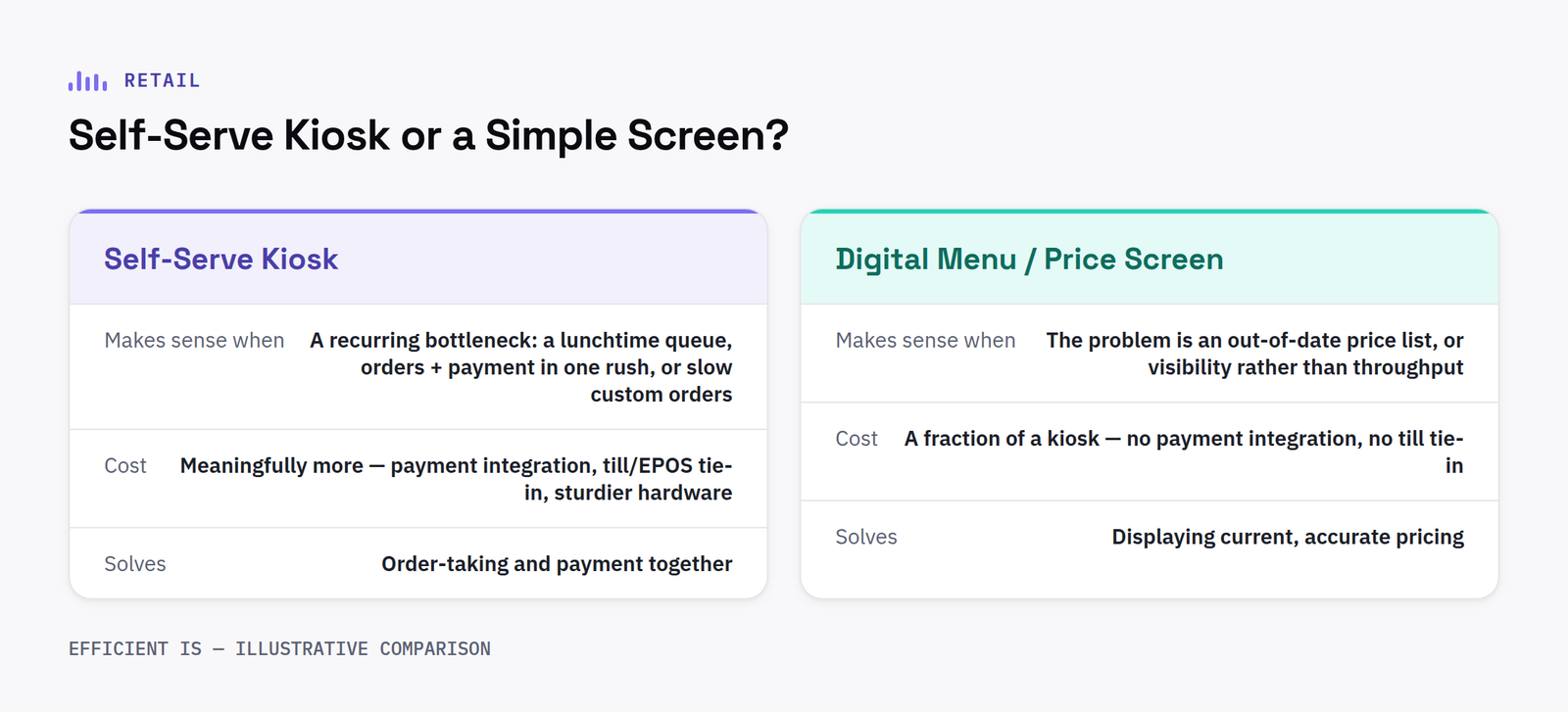
Self-serve kiosks comparison diagram: when a kiosk earns its keep versus when a simple digital menu or price screen does the same job for less

The numbers, and what they actually cover

Tillster’s 2025 Phygital Index found that 61% of consumers now want more self-serve kiosk ordering in restaurants, up sharply from 36% just two years earlier, and that 76% of kiosk users said they ended up spending more than they’d originally planned. Those are genuine, recent, well-sourced findings, and they point at something real: customers increasingly like ordering their own way, at their own pace.

What they don’t tell you is whether a kiosk makes sense for your counter. That research is drawn overwhelmingly from higher-volume restaurant and quick-service settings, where a queue at busy periods is a routine, costly problem. A single-till independent café, salon reception or clinic front desk is a genuinely different situation, and the same conclusion doesn’t automatically transfer.

When a self-serve kiosk earns its keep for a single site

A kiosk tends to make sense once you’ve got a specific, recurring bottleneck: a lunchtime queue that regularly costs you sales, a counter that has to handle both orders and payments during a rush, or a process (like a customer building a custom order) that takes a member of staff longer to key in than the customer would take themselves.

When a simple screen does the same job for less

If your actual problem is a price list or menu that’s out of date, or a queue that’s more about visibility than throughput, a digital menu board or a simple digital price display usually solves it at a fraction of the cost and complexity of a kiosk, no card payment integration, no till system tie-in, no ongoing kiosk maintenance. We cover the wider picture of what’s worth it for an independent business in our companion piece on digital signage for independent shops, salons and clinics.

The bottom line: the appetite for self-serve is real and growing, but the research behind the headline numbers is mostly drawn from higher-volume settings than a single independent counter. If you’ve got a genuine, recurring bottleneck, a kiosk can be worth it, if you don’t, a simpler digital menu or price screen usually gets you most of the benefit for a lot less outlay.

Get a live price on a digital menu or price screen through our Retail & Restaurant Screens configurator, or talk to us before you commit to anything, we’d rather tell you a kiosk isn’t worth it than sell you one that isn’t.

Questions worth asking

FAQ

How much does a self-serve kiosk cost compared to a digital menu screen?

A kiosk costs meaningfully more than a display-only screen, largely because of payment integration, till/EPOS tie-in and the sturdier hardware needed for customer handling. A digital menu or price screen with no payment element is a simpler, cheaper starting point if payment isn’t the bottleneck you’re solving.

Does a kiosk mean I need less staff?

Not necessarily fewer staff overall, more commonly it frees up whoever’s on the counter to do higher-value work (making the order, not keying it in) rather than removing a role entirely.

Is kiosk research from big chains relevant to my small business?

Directionally, yes, it tells you customer appetite for self-serve is real and growing. Numerically, be cautious: most published kiosk statistics come from higher-volume restaurant and retail settings, and won’t necessarily repeat at a single independent counter’s scale.

What should I check before ordering a kiosk?

Whether it needs to integrate with your existing till or payment system, who’s maintaining it day to day, and whether the actual bottleneck it’s meant to fix is order-taking, payment, or something else entirely, the answer changes what hardware you actually need.

Not sure if a kiosk is the right answer?

Tell us what’s actually slowing your counter down and we’ll tell you honestly whether a kiosk, or something simpler, is the right fit.

📞 0845 095 3600  ·  ✉ av@efficient-is.co.uk

Book a discovery call

Digital signage for independent shops, salons & clinics

Retail · 4 min read

Digital Signage for Independent Shops, Salons & Clinics: What Actually Works

Most digital signage advice online is written for supermarket chains and shopping centres. Here’s the version scaled for a single shop, salon, clinic or agency, what actually earns its keep, and what’s solving a problem you don’t have.

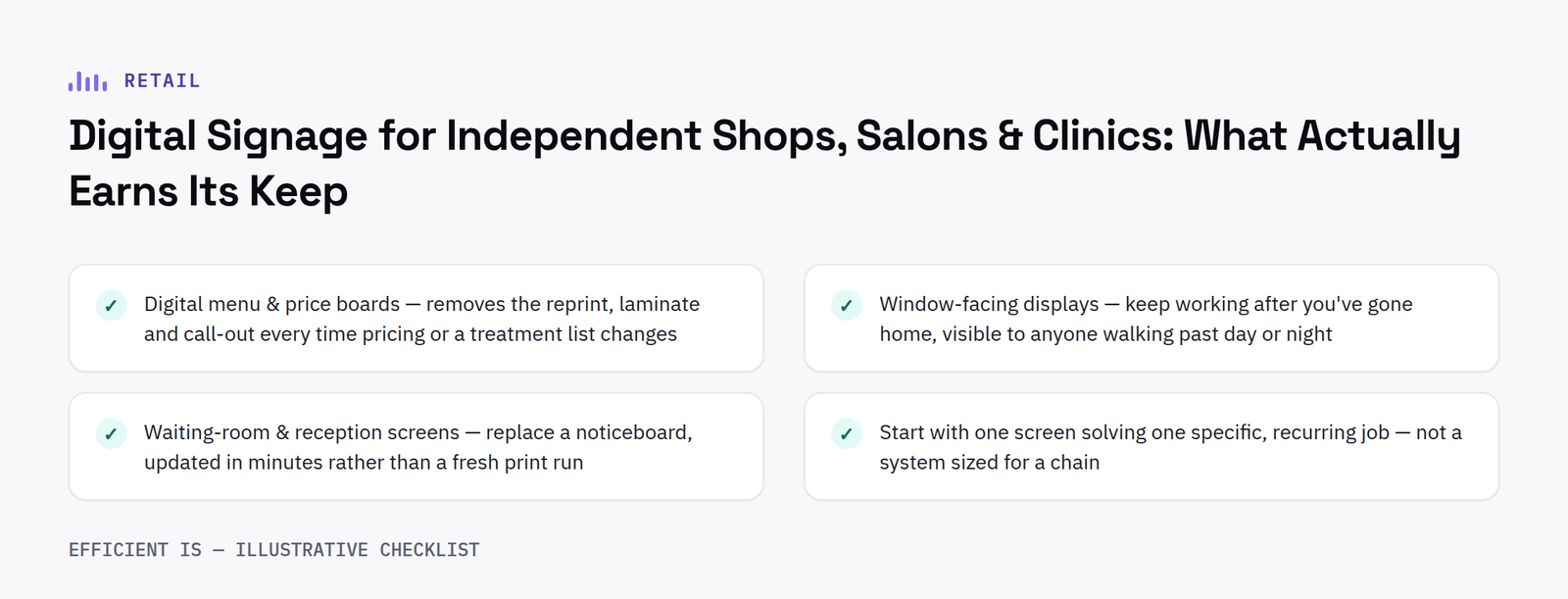
Checklist diagram: what actually earns its keep in digital signage for independent shops, salons and clinics - digital menu and price boards, window-facing displays, waiting-room and reception screens, starting with one screen solving one specific job

Start with the job, not the screen

The businesses that get the most out of digital signage don’t start by asking “what screen should I buy?”, they start with a specific, recurring job: a price list that changes every time you add a treatment, a window that sits empty of marketing for sixteen hours a day, or a waiting room with nothing on the wall but a clock. A screen is the answer to a specific job like that, not a general upgrade.

What actually earns its keep

Three things consistently pay for themselves for a single-site independent business:

Digital menu and price boards. If you update pricing, specials or a treatment list more than a few times a year, a screen removes the reprint, the laminate and the call-out every single time, a nail salon adding a new treatment, a café changing its specials board daily, a pharmacy running a seasonal health campaign.

Window-facing displays. A shopfront window is marketing space you’re already paying rent on, and a static poster only earns its keep until the next promotion. A digital window screen keeps working after you’ve gone home, an estate agent’s listings, a clinic’s opening hours and services, a salon’s current offers, visible to anyone walking past, day or night.

Waiting-room and reception screens. For dentists, private clinics and salons especially, a reception screen replaces a noticeboard with something that can carry practice information, appointment reminders or simple ambience content, and takes two minutes to update rather than a fresh print run.

What’s usually overkill

A bank of ordering kiosks, a full multi-screen video wall, or joining an enterprise-scale retail media network are all real technologies, and all typically built for a business with a lot more counter volume, floor space or site count than a single independent shop or clinic has. That doesn’t mean none of it ever applies (see our companion piece on whether self-serve kiosks are worth it for a small business): it means the starting point for most independents is one or two well-placed screens doing a specific job, not a system built for a chain.

The bottom line: for most independent shops, salons and clinics, the right starting point is a single digital menu, price or window screen solving one specific, recurring problem, not a system sized for a chain. You can always add a second screen, or scale up to a full network, once the first one’s proven itself.

See real, live pricing for a shop or window screen on our Retail & Restaurant Screens configurator, or get a ballpark for any solution on our Get an Estimate page.

Questions worth asking

FAQ

What’s the cheapest way to get started with digital signage?

A single indoor screen with a content management licence, typically from around £410 to £1,200 supplied and installed, covers most independent shops, salons and clinics for a first screen. See our Digital Signage page for a full pricing table.

Do I need content management software, or can I just plug a screen in?

If it’s one screen showing a fixed image or video on a loop, no, load the file onto a USB stick and you’re done. Content management earns its cost the moment you want to update pricing or specials yourself, from any device, without a call-out.

Is digital signage worth it for a business with only one location?

Yes, if it’s solving a specific job, a price list that changes often, a window that’s empty of marketing outside trading hours, or a waiting room with nothing to look at. It’s less clearly worth it as a general “upgrade” with no specific problem behind it.

Can I start with one screen and add more later?

Yes, nothing about starting with a single screen locks you out of adding a window display, a second in-store screen, or scaling up to a full multi-site Digital Signage network later.

Not sure which screen actually solves your problem?

Tell us what’s slowing you down, a price list, a window, a waiting room, and we’ll tell you honestly what’s worth it.

📞 0845 095 3600  ·  ✉ av@efficient-is.co.uk

Book a discovery call

Find our work useful? Add us as a preferred source on Google.