Immersive and Sensory Rooms in Schools: Two Different Things, One Goal
Immersive and Sensory Rooms in Schools: Two Different Things, One Goal
“Immersive room” covers two genuinely different kinds of space in a UK school, and knowing which one you actually need is the first decision, before any supplier conversation happens.
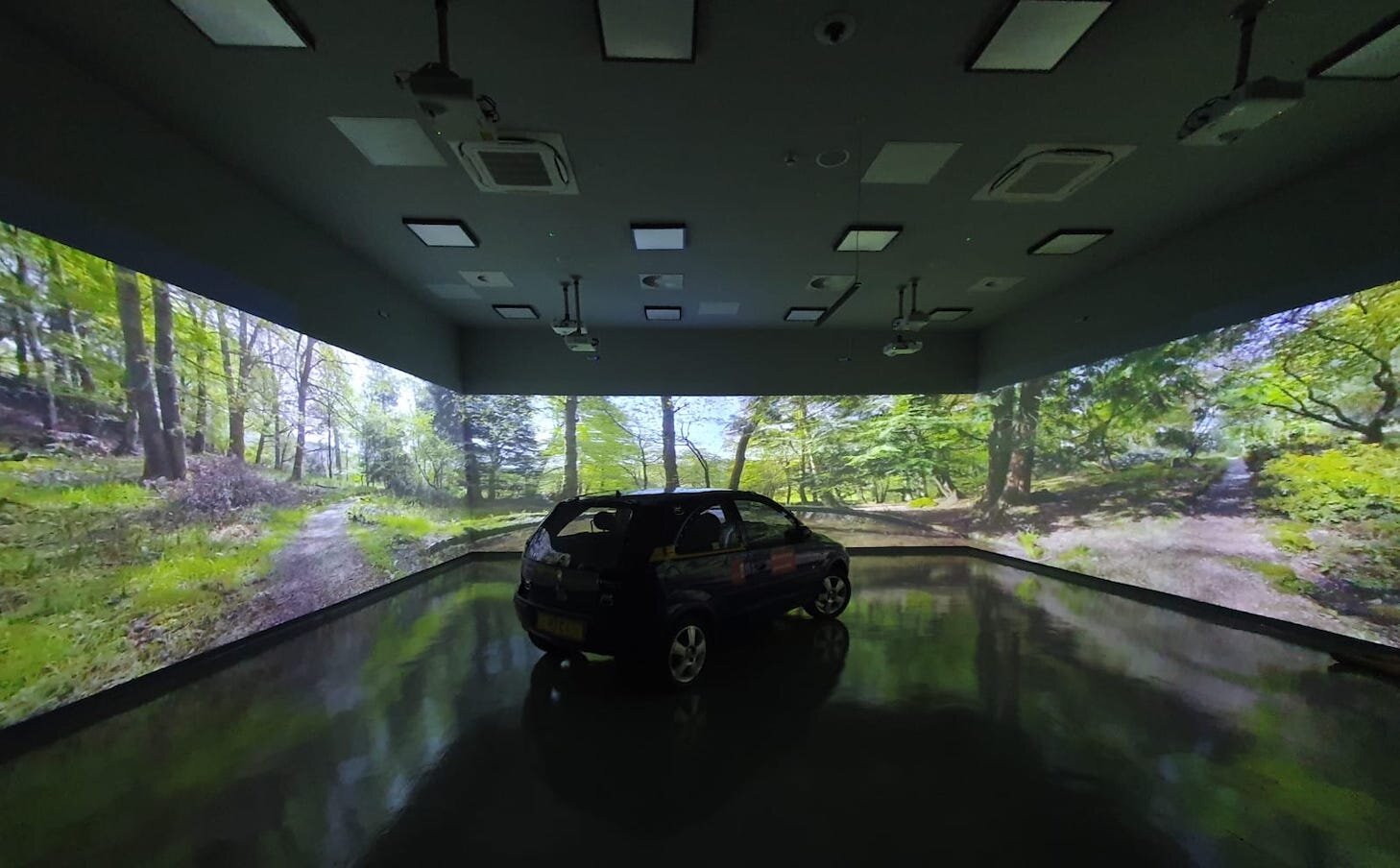
A sensory room and an immersive projection room solve different problems, even though both get called “immersive rooms” in casual conversation. A sensory room, sometimes still called a Snoezelen room after the original Dutch concept, is built around controlled lighting, sound, texture and movement to help pupils with autism, sensory processing needs or anxiety regulate themselves. An immersive projection room wraps one or more walls, and sometimes the ceiling, in large scale video content for general teaching: a history lesson set inside ancient Rome, a geography lesson inside a rainforest, a science lesson inside the human bloodstream. Some schools genuinely want both functions from one flexible space. Most schools need to be clear about which one they are solving for before they start comparing suppliers, because the equipment list and the budget look quite different depending on the answer. For a plain explanation of how the projection and content side of either room actually works, see our guide on what an immersive room actually is.
Sensory rooms: SEND and wellbeing provision
Sensory rooms sit squarely inside SEND and wellbeing provision. The core equipment is well established: bubble tubes, fibre optics, soft play, controlled lighting and sound, sometimes projection effects layered on top. This is mature, well understood school provision, and demand is genuinely rising. The Department for Education has allocated seven hundred and forty million pounds for ten thousand new school places for pupils with SEND, explicitly citing breakout spaces and assistive technology as part of that investment, alongside separate funding of one billion pounds for mainstream SEND related places and a further sum for school estate maintenance. That is a real, government backed signal that this kind of provision is being treated as a genuine priority rather than a nice to have.
Immersive projection rooms: general teaching
The newer category is the 360 degree immersive classroom, used across the general curriculum rather than for SEND specifically. Cadoxton Primary School in the Vale of Glamorgan opened one of these, with four walls plus the ceiling covered in projected content, touch screen interaction and multisensory effects including sound, smell and wind, delivered in partnership with BT and funded through the Welsh Government’s Community Focused Schools Grant. The school even hires the room out externally outside school hours, which is worth bearing in mind if your own budget case needs to show a room paying some of its own way over time. A handful of specialist suppliers serve this market in the UK, each with a slightly different focus, so it is worth treating the supplier landscape as a genuine choice rather than a single obvious option.
Why this is worth planning properly now
Capital funding for SEND and inclusive provision is moving, and schools that have a clear specification ready tend to make better use of a funding window than schools starting from a blank page once money is confirmed. That is as true for a single sensory corner as it is for a full immersive classroom. The practical difference between the two categories also shows up in lead time and disruption: a well specified single wall is usually the quicker, lower cost way to prove the concept works for your pupils before committing to a full room.
What to actually specify
Four things decide whether a room works in daily use rather than becoming an expensive novelty. First, who runs it day to day, and how much training that member of staff needs, since a system nobody feels confident operating will sit unused. Second, how the room is controlled in the moment, since a teacher or therapist needs to be able to change a scene or adjust intensity live, matched to what is actually happening with the pupils in front of them, not from a fixed schedule set in advance. Third, whether the room needs to serve both a calm, low stimulus sensory function and a brighter, general teaching function, because that dual use genuinely changes the specification rather than being an afterthought. Fourth, acoustics and safeguarding, particularly where the room will be used by pupils with additional needs, since sightlines and sound isolation from the rest of the school matter as much as the visual content itself.
See our Immersive Rooms and Sensory Spaces page for how we scope and deliver these for schools, or get a ballpark on our Get an Estimate page.
FAQ
What is the difference between a sensory room and an immersive classroom?
A sensory room is built for SEND and wellbeing regulation, using controlled lighting, sound, texture and sometimes projection to help pupils self regulate. An immersive classroom is built for general teaching, wrapping walls and sometimes the ceiling in large scale video content for any subject. A room can combine both functions if it is specified for that from the start.
Is there funding available for this kind of provision in UK schools?
Yes, there is a genuine and growing funding picture. The Department for Education has allocated seven hundred and forty million pounds toward ten thousand new SEND school places, with breakout spaces and assistive technology named specifically, alongside separate mainstream SEND capital funding. Some schools have also used devolved or local authority grants, as Cadoxton Primary did through the Welsh Government’s Community Focused Schools Grant.
Do we need a dedicated room, or can we start smaller?
You can start smaller. A single, well specified wall or corner in an existing room is a genuine, lower cost way to prove the concept before committing to a full dedicated room, and nothing about starting small locks you out of expanding later.
Who normally operates the room day to day?
Usually a SENCO, a teaching assistant or a therapist, depending on whether the room’s main use is sensory regulation or general teaching. Whoever it is, they need to be comfortable changing content live rather than just pressing play on a fixed loop, so training and a straightforward control interface matter as much as the room itself.
Have a school project in mind?
Tell us what you’re trying to fix and we’ll tell you honestly what’s realistic.