
What ITIL-Aligned IT Support Actually Means for Your Business

BLOG · IT & NETWORK

What ITIL-Aligned IT Support Actually Means for Your Business

“ITIL-aligned” gets used a lot in IT support marketing. Here’s what it actually means in practice, not just as a phrase on a page.
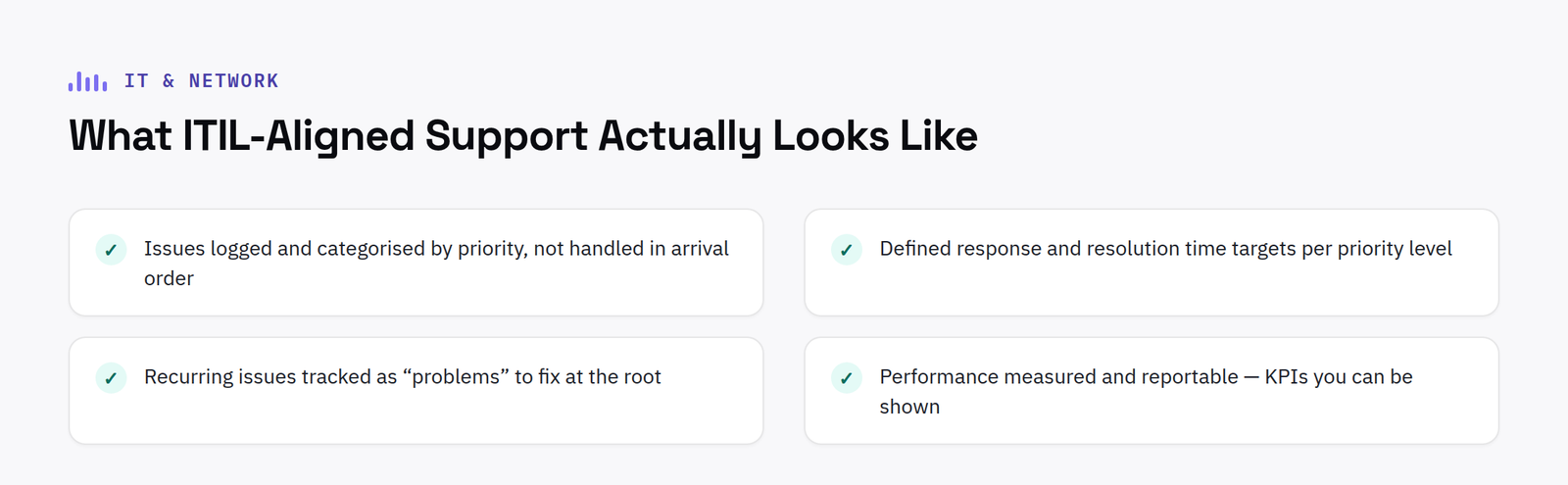
Checklist of what ITIL-aligned IT support actually looks like

ITIL, briefly

ITIL (IT Infrastructure Library) is a widely-used framework for how IT services should be structured, delivered and measured: covering things like incident management, problem management, and service level management. It’s not a certification your support provider either has or doesn’t; it’s a set of practices a provider can be more or less rigorous about actually following.

What ITIL-aligned IT support looks like day to day

In practical terms, ITIL-aligned support means: issues are logged and categorised by priority, not just handled in whatever order they arrive; there are defined response and resolution time targets for each priority level; recurring issues get tracked as “problems” to be fixed at the root, not just repeatedly resolved as one-off tickets; and performance against all of that is actually measured and reportable, KPIs you can be shown, not just told about.

Why this matters more than it sounds like it should

The practical difference between “we’ll sort it” and an ITIL-aligned service is what happens when something genuinely urgent comes in during a busy week. A framework with defined priorities means an urgent issue gets urgent treatment regardless of what else is in the queue, informal support, however well-intentioned, doesn’t have that structural guarantee.

What to ask a provider claiming to be ITIL-aligned

What are your response time targets by priority level, how are they measured, and can you show reporting against them? A provider genuinely running this way will have a straightforward answer; one using the phrase loosely usually won’t.

What changes once ITIL alignment actually sticks

The real test of ITIL alignment is not the framework itself but what happens six months after it is introduced. A provider that has genuinely adopted structured priorities should be able to show a trend, not just a snapshot: response times holding steady or improving as ticket volume grows, the same handful of recurring issues not reappearing month after month once they have been logged as problems and fixed at the root, and reporting that gets more useful over time rather than staying a static dashboard nobody revisits. None of that happens automatically just because a provider mentions the word ITIL somewhere on their website.

It is also worth understanding what ITIL alignment does not promise. It is not a guarantee that nothing will ever go wrong, and it is not a substitute for enough engineers to actually cover the ticket volume a business generates. What it does promise is that when something does go wrong, there is a defined process for how it gets handled, escalated and closed, rather than whichever engineer happens to pick up the phone deciding on the spot how urgent it is. For a growing business moving from informal support to a proper managed service, that structural change, more than any specific tool or dashboard, is usually the biggest practical difference they notice.

A useful way to test this before signing a contract is to ask for a real example, not a hypothetical one: a recent incident, what priority it was assigned, how long it took to resolve, and whether it was logged as a one off fix or flagged as a problem for root cause investigation. A provider running a genuinely ITIL-aligned service should be able to walk through a real case in a few minutes. One that cannot usually has the structure on paper but not in daily practice.

Want to see it running at scale?

See how we structure priorities and KPIs, including a live example for a national client.
Managed IT Support

In-House IT vs Managed IT Support: How SMEs Should Decide

BLOG · IT & NETWORK

In-House IT vs Managed IT Support: How SMEs Should Decide

There’s a point in most growing businesses where “someone in the office who’s good with computers” stops being a sustainable IT strategy. The question is usually less “should we get support” and more “in-house, or managed.”

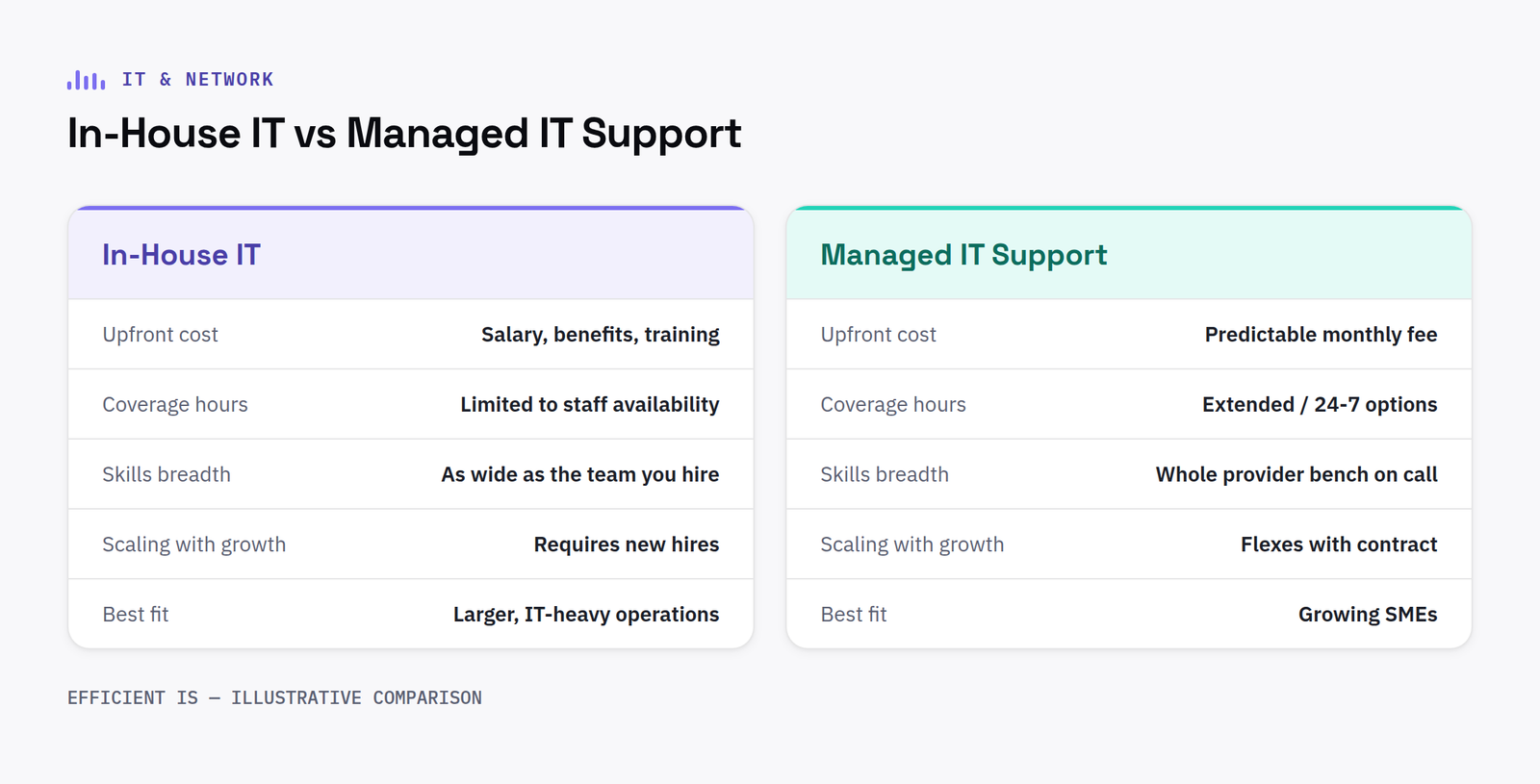
Comparison of in-house IT vs managed IT support across cost, coverage and scaling

What in-house gets you

Someone who knows your systems intimately, is physically present, and is fully dedicated to your business. It also means you’re carrying one person’s (or one small team’s) availability, holiday cover, and skill gaps as single points of failure: and hiring for a broad enough skill set to cover networking, device management, security and day-to-day helpdesk is a genuinely hard hire at SME budgets.

What managed support gets you

A team rather than a person, so illness, holiday and skill gaps don’t become your problem, plus SLA-backed response times you can actually hold a provider to, rather than informal expectations. The trade-off is less day-to-day physical presence, though a good managed provider builds relationship and responsiveness that closes most of that gap.

The real decision point isn’t in-house IT vs managed IT as a binary

Plenty of organisations run a hybrid, a smaller in-house presence for anything genuinely site-specific, backed by a managed helpdesk for volume, escalation and out-of-hours cover. What matters is having SLA-backed response times and clear escalation paths either way, not just “call someone when it breaks.”

What to actually check before choosing a managed provider

Ask what “1st line” and “2nd line” actually mean in their service, what the response time commitments are by priority, and whether that’s measured against real KPIs or just described as a general aim.

What a hybrid model actually looks like in practice

The hybrid approach mentioned above is worth spelling out with an example, since it tends to be more practical than either extreme for a business somewhere between 20 and 150 staff. A common pattern is one in-house IT person handling anything physically hands on, new starter setup, meeting room troubleshooting, liaising with the office on day to day requests, backed by a managed provider covering the helpdesk queue, security monitoring, patching, backups and out of hours cover. Neither side is carrying the whole load alone, and neither gap, the in-house person’s holiday or the managed provider’s lack of daily physical presence, becomes a genuine single point of failure.

The trade-off worth being honest about is cost structure rather than capability. Pure in-house is usually cheaper on paper for a small headcount, until the business needs to cover holiday, sickness or a skills gap that the one person on staff simply does not have. Pure managed is more predictable month to month, but can feel less personal for a business used to having someone they know walk over and fix something in person. A hybrid model costs more than either extreme individually, but for many growing businesses it removes the single biggest risk in either pure approach: one person, or one relationship, being the entire IT function.

Whichever model a business chooses, the practical test is the same: ask what actually happens the day the one person who understands the network is unreachable. If the honest answer is that the business would struggle, that is usually the clearest sign a change is worth making, regardless of which direction it points in.

Timing matters too. The decision is easiest to make well before a genuine gap appears, not in the middle of a crisis after a key person has already handed in their notice. Reviewing the setup annually, alongside a normal IT budget conversation, means the business is choosing deliberately rather than reacting to whoever happens to leave next.

Weighing up in-house vs managed?

See how we structure priorities and KPIs, including a live example running at national scale.

Managed IT Support

Find our work useful? Add us as a preferred source on Google.











