
What Is AV Over IP? A Plain Answer for People Who Run Networks and People Who Don’t
Your video and audio end up on the same network as everything else. Here’s what that means for the person who buys the AV and the person who looks after the switches.
AV over IP sends video and audio between rooms as data over network switches, so any source can reach any screen without its own dedicated cable. Network cable and managed switches take the place of HDMI leads running back to a central matrix. The SMPTE ST 2110 suite is one of several families that do this.
If you buy AV, read the next section, the family list and the last section. If you run the network, jump to bandwidth and the switch settings. Both of you should read the part on when to skip AV over IP altogether.
How AV over IP works
Every source gets an encoder and every screen gets a decoder. A laptop input, a camera or a Blu-ray player plugs into an encoder, which turns picture and sound into network traffic. A decoder behind each display turns it back. In the middle sit ordinary managed network switches and a control system that tells each decoder which stream to show.
Compare that with a matrix switcher. That’s one box with a fixed number of inputs and outputs, and a cable from every source and every screen back to it. Outgrow the box and you buy a bigger one. With AV over IP, adding a screen means adding a decoder and a switch port. It runs over the structured cabling a building already has, and one stream can reach many screens at once.
The catch is that the network now carries your picture, so the people who look after it have to be in the room when you plan the AV. A bad switch setting shows up as a frozen screen in a boardroom. On the jobs we see, “who owns the network” is the most common project dispute.
The main families
People use these names as if they meant the same thing. They don’t, and some of them aren’t even video.
- SMPTE ST 2110 is a broadcast suite. Video, audio and ancillary data travel as separate streams, timed with PTP (IEEE 1588). Part 20 covers uncompressed video, part 22 compressed video and part 30 audio, which refers to AES67. It was aimed at replacing SDI in broadcast, and it’s rare in ordinary corporate rooms.
- SDVoE is an alliance specification. Its own specification page claims end-to-end latency under 100 microseconds and uncompressed transmission of all HD and 4K30 signals, plus true 4K60 at 4:4:4. Those are the alliance’s claims. In our experience it runs on 10GbE networks.
- NDI is another video format, and a lighter one on bandwidth. Its documentation puts a typical 1080p60 stream at up to 150 Mbps and says the traffic isn’t deterministic, so you plan on average use. The compressed HX3 flavour is quoted at about 62 Mbps with H.264 and about 50 Mbps with H.265 at 1080p60, with average latency under 100 ms.
- Dante and AES67 carry audio only. AES67 is an interoperability standard from the Audio Engineering Society, published in September 2013. Dante is a proprietary audio networking system, and it supports AES67.
What AV over IP does to your bandwidth
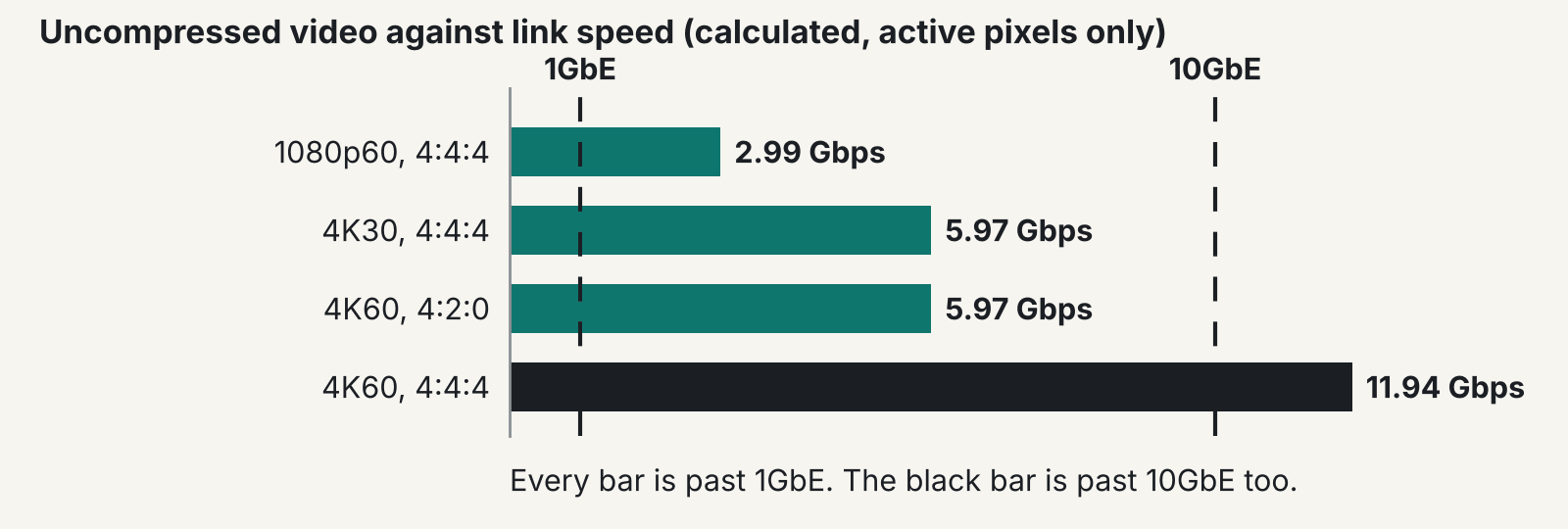
Uncompressed 1080p60 won’t fit a gigabit link, and uncompressed 4K60 at full colour won’t fit 10GbE. The sums below are our own arithmetic from standard video formats, not a quotation, so check them before you rely on them.
Take 1080p60 at 8 bits per colour with full 4:4:4 colour. That’s 1920 x 1080 x 60 x 24 bits, or about 2.99 Gbps of picture, nearly three times what 1GbE carries. 4K30 at the same depth is about 5.97 Gbps, which fits 10GbE. 4K60 at 4:4:4 is about 11.94 Gbps of active pixels, and about 14.3 Gbps once standard blanking is counted, so it overflows 10GbE too. Drop 4K60 to 4:2:0 colour and it falls to about 5.97 Gbps.
That’s why compression exists. A 1GbE system has to squeeze 1080p60 by roughly 3:1 or more, and 4K60 at 4:4:4 by about 13:1 or more if you want headroom. One codec vendor quotes JPEG XS ratios from 2:1 to 15:1 with latency under 1 ms, but that is a vendor claim, so ask any supplier for measured latency on your own kit before you accept it. Lag between a presenter’s click and the picture is where compression shows.
What the network side has to do
Three settings cause most of the grief: multicast handling, VLANs and quality of service. Take multicast first. With IGMP snooping, a switch listens to IGMP messages to learn which hosts belong to which multicast group, then forwards the stream only to those hosts. Without it, every stream floods every port. one switch maker’s documentation adds that an IGMP querier is needed on a VLAN with no multicast router. In our experience, the commonest fault is a missing or timed-out querier. Streams run for a few minutes and then die.
Next, keep AV on its own VLAN or its own switches and firewall the edge. Put encoder and decoder management on a separate management VLAN. The Dante support pages say gigabit is the suggested standard and 100 Mbps is acceptable only in restricted cases. They add that 32 or more channels need gigabit, and that QoS should be on in all Dante networks.
Then the dull checks. Use managed non-blocking switches with enough buffer and read the manufacturer’s tested switch list. Switch off Energy Efficient Ethernet on AV ports. Write down the port maps and the IP plan. Run Cat6 or Cat6a to every endpoint, which our Cat6 or Cat6a guide covers. Our network design mistakes post explains why flat networks bite later.
AV over IP and Cyber Essentials
Cyber Essentials doesn’t name AV equipment, so you have to ask the scope question for each device. The NCSC requirements for IT infrastructure (version 3.3, April 2026) bring a device into scope if it can accept incoming connections from internet-connected devices, can start outbound connections, or controls data flow between them. The document mentions neither IoT nor AV.
So ask device by device. Does this encoder, decoder or control processor accept connections from anything that can reach the internet? Can it start one? A firewalled AV VLAN with no internet path usually makes the answer easier to defend, though your assessor makes the call. That’s our practical advice and NCSC doesn’t say it. In our experience the usual gap is patching. Put encoders, decoders and control processors on your asset register with their firmware versions, and agree who updates them after handover. Nobody updates AV kit by default. Our Cyber Essentials and Plus comparison covers the two schemes.
When a matrix is still the better buy
A matrix is still the better buy for a single room with sources and displays within a few metres of each other. It has no network to misconfigure and no encoders to licence. Where nobody can tolerate a network fault, or nobody skilled can maintain a network, it’s the safer choice. It’s usually cheaper too when the budget can’t stretch to 10GbE switching plus an encoder and decoder at every endpoint.
In our view, AV over IP starts to win with many rooms, long distances or sources that need to reach several buildings. Below that, we’d skip it. Budget for the control and management software as well, because it’s the line that gets forgotten. See our AV Over IP page and our network design service.
FAQ
Is AV over IP the same as streaming?
They overlap, but they behave differently. Streaming over the internet compresses heavily and tolerates a few seconds of delay. AV over IP inside a building aims for delay nobody notices, and the traffic stays on your own switches.
Does AV over IP need 10GbE?
Not always. Compressed systems can run on 1GbE, while uncompressed or near-lossless 4K usually wants 10GbE. Check each product’s own network requirement, because vendors differ.
What is AV over IP used for?
Mostly routing many sources to many screens, as in control rooms, lecture theatres, campuses and large venues. It also suits sites where rooms share sources, or where cable runs are long. A single boardroom rarely needs it.
Can AV over IP share the corporate network?
It can, if the switches are managed, multicast is configured and the AV traffic sits on its own VLAN. We wouldn’t put it on a flat network alongside everything else. Agree who owns the network before the project starts.
Is Dante the same as AV over IP?
Dante carries audio only. AES67 is an audio interoperability standard from the Audio Engineering Society, and Dante supports it. Video needs a separate system.
Does AV over IP fall under Cyber Essentials?
The scheme doesn’t name AV equipment. The question is whether each encoder, decoder or control processor meets the test for an in-scope device. Put it to your assessor early.
Weighing AV over IP against a matrix?
Tell us how many rooms, how far apart, and who looks after your network, and we’ll give you a straight answer.











