
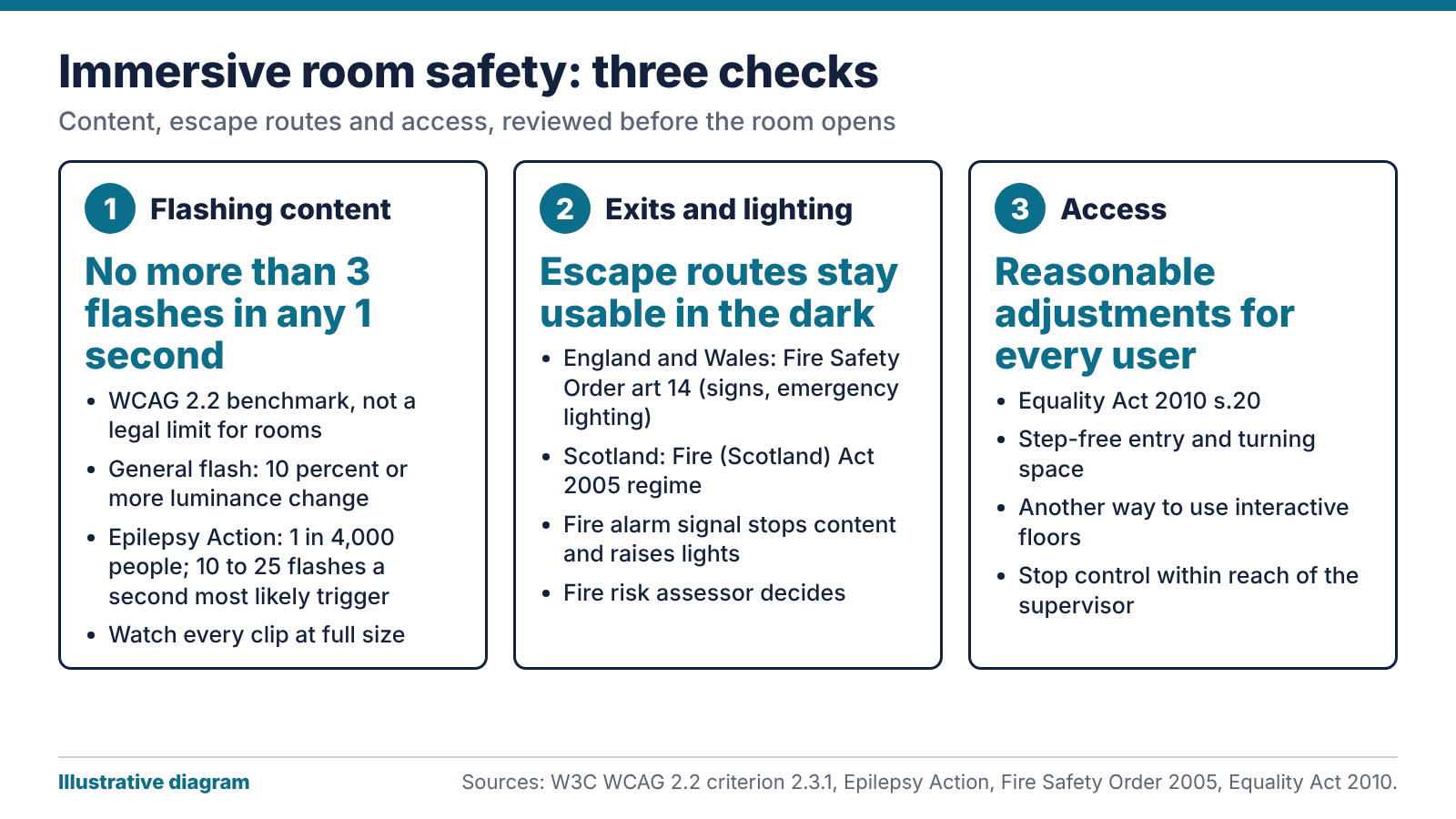
Most immersive room safety gets decided before the first session. We’d check every clip for flashing and stripes, link the room to the fire alarm so a signal stops the content and raises the lights, and write down who can stop a session and how. Access matters just as much: a wheelchair user should be able to take part.
What a flashing projected wall does to the eye
Immersive rooms are sold on what they do for the people using them, and few brochures say what happens when a clip flashes. A projected wall fills far more of your vision than a monitor does. That makes content the first question for immersive room safety.
Epilepsy Action says photosensitive epilepsy affects around 1 in 4,000 people overall, and only about 3 to 5 percent of people with epilepsy have it. Flashing at 10 to 25 times a second is the most likely to trigger a seizure, though some people react from 3 flashes a second up to 60.
The charity’s page on photosensitive epilepsy adds that risk rises when the light is intense, takes up at least 10 percent of what you can see, or lasts half a second or more. In a small room, one projected wall can meet the second test on its own.
Repeating patterns matter for immersive room safety too. The same page lists strong stripes and checks as triggers, and says on-screen stripes get riskier at roughly 5 to 8 pairs, especially if they’re bright, large or vibrating.
How to review content for immersive room safety
We’re not aware of a UK legal flash limit written for rooms like this, so the recognised benchmark is the web standard. Under WCAG 2.2 success criterion 2.3.1, nothing should flash more than three times in any one second unless it falls below the general and red flash thresholds. A general flash is a pair of opposing changes in relative luminance of 10 percent or more, where the darker image is below 0.80. A red flash is any pair of opposing transitions involving a saturated red.
The standard also has an area allowance: 0.006 steradians within a 10 degree field, roughly a quarter of that field at typical viewing distance. It was written for screens at desk distance. Our reading is that a wall-sized projection in a small room leaves little room for that allowance, so we treat the three-flash rule as the working limit.
Before any clip goes into the library:
- Watch it at full size in the room, because a laptop hides the problem.
- Look for strobing, fast cuts between light and dark, and saturated red flashes.
- Look for stripes, checks and grids that move, reverse or shimmer.
- Log who approved it and when, and lock the library against unreviewed uploads.
Set a brightness ceiling at commissioning. Lower brightness and contrast is one of Epilepsy Action’s own tips for screens.
Exits, escape lighting and the fire alarm in a darkened room
In immersive room safety, a dark room and a fire escape want different things. In England and Wales, article 14 of the Regulatory Reform (Fire Safety) Order 2005 sets out what emergency routes and exits need. Doors must open in the direction of escape, routes must be indicated by signs, and routes needing illumination must have emergency lighting of adequate intensity if normal lighting fails. The wording is in article 14.
Scotland has its own regime, the Fire (Scotland) Act 2005 and the Fire Safety (Scotland) Regulations 2006. We’re a Glasgow firm, so we always ask which one applies. Your fire risk assessor decides what the room needs, and we build the AV around their decisions.
Projected content mustn’t wash out an exit sign or hide a door, so test the emergency lighting with the projection running. We’d also link the room to the fire alarm, so a signal stops the content and brings the lights up. The fire panel belongs to a fire alarm specialist, so we agree how the link works with them and ask them to test it.
Keep loose furniture and cables out of the walking routes. A dim room makes trips more likely.
Access and reasonable adjustments
Many immersive rooms are built for people with additional needs, so access belongs in immersive room safety from the start. Section 20 of the Equality Act 2010 sets a duty to make reasonable adjustments where a provision, criterion or practice, a physical feature or the lack of an auxiliary aid puts a disabled person at a substantial disadvantage. This isn’t legal advice. It’s how we apply the headings to a room.
Physical features include step-free entry, door widths, space to turn a wheelchair and clear floor between seating and equipment. An interactive floor can exclude a wheelchair user, so offer another way to take part, such as a handheld controller. Practices include asking people to stand, sit on the floor or stay for a fixed time, so offer alternatives where you can. Aids can be as simple as a hearing loop, written instructions or a quiet-start mode.
Some people may find a darkened room frightening. Let them see the exit, keep the door openable from inside, and give staff a way to raise the lights without hunting for a control. Our posts on sensory rooms for SEN schools and dementia care settings show how users’ needs change the layout.
Supervision, stop controls and handover
Decide who runs each session and who is responsible for the group. Staffing ratios depend on the users and your own risk assessment, so we won’t invent a number.
Put a stop control within reach of the supervisor. Our view: fit a dedicated button that blanks the projection and raises the lights, as well as the control app. Apps freeze, tablets run flat and people hand them round. Brief each group at the start, say there may be flashing or moving patterns, and ask the group’s lead whether anyone has photosensitive epilepsy.
Before you take the room over, ask the installer for these immersive room safety records in writing: the content approval process and who owns it, the brightness ceiling set at commissioning, the fire alarm interface and the date it was last tested, a photograph of the exit signs visible with the projection running, and the stop control location with the emergency card for the door. If you need the basics first, start with our explainer on immersive rooms. For what we install, see our immersive room solutions.
The bottom line: for immersive room safety, use the three-flash rule as your benchmark for every clip, get your fire risk assessor in before the room is finished, and keep the stop button where the supervisor can reach it. Write all three down at handover.
FAQ
What does immersive room safety cover?
Content, the building and the people. Content means flashing and patterns. The building means exits, escape lighting and the fire alarm link. The people side covers access, supervision and a way to stop a session, and each part needs a written owner and a handover record.
Is there a legal flash limit for immersive room safety?
Not one we know of. The recognised benchmark is the web standard, WCAG 2.2 criterion 2.3.1, which allows no more than three flashes in any one second unless below defined thresholds. Treat it as good practice and ask your own health and safety adviser.
How many people are sensitive to flashing lights?
Epilepsy Action says photosensitive epilepsy affects around 1 in 4,000 people overall. Only 3 to 5 percent of people with epilepsy have it. Sensitivity doesn’t show from the outside, so we check every clip as if someone in the room has it.
Do immersive rooms need emergency lighting?
Routes that need illumination must have it in England and Wales under article 14 of the Fire Safety Order, and Scotland’s regime covers escape too. Your fire risk assessor decides what’s needed in a given room. We test the lighting with the projection running.
Should an immersive room connect to the fire alarm?
We recommend it. A fire signal can stop the content and bring up the lights, so nobody is leaving a dark room while a clip plays. The fire alarm specialist designs and tests that link, and we make the AV side respond.
Can a wheelchair user take part in an immersive room?
Often, if you plan for it. Check door width, turning space and sightlines at design stage, and offer a different way to use any interactive floor. Section 20 of the Equality Act 2010 expects reasonable adjustments.











