Digital signage security mostly means dull maintenance on a networked computer that happens to drive a screen. Keep the player and its firmware updated, retire software the maker has dropped, put the screens on their own network segment and close any remote access you don’t use. The NCSC’s device guidance applies to signage players like any other device.
Why digital signage security gets missed
A screen on a wall doesn’t look like IT. An AV team fits it, marketing or estates own it, and nobody touches it until the content goes stale. Meanwhile the box behind it has an operating system, a network address, an admin login and a remote connection back to a content system.
The NCSC’s device security guidance says it covers phones, tablets, laptops, desktops and other connected devices. A signage player fits that description. The guidance includes separate guides on updates, firmware and obsolete products, and those are the topics that apply most directly to signage.
We’re not citing any particular incident, because we haven’t verified one. The risk is simpler. A device nobody owns doesn’t get patched, and an unpatched device on a flat network is a way in for anything else.
Our view: start with an owner. Name one person responsible for every player and give them a register listing each one, where it is, what it runs and when its support ends.
Digital signage security for players: updates and obsolete software
Every player runs software, and every piece of software eventually goes out of support. The NCSC’s guidance on obsolete products says that, ideally, technology that has gone out of date should not be used, and that extended support is a stopgap while you migrate. It also tells buyers to consider a product’s support lifetime before they buy.
For digital signage security, ask these before you buy:
- What operating system does the player run, and when does its support end?
- How are updates delivered, and can they be scheduled out of hours?
- Can an update be rolled back if it breaks playback?
- Who tells you when a security update is released?
Keep the answers. Put the support end date in your register with a reminder a year ahead. An ageing player that still runs fine is easy to forget and hard to explain later.
Unmanaged players are the worst case. A screen fed by a USB stick, or by a smart-TV app nobody logs into, sits outside any change control. We’d take a boring managed player over a clever one nobody can reach.
Firmware, the layer under the player
Firmware is the first code that runs when a device powers on. The NCSC’s firmware guidance warns that a successful attack on it could provide long term, persistent access or be destructive in nature. Attacks like that are hard to mount, but the impact can be severe.
Its recommendations carry straight over to digital signage security. Restrict who can change firmware and boot settings to administrators. Log the firmware version of each device. Treat firmware updates as part of the normal update process, automated where possible.
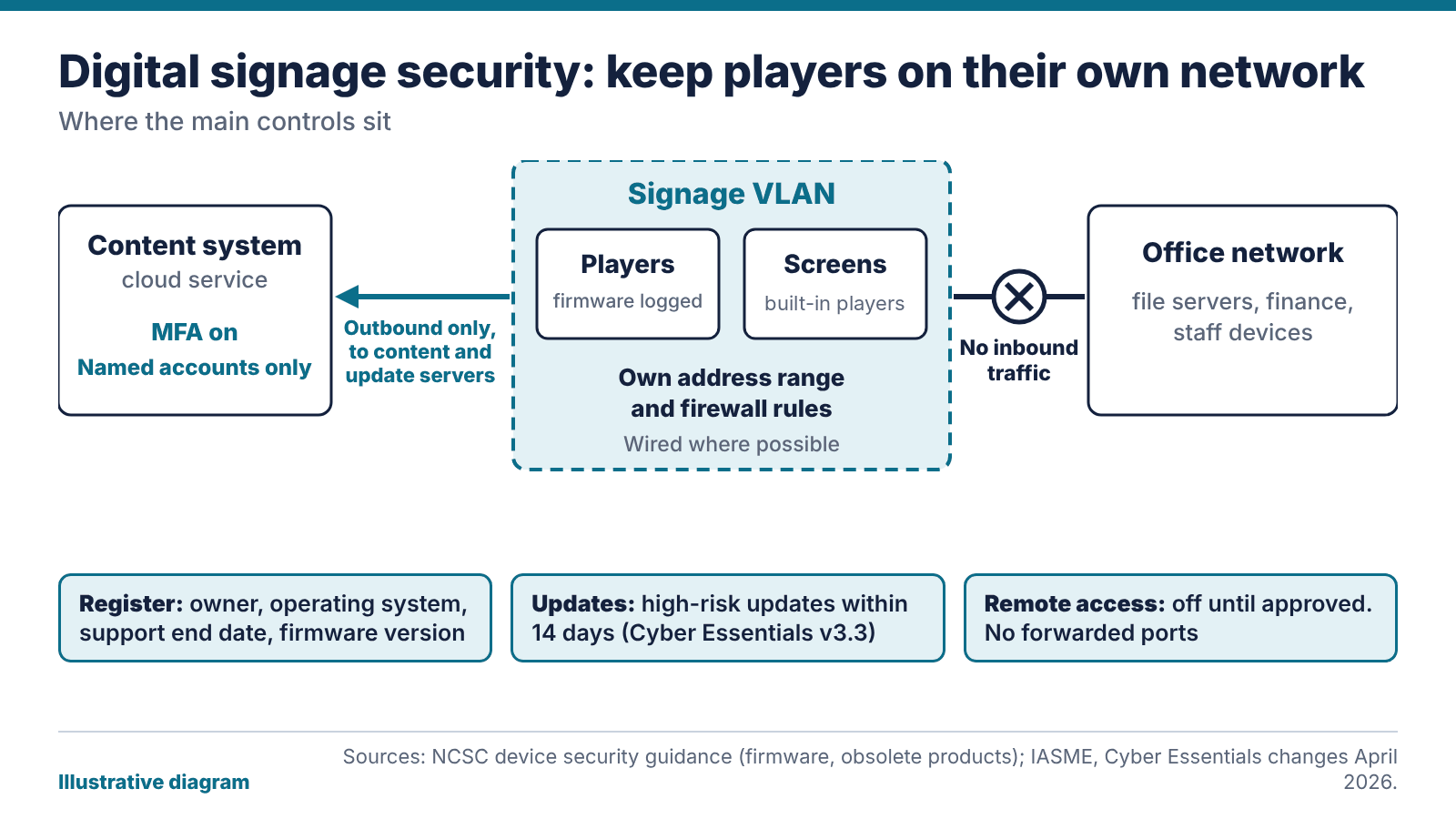
In practice your register gets a column for firmware version. When the maker publishes a security fix for the player or the display, someone decides whether to apply it and when. Displays with built-in players count, and so do the network switches behind the screen.
Set boot settings and secure boot options at installation, then lock them and record them at commissioning, so the handover pack tells your IT team what was done.
Give digital signage its own VLAN
Put signage players on their own network segment, with their own VLAN, so a problem on one can’t spread to the office network. Then allow only the traffic a player needs: outbound to the content system and the update servers, and nothing inbound from the wider network.
If a player is compromised, it has far less chance of reaching file servers or finance systems. If the office network has a problem, the screens keep playing. Keep players off guest Wi-Fi and use wired connections where you can.
Content that pulls from the internet needs care. A screen that displays a web page or a live feed is only as safe as that source. Prefer content you control and restrict which addresses the player can reach.
VLAN design and firewall rules belong to whoever runs your network. If that’s us, we’ll agree them with you at design stage. If it’s your IT team, give them the player’s traffic requirements early. Our network design service covers the segmentation side.
Remote access and accounts
Remote access is how most signage gets looked after, and it’s where weak digital signage security habits show. Shared admin passwords, a remote desktop tool left running all the time and accounts for former staff or agencies that were never closed are common weak spots.
The rules are short. Give each person a named account on the content system. Turn on multi-factor authentication wherever it’s offered. Remove accounts when people leave or a contract ends. Keep vendor remote support switched off until you approve a session, then switch it off again. Never forward a port from the internet to a player.
The content system matters as much as the player. Our post on how digital signage content management works covers permissions and approvals. The security point is that anyone who can publish to the system can put anything on every screen. Log who changed what and who approved it, and note in the register who is allowed to switch remote support on.
Cyber Essentials and the 14-day rule
If you hold Cyber Essentials, or plan to, digital signage security should be in the scope you declare. The scheme’s requirements moved to version 3.3 in spring 2026. IASME’s article on the April 2026 changes says multi-factor authentication is mandatory for cloud services where it’s available, and that high-risk updates and those rated at the top severity must be installed within 14 days of release.
Both rules bite on signage. A cloud content system without MFA is a likely fail. So is a player on an operating system that can’t take updates within 14 days. Exact dates for when v3.3 applies to you depend on your assessment account, so check with your assessor. Don’t rely on our summary.
Our comparison of Cyber Essentials and Cyber Essentials Plus explains the two levels. If you want help getting there, our Cyber Essentials certification support starts with a gap check, and signage players go on the list from day one. For the AV side, see our digital signage solutions.
The bottom line: most of digital signage security is housekeeping. Every player needs an owner, a support end date and a firmware version on one register, and the screens belong on their own VLAN with remote access shut until someone approves it.
FAQ
Why does a signage player need securing?
It’s a networked computer with an operating system, an address and often a remote connection. A device that isn’t patched or owned is a weak point on any network. Updates, a separate VLAN and named accounts all reduce that risk.
Does digital signage security include firmware updates?
Yes. The NCSC says firmware updates apply bug fixes and security updates, and recommends handling them as part of your normal update process, automated where possible. Record each device’s firmware version so you know what’s current.
Should digital signage be on its own network?
We recommend it. A separate VLAN stops a problem on a player reaching your office systems. Allow only the outbound traffic the players need, and block everything inbound from other networks.
Does Cyber Essentials cover digital signage?
Players and displays that connect to your network can fall within your declared boundary. Version 3.3 asks for multi-factor authentication on cloud services and 14-day installation of the highest-rated updates. Confirm the details with your assessor.
What happens when a signage player’s software is no longer supported?
The NCSC advises that, ideally, once technology is out of date it shouldn’t be used. Plan migration before the support end date, because paid extended support is a stopgap.
Who should own digital signage security?
One named person, usually in IT or estates, with the marketing team owning content. Give them the device register and the authority to approve updates.