
A meeting room camera can crop to the group or follow whoever is talking without naming anyone. Putting names on faces is another matter, because the ICO treats biometric recognition as special category data. Settle the lawful basis, the data protection impact assessment question and the door signage before anyone switches it on.
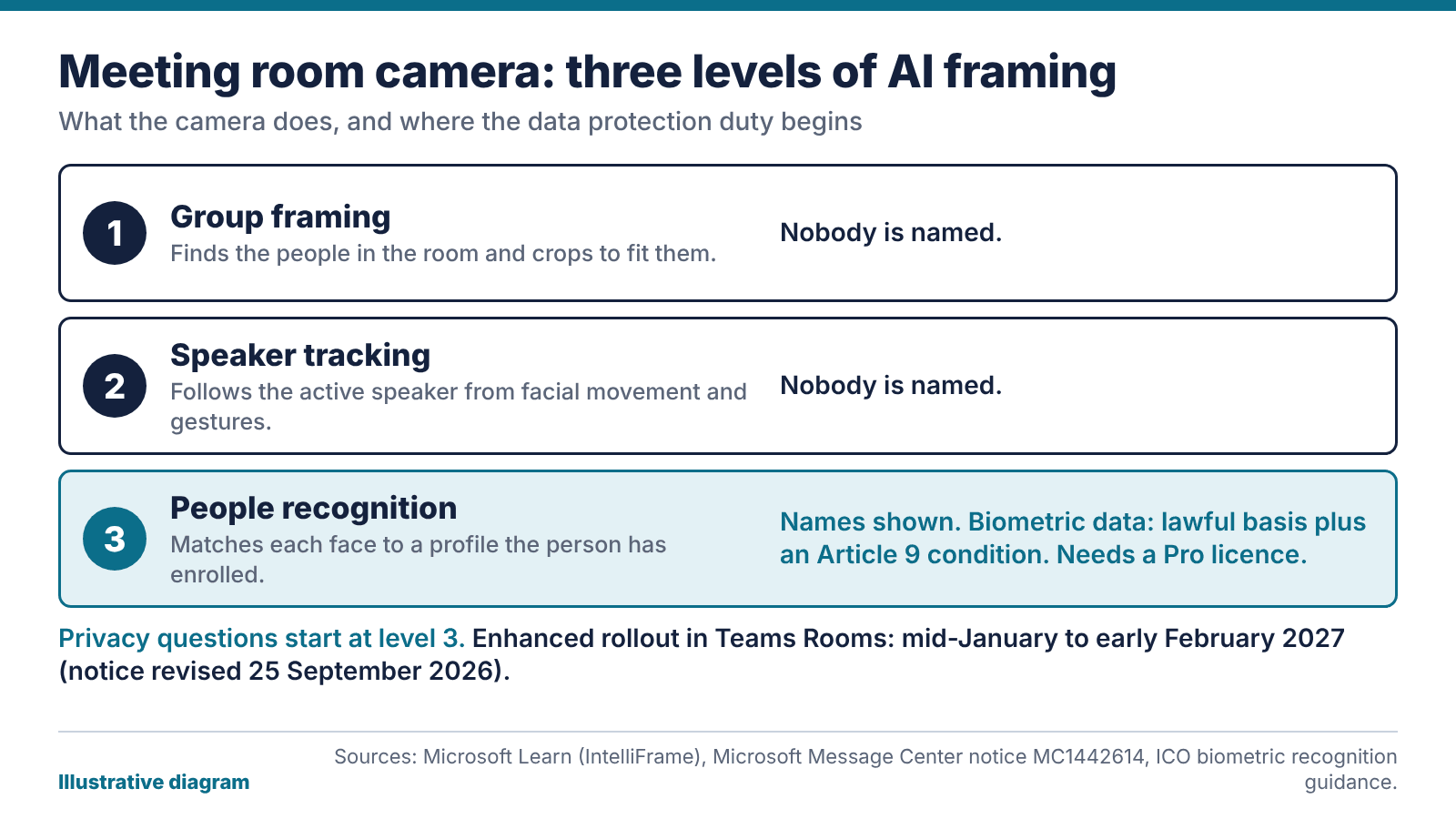
What changed: as of 15 October 2026, Microsoft’s notice for the enhanced IntelliFrame feature in Teams Rooms was revised on 25 September 2026. General availability now starts in mid-January 2027 and should finish by early February 2027. The earlier timeline was mid-October to mid-November 2026, so older articles quoting autumn dates are out of date.
What a meeting room camera with AI tracking does
There are three levels. The first is group framing: the camera finds the people in the room and crops to fit them. The second is speaker tracking, which Microsoft’s IntelliFrame documentation describes as certified cameras picking out the active speaker by recognising facial movements and gestures. Nobody is named at either level.
The third is people recognition. The camera sends several video streams, and the Teams service matches each person on screen against a face profile they’ve enrolled, then shows their name under their video. Microsoft says this needs a Teams Rooms Pro licence. Rooms on the Basic licence get active speaker and panoramic views only, so a meeting room camera in one of those rooms follows the speaker but never labels anyone.
Enrolment comes in stages. A person enrols their voice first, then their face. Only enrolled people get a name label, up to 12 at once in the room, so anyone else on screen stays unlabelled.
What the ICO says about biometric data
The ICO’s biometric recognition guidance is blunt on the key point: “If you use a biometric recognition system, you are using special category biometric data.” So you need a lawful basis under UK GDPR and a separate Article 9 condition. Its worked example is a staff access system, but the same logic covers anything that identifies people from their faces or voices.
The page is dated 9 October 2025 and says it’s under review because of the Data (Use and Access) Act, so check it again before you rely on it. This isn’t legal advice either. Your data protection officer or solicitor decides what your organisation can do.
For a sense of how the regulator treats workplace biometrics, read the ICO’s February 2024 order against a leisure operator. It was told to stop using facial recognition and fingerprint scanning to monitor staff attendance at 38 sites. The ICO’s concerns included necessity, proportionality and the imbalance of power between employer and employee.
That case was about attendance and had nothing to do with meeting rooms, so don’t read it as a ruling on cameras. What it does show is that the ICO weighs the power imbalance. That matters if enrolment is voluntary on paper but expected in practice.
Signage, notice and the DPIA question
Microsoft’s documentation puts the responsibility on you. If you install an AI-capable meeting room camera and use face enrolment and people recognition, you answer for compliance with local laws, including notice, consent and data retention. It also tells customers to put signage outside any meeting room with an AI camera, advising people about people recognition, face enrolment and voice recognition.
We’d go further than a sticker. Put the notice at the door, say what’s switched on and who can see the result, and carry the same wording into your visitor guidance. People from outside your organisation walk into these rooms too, and they haven’t read your intranet.
Then ask about a data protection impact assessment. UK GDPR requires one where processing is likely to result in a high risk to people, and special category data is a reason to raise it. Whether you need one is for your DPO, but they can’t decide without facts. We’ll write up the room side: the hardware, the licences, which features are on and what the settings allow. Your IT team supplies where profiles are held, how long they’re kept and how someone withdraws.
Speaker tracking from a meeting room camera without naming anyone
For most rooms, speaker framing does most of the job. Remote colleagues see who’s talking and get a sensible view of the room. Nobody enrols a face, no biometric profile sits in your tenant, and the DPIA conversation is far shorter. A meeting room camera used this way is much easier to defend.
Our view: leave people recognition off unless a specific room has a specific reason, and write the reason down. A boardroom where remote directors can’t tell the members apart on a long call is a reason. “It was in the feature list” isn’t.
The controls are in the admin settings. Microsoft documents a Teams policy that allows or blocks end-user face enrolment, so your IT team can switch it off and keep the framing. Set it on purpose and check what the default is. Camera height, a clear view of every seat and lighting that doesn’t put faces in silhouette cut the need for clever framing anyway. Our corporate meeting room AV checklist covers those.
What the revised rollout date means for your meeting room camera
The enhanced version adds faster speaker framing and labelling of in-room participants. Microsoft says the AI processing happens on the camera, with metadata sent over a dedicated data channel. Only certified AI-capable cameras are eligible. The notice, MC1442614 (a third-party mirror of the Message Center post), says the feature is on by default for Teams Rooms on Windows with those cameras and Pro licences, and needs no admin action.
Microsoft moved the start from mid-October 2026 to mid-January 2027 on 25 September. We wouldn’t promise the date holds, because it has already moved once. Treat mid-January as the point after which any eligible meeting room camera might show the feature.
Use the gap. List which rooms have Pro licences and certified cameras, and decide the policy for each. Update the signage, brief the people who book rooms and give your DPO the dates. If you’re weighing platforms, our comparison of the two main room platforms sets out how the choice affects room hardware.
Questions to settle before you switch people recognition on
Put these to your IT lead and DPO in a single meeting. If you can’t answer one, leave the feature off until you can.
- Which rooms have a Pro licence and a certified camera, and who owns each room’s settings?
- Who is the feature for, and what does it fix that plain speaker tracking on the meeting room camera doesn’t?
- What is the lawful basis, and which Article 9 condition applies?
- How does someone enrol, refuse, withdraw and have their data deleted?
- How long are profiles kept, and who can see them?
- Where’s the signage, and does the visitor guidance say the same?
- Has the DPO been asked about a DPIA, and is the answer recorded?
If you’d like us to check the room side, our meeting room AV team can audit what’s installed, which licences apply and what the settings allow, then give you a plain list to hand to your DPO.
The bottom line: Microsoft puts the compliance duty for people recognition on you, and the enhanced rollout is now due from mid-January 2027. Use the gap to find out which rooms are eligible, put signage on the door and write down the reason for any room where recognition stays on.
FAQ
Does a meeting room camera with AI tracking identify people?
Not by default. Group framing and speaker tracking follow faces and movement without naming anyone. Naming happens only with people recognition, which needs a Pro licence and each person to have enrolled their voice and face.
Is facial recognition from a meeting room camera legal in the UK?
Legality turns on your lawful basis, your Article 9 condition, how you give notice, how long you keep data and whether people can withdraw. The ICO treats biometric recognition as special category data. We can’t give legal advice, so ask your DPO or a solicitor.
When is the enhanced IntelliFrame feature arriving?
The notice, revised on 25 September 2026, gives mid-January 2027 for the start and early February 2027 for the finish. The earlier dates were mid-October to mid-November 2026. It has already moved once, so check the notice again nearer the time.
Do I need a Teams Rooms Pro licence for people recognition?
A Pro licence is required for IntelliFrame and people recognition, according to Microsoft. Rooms on the Basic licence get active speaker and panoramic views only.
Can a meeting room camera track speakers without face recognition?
Yes. Speaker tracking works from facial movement and gestures alone, so nobody needs to enrol. Face enrolment is controlled separately through Teams policy, which means your IT team can leave it off and keep the framing.
Do I have to put a sign on the meeting room door?
Put signage outside any room with an AI camera: that’s Microsoft’s advice to customers, and it covers people recognition, face enrolment and voice recognition. Whether the law also requires it is a question for your DPO. A clear sign costs little and answers most visitor questions.











