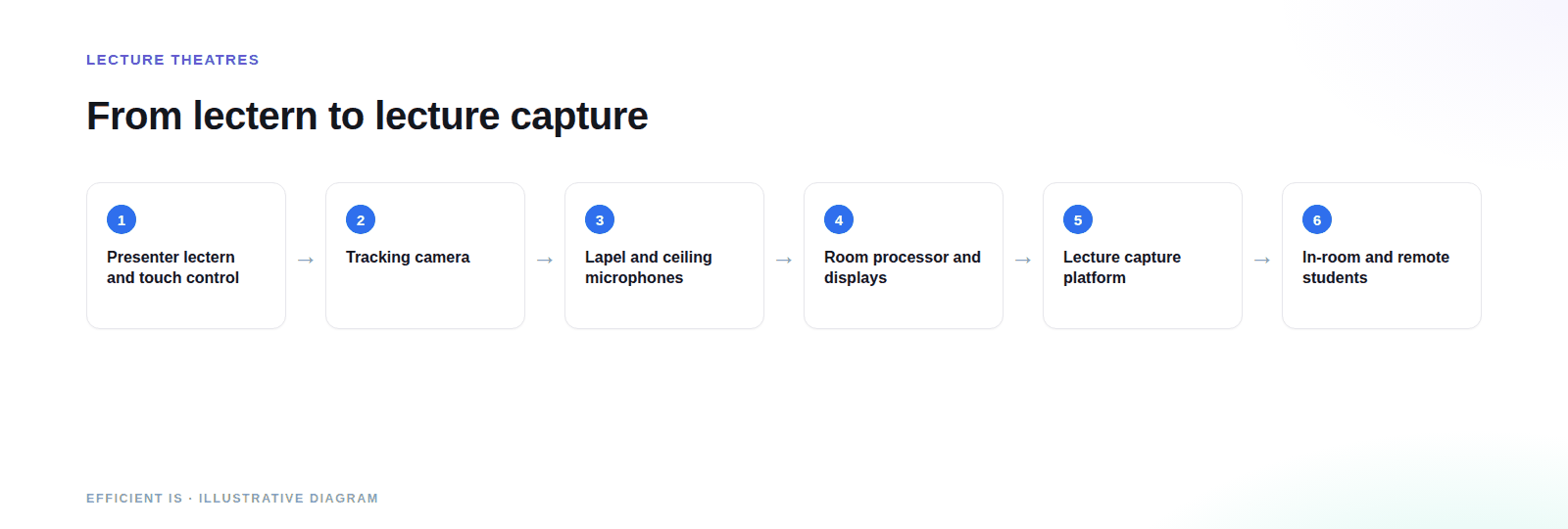
A lecture theatre AV system lets a lecturer teach a big tiered room and have the session recorded or streamed without anyone operating it. Efficient IS designs and installs the displays, cameras, audio and control for universities, colleges and schools with large halls across the UK, and works with the capture platform you’ve already chosen.
Tiered rooms for hundreds of students, booked back to back, often by lecturers who use the room once a week. See our work for universities and colleges.
Large rooms that switch between lectures, briefings, exams and events, where the AV has to cope with all of it without reconfiguring.
Halls used for assemblies, presentations and performances, where lessons or events may need recording or streaming. See schools.
A lecture theatre is a big room with one presenter and very little time to set up. The back row matters as much as the front, and that drives most of the design.
A lectern or presenter desk with a simple touch panel, a document camera or visualiser if you teach with one, and clear connections for visiting speakers’ laptops. Everything the lecturer needs is reachable without leaving the presenting position.
Tiered seating means long sight lines and often two or three surfaces to fill. We choose between laser projection, large flat panels and LED according to ambient light, room geometry and how far the back row is from the screen.
Cameras that follow the lecturer around the stage remove the need for a camera operator, which is what makes recording every session affordable. We tune the tracking to your lecturers’ habits, not to a demo.
A lapel or headset microphone for the lecturer and ceiling microphones to pick up questions from the tiers. Both feed the room speakers and the recording, so remote students hear the question as well as the answer.
Most universities already have a lecture capture platform, and it isn’t ours to change. We integrate with the one your institution has chosen: we confirm compatibility at design stage and set up the room so sources, camera and audio arrive in the recording as your platform expects.
The aim is the same everywhere: a lecturer presses one button, and the recording starts and ends on its own, tied to the timetable where your system allows it.
Remote students need to see the slides and the lecturer, and hear questions asked in the room. That means sensible camera shots, audio that picks up questions from the tiers and a return path if you want remote students to ask questions live.
Our meeting room AV experience in conferencing carries straight across, scaled for a bigger room.
Accessibility belongs in the first design meeting. It’s far harder and dearer to add after the ceiling is closed.
Induction loops, infrared or radio systems let people who use hearing aids or cochlear implants hear the lecturer directly. Induction loop performance is covered by BS EN IEC 60118-4, and we design to it. Tiered rooms are tricky for loops, so we check coverage in the actual seats.
Live captions, delivered through your capture or conferencing platform or a captioning service, help deaf students and anyone in a noisy home. Under the public sector accessibility requirements, pre-recorded video published since 23 September 2020 is in scope where the regulations apply to you, while live video is exempt. Check with your accessibility lead whether your institution is covered.
One good lecture theatre is a project. A campus of timetabled rooms is an operation, and the rollout decides whether the estate works or becomes a support headache.
A standard control interface, the same layout on every touch panel and the same fault behaviour mean a lecturer can walk into any room and teach. Rooms that behave differently are what fill help-desk queues.
The summer break is the usual window and term time is largely off limits. We plan batches of rooms against your calendar and pre-configure equipment where we can, to keep time on site per room as short as possible.
Where the equipment supports it, remote monitoring can flag a failed microphone or camera before the first lecture of the day. Pair it with support and maintenance with an agreed response time for a room full of students.
Seat count, depth of the room and the number and size of display surfaces.
Tracking cameras, microphones and how well the room’s acoustics behave.
How closely the room must work with your capture platform and timetable.
A repeatable design across many rooms lowers cost per room and eases support.
Survey rooms and talk to lecturers, AV support and learning technology staff about what actually goes wrong today.
A standard room design with confirmed capture platform compatibility. Design and consultancy is available on its own for tender packs.
Delivered by our engineers in Scotland, or a vetted local partner, anywhere in the UK, and tested with a live recording before handover.
Short lecturer training sessions, quick-start guides in the room and ongoing support through term time.
A synced video wall for an SFRS auditorium that hosts graduation ceremonies, training and major briefings, paired with cameras that automatically find whoever is speaking and a ceiling microphone array that follows them too, streamed live to Microsoft Teams.
Read the case studyIt’s not a university, but it’s a tiered room with a presenter, an audience and remote viewers. Voice-tracking cameras and an automixing microphone array remove the need for a camera operator, so the same room adapts to ceremony, training or briefing without reconfiguring anything between events.
Prefer to talk it through? Call 0845 095 3600 or email av@efficient-is.co.uk. We’ll give you a straight answer, not a sales script.
A simple presenter position, large display or projection visible from every seat, audio for the lecturer and the audience, and a control panel anyone can use. For recorded teaching, add tracking cameras and a connection to your capture platform.
We do. We integrate with the platform your institution has chosen and confirm compatibility during design. Tell us what you run and we’ll say plainly what the room needs to work with it.
They can. Tracking cameras follow the lecturer, microphones are mixed automatically and recording can start and stop from the room control or the timetable, depending on your platform. That’s what makes recording every session practical.
Remote students get camera shots, slides and room audio that includes questions from the tiers. For hearing support we design assistive listening such as induction loops with BS EN IEC 60118-4, and we can support live captioning through your platform.
Usually, with a standard design, pre-configured equipment and a batch plan agreed with your estates team. Be realistic about numbers early, because access, cabling and sign-off take longer than the installs themselves.
Schools with large halls or lecture-style rooms use the same principles at a smaller scale: clear audio, a simple control panel and an option to record or stream. See our schools page.
Tell us the rooms, the capture platform and the timetable. We’ll tell you what’s realistic.












Find our work useful? Add us as a preferred source on Google.