
What a Clinical Simulation Suite Needs From Its AV
Cameras and microphones are the easy part. The harder questions are who can watch the recordings, how long you keep them and whether learners know they’re being filmed.
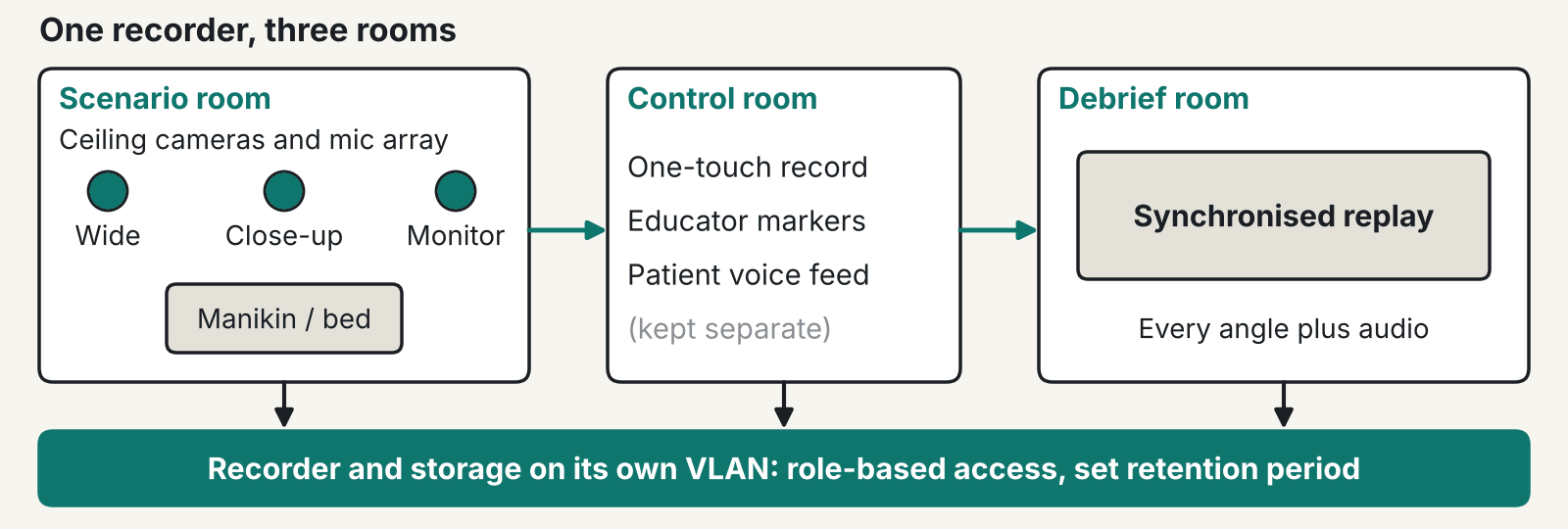
A clinical simulation suite needs clear sound at the bed, camera angles that still work when the room changes, and a recording policy your data protection officer has signed off. The ICO’s page on special category data shows why the recordings need more thought than the cameras do.
Why sound comes first in a clinical simulation suite
In our experience, poor audio is the commonest complaint about simulation recordings, so spend there first. Footage of a manikin with muffled sound is close to useless in the debrief room. Debrief is mostly about what people said and when they said it.
Ceiling microphones above the bed pick up the whole team without anyone wearing a pack. Keep them clear of air handling outlets. A mic under a diffuser records ventilation and not much else. We normally specify beamforming ceiling arrays for this. The assessment pods described further down use the same type.
Give the instructor’s patient voice its own feed. When the control room speaks as the patient, that audio should be separable from the room mics, so you can replay the learner’s side alone. A facilitator’s coaching then can’t land in the recording by accident.
In our view, audio deserves the budget before a fourth camera does. We’d skip the extra camera every time. Test the sound with the whole team talking over each other.
How many cameras does a scenario room need?
Two or three angles cover most scenarios in a clinical simulation suite, and one of them should see the patient monitor or the procedure area. A wide shot shows who stood where. A close-up shows hands and technique. The third angle lets the debrief check what the team could actually see when they made a call.
Rooms in a clinical simulation suite change. One week it’s a ward bay, the next an ICU, a theatre or a home visit. Ceiling-mounted PTZ cameras with saved presets cope with that. Fixed cameras on a wall bracket usually don’t. Cable for the reconfiguration as well: leave data points at more than one position, because a camera can only go where its cable reaches.
Keep a tested spare camera and encoder on the shelf before the first booked assessment. A dead camera on an exam day, with nothing to swap in, is a bad day for the whole cohort.
Camera and encoder support differs between simulation platforms and changes between versions. Get the vendor’s supported list in writing before you specify anything.
Debrief and observation
A debrief room in a clinical simulation suite needs synchronised replay on a display big enough for the whole cohort, with every angle and the audio playing back together. Add one-touch start and stop in the scenario room, and let the educator drop markers on the timeline as things happen. Nobody then has to hunt through an hour of footage for the moment that matters.
The ASPiH Standards 2023 cover this ground at a high level. Standard 12 deals with facilitated reflection, or debriefing, and Standard 17 lists confidentiality and safe sharing of information and data. The standards don’t mention audiovisual kit or recording, so they won’t tell you how many cameras to buy. If a supplier says ASPiH requires a particular system, ask for the clause. We couldn’t find one.
Observation is changing too. In our experience one-way glass is giving way to screens and streams, with observers watching a live feed from another room. That brings two details people forget. The feed lags the room, so observers react late. They also need to hear the scenario without the scenario room hearing them. Several simultaneous streams need a dedicated VLAN too, which is a job for your network design team early on.
Are simulation recordings personal data?
Yes, under UK GDPR, because they show identifiable people. They aren’t automatically special category data. The ICO list covers health data, biometric data used for identification and several other types. A learner running a scenario on a manikin doesn’t normally fall into any of them.
That can change. A recording might reveal something about a staff member’s health, or a real patient might appear in it. Voice or face analytics would change it as well, because the ICO says inferring a special category attribute from an image counts as special category processing.
Consent is awkward. The ICO’s consent guidance says public authorities, employers and anyone in a position of power should avoid relying on consent unless they can show it is freely given. A student on a course that requires simulation can’t easily say no. Many NHS boards and universities therefore rest on a different lawful basis. Your DPO decides that, not your installer and not us. This is not legal advice.
Whatever the basis, a clinical simulation suite should tell learners before recording starts. The pitfalls we see most are recording that begins without learners knowing and recordings saved on a local PC. Shared logins and streams that anyone can open come next.
Decide retention before you buy storage
Pick the retention period first, because the platform’s storage size and auto-delete rules follow from it. The storage limitation principle in UK GDPR says personal data should be kept in identifiable form for no longer than necessary. The ICO’s storage limitation guidance says to set standard periods by category, ideally in a retention schedule, and to erase or anonymise at the end. It also warns that moving data offline isn’t the same as deleting it, and that deleted data should come out of backups where possible.
For a clinical simulation suite, that means asking some dull questions early. Are formative recordings deleted after the debrief? Do assessed ones stay until any appeal window closes? Those are your policy calls. We don’t make them for you. We do check that the platform can enforce them, with role-based access, deletion on a schedule and a separate login for every educator. Shared logins break the audit trail, and you will want that trail the first time someone asks who viewed a particular recording.
Questions to put to a platform vendor
One simulation vendor describes its capture software as a simulation education and training management platform with integration to its own simulator and handheld control products. That’s the vendor’s description, so treat it as a claim to test. We haven’t verified current feature lists or integrations for any platform. Ask each vendor the same plain questions.
- Which cameras, encoders and microphones does this version support?
- Where are recordings stored, and who can open them?
- Can it delete on a schedule, backups included?
- What happens to a session if the network drops mid-scenario?
- Who do we ring at 08:30 on an exam day?
For a worked example of the AV hardware, our SFRS Incident Command Centre project has assessment pods. Each has a dual-lens PTZ camera, beamforming ceiling mics, a media processor for local recording and RTMP/RTMPS streaming, a central DSP, a touch panel and wireless tablet control for the assessor. There is also a plenary observation space. It isn’t a clinical simulation suite, but you’d meet the same pieces in one.
We design and install the AV side from Glasgow and work with whichever simulation platform your educators use. See our Simulation Suites page, our NHS and Healthcare work and what we do for universities.
FAQ
What AV does a clinical simulation suite need?
Ceiling cameras, ceiling microphones, a control room with one-touch recording and a debrief space with synchronised replay. Add a live feed if you have a separate observation room. Your simulation platform decides which cameras and encoders it will accept, so confirm that with the vendor first.
Do simulation recordings need learner consent?
Not necessarily. The ICO says organisations in a position of power should avoid relying on consent unless it is freely given. Your DPO picks the lawful basis, and learners should still be told before recording starts.
How long should simulation recordings be kept?
There is no figure in the ASPiH standards or in the ICO guidance we read. UK GDPR says no longer than necessary. Set a period for each type of recording, write it in your retention schedule and make the platform delete on that schedule.
Does ASPiH say what AV a clinical simulation suite must have?
No. The ASPiH Standards 2023 cover debriefing under Standard 12 and confidentiality of data under Standard 17. They don’t mention audiovisual kit or recording.
Can observers watch a scenario live from another room?
Yes, over a stream. Plan for a short delay and a one-way audio return, so observers hear the scenario and the room never hears them. Keep the stream on its own VLAN and limit who can open it.
Is a recording of a simulation special category data?
Only in some cases. A recording that reveals health information, or one where voice or face analytics are applied, can be. Ask your DPO to assess each use before you buy any analytics feature.
Planning a new simulation suite or refitting one?
Tell us the rooms, the cohort size and the platform your educators use, and we’ll give you a straight answer.











