
MDT Meeting Room AV for the NHS: Audio, Screens and Controls
Most MDT rooms get the screen sorted and the sound forgotten. We’d do it the other way round. Here’s the order we work in, and who signs off what.
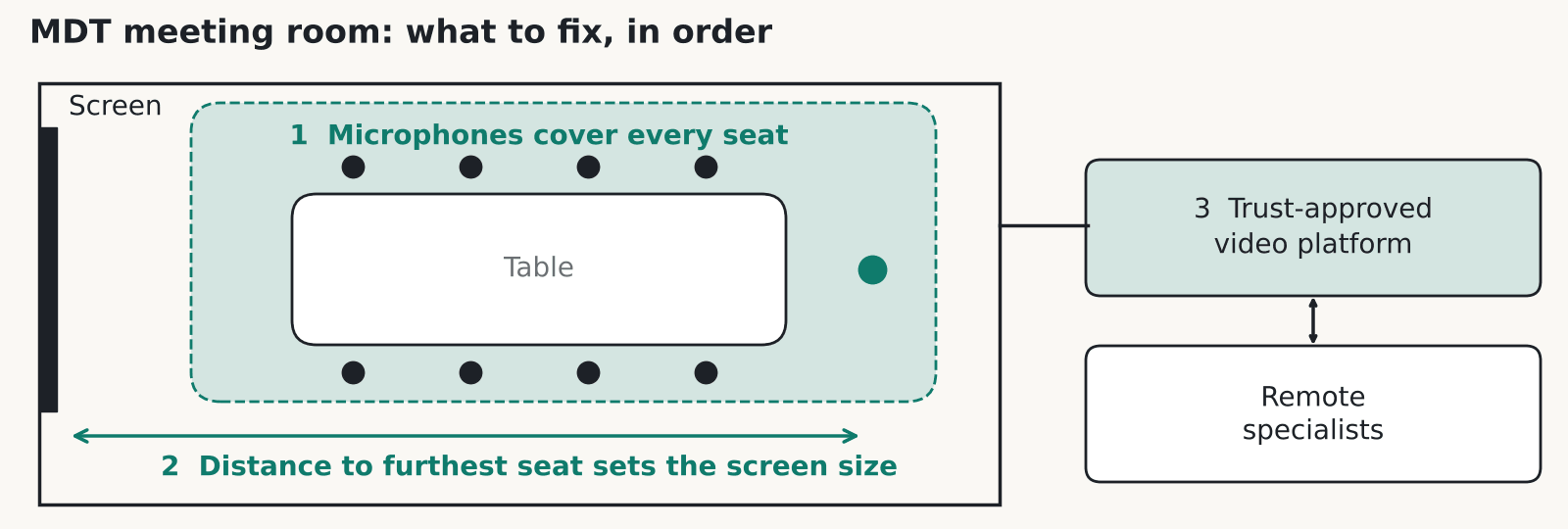
An MDT meeting room works when the people dialling in can hear everyone at the table and the people at the back can read the scan. Spend the first part of the budget on audio, then on screen size for the furthest seat, then on a control panel a locum can use cold. NHS England publishes guidance on streamlining MDT meetings for Cancer Alliances.
What an MDT meeting room actually has to do
A multidisciplinary team meeting puts clinicians from several specialties in one room, often with a few more on a call, to agree what happens to each patient. Cases come up one after another. Someone puts up a scan and talks to it. Someone on the call asks a question. The AV has to keep up without anyone fiddling with a cable. Specialists may dip in for a single case and leave, so people join and drop off the call all through the list. The room should be ready before the chair walks in, with the call live and the first case on screen.
NHS England’s guidance focuses on complex cases. The page we read says nothing about hybrid technology, so we can’t tell you what a national standard asks of the room. What we can describe is what goes wrong on site.
One boundary matters here. Our work on these rooms is meeting room AV and isn’t a medical device. Diagnostic-grade viewing is a question for your radiology and clinical engineering leads, and the information governance (IG) decisions stay with the organisation.
Why audio comes first in an MDT meeting room
In our experience audio is the commonest failure in an MDT meeting room, and it’s the first thing we’d fix. Clinicians turn to look at the screen while they talk, and they sit at different distances from any microphone. Two people mutter about the next case while somebody on the call tries to speak.
The person on the call suffers most. They can’t see who’s speaking, so a missed word can mean a missed decision. Bad audio also makes a room feel broken, and people stop using it for hybrid meetings.
The fixes are plain. Cover every seat with ceiling or table microphones, so nobody has to lean in. Use echo cancellation in a DSP (the box that processes the sound) so the far end doesn’t hear itself. Place the speakers so the remote voice comes from the screen direction, which helps people feel they’re talking to someone. In a hard-surfaced room, soft finishes or a few acoustic panels make a bigger difference than a dearer microphone.
Test the MDT meeting room full. An empty room flatters every system.
Sizing screens for the furthest seat
Work out the distance from the screen to the furthest seat, and size the display so a scan is readable from there. In our experience rooms often go wrong the other way: somebody picks the biggest screen the budget allows, and then the people sitting nearest to it can’t take it all in.
In our experience a single 65 inch screen runs out of road in a longer room. Two screens often work better, one for imaging and one for the people on the call and the case list. That saves the chair from flicking between views.
Make the supplier prove it. Ask them to put one of your real scans on a demo screen, then walk to the furthest seat and read it. If you can’t, the screen is too small or the room needs a second one. Check the source side too. The laptop or PC that feeds the screen should connect with one cable at the lectern end, and the room should tolerate a visiting consultant’s own laptop.
Hybrid MDT meetings and the trust’s approved platform
The platform is a decision for the organisation, and the room should fit whatever it has approved. In Scotland, Futurescot reported that NHS Scotland rolled out Microsoft Teams to more than 160,000 staff in May 2020, so a Teams-ready room is a sensible starting point for many Scottish boards. That article gives no clinical-use or IG guidance, and neither do we.
Near Me is a different thing. It’s the national video consulting service for patient appointments, described on the NHS Scotland video consulting site. It isn’t the platform for MDT meetings.
In England, NHS England’s remote consulting page covers tools such as DTAC assessment and the DCB0160 clinical risk standard. That’s aimed at patient-facing consulting tools, so ask your IG and clinical safety leads whether any of it reaches a meeting room.
Before the install, get four answers from IT: which platform and room device are approved, whether outside specialists can join as guests, whether recording is allowed at all, and who decides what can be shown on screen. Your network team will also need to supply a data point and any VLAN or firewall rules for the room.
Look at the sightlines as well. Patient names on a screen are visible through a glass door.
Controls for people who use the MDT meeting room once a month
The control panel should work for someone who has never seen it. A consultant who joins one MDT a month will not read a manual. One button to start and an obvious way to hang up cover most of it.
We’d skip any control system that needs a training session to learn. If the room needs a laminated A4 sheet taped to the wall, the panel has failed. Keep the rest simple: wireless sharing from a laptop should be optional, and the room should wake and sleep on its own so nobody has to find a remote.
Label sources by what people recognise, such as Laptop and Imaging, and never by input numbers. Put the panel at the chair’s seat or on the table, where the person running the list can reach it. Set the camera to frame the whole table by default, so nobody has to steer it while a case is being discussed. Keep one spare HDMI lead and one USB-C lead in the table box for visitors.
Our meeting room AV work uses the same principle for every room: the person who turns up cold should still get the meeting started. In an MDT room that person might be a locum or a visiting specialist, and the case list won’t wait for them.
Installing an MDT meeting room around live clinical activity
These rooms are used every week and sometimes every day, so the install has to fit around the clinical timetable. Our NHS Tayside case study covers ward eWhiteboards, not MDT rooms: 32 to 65 inch screens across NHS Tayside hospital sites, procured via Insight, with installs scheduled around live clinical activity. The same discipline applies here.
Agree the working windows early. Find out what access, badges and local approvals the site wants for an outside installer, and whether any local infection control rules apply to the work. Book out-of-hours time for anything noisy. Agree, too, who can sign the room off as ready for the next meeting.
Plan for a handover session at the room itself, with the people who chair the meetings as well as the estates team.
See our MDT rooms and NHS and Healthcare pages.
FAQ
What AV does an MDT meeting room need?
At minimum, microphones that cover every seat, speakers, a screen sized for the furthest seat, a camera for the remote participants and a simple control panel. The room also needs to work with whichever video platform your organisation has approved. Audio is where most rooms fall short.
Is an MDT room a medical device?
No. The AV is ordinary meeting room equipment. Diagnostic-grade viewing and clinical safety questions sit with your radiology, clinical engineering and information governance teams.
Can Near Me be used for MDT meetings?
Near Me is the national video consulting service for patient appointments in Scotland. It isn’t the MDT platform. Your board will say which tool it has approved for clinician meetings, and Teams is widely used across NHS Scotland.
How big should the screen be in an MDT meeting room?
Size it from the furthest seat, then see what the budget allows. Put a real scan on a demo screen and read it from the back row. A single 65 inch panel may be too small in a longer room, in which case two screens are a better answer.
Who signs off recording in an MDT meeting room?
Your organisation does. Information governance teams decide whether meetings can be recorded and what may appear on screen. We fit the equipment to that decision.
Can installers work while the ward or department is running?
Yes, with planning. On NHS Tayside ward eWhiteboard installs, work was scheduled around live clinical activity. Agree access, time windows and sign-off with the site before anyone arrives.
Fitting out an MDT room?
Tell us how many people sit in the room, who dials in and which video platform your board has approved. We’ll give you a straight answer on the AV.











