People should be able to walk into a meeting room and put their laptop or phone on the screen without a cable, whether that’s AirPlay, Miracast, Google Cast, USB-C or a web browser. Efficient IS, a Glasgow AV and IT integrator, specifies the system and the network and security setup behind it.
Wireless sharing is what makes a huddle room get used, because nobody wants to hunt for an adaptor that fits. It pairs naturally with meeting room AV and one-touch video calls.
Visitors arrive with their own laptops and shouldn’t need to join your network to share. Staff can share without a cable, and a wired lead stays on the table as a fallback.
Councils, police, justice and healthcare sites often have strict rules on what can join the network, so the method has to fit the policy. See our work for police and justice bodies.
There isn’t one wireless standard. Each protocol suits certain devices and behaves differently on your network, so a good room supports several.
Apple’s protocol for iPhones, iPads and Macs. Receivers include Apple TV, and many displays and presentation units support it. Discovery uses Bonjour, which relies on multicast traffic that normally doesn’t cross subnets, so sender and receiver generally need to be on the same network segment unless the network is set up to pass it. Apple sets this out in its deployment guide.
A Wi-Fi Alliance certified technology for sharing a screen between Wi-Fi devices, found in Windows and some Android devices. According to the Wi-Fi Alliance, it works even where no Wi-Fi network is available, because devices can connect directly. That makes it useful where guests must stay off your network. Apple devices don’t use it.
Used by Chromebooks, the Chrome browser and Android devices to send a screen or tab to a Cast receiver. Google says sender and receiver must be on the same Wi-Fi network, and its troubleshooting steps point to multicast discovery, so Cast behaves much like AirPlay on a segmented network.
Some systems have the guest plug a USB-C cable or dongle into their laptop and press a button, with the picture carried wirelessly or over the cable. Others are browser based: the guest opens a web address and types the code shown on the screen. Neither needs software installed on the guest’s laptop.
It can be, but not by default. The risk is the box on the wall: a networked computer on your estate that guests are invited to connect to.
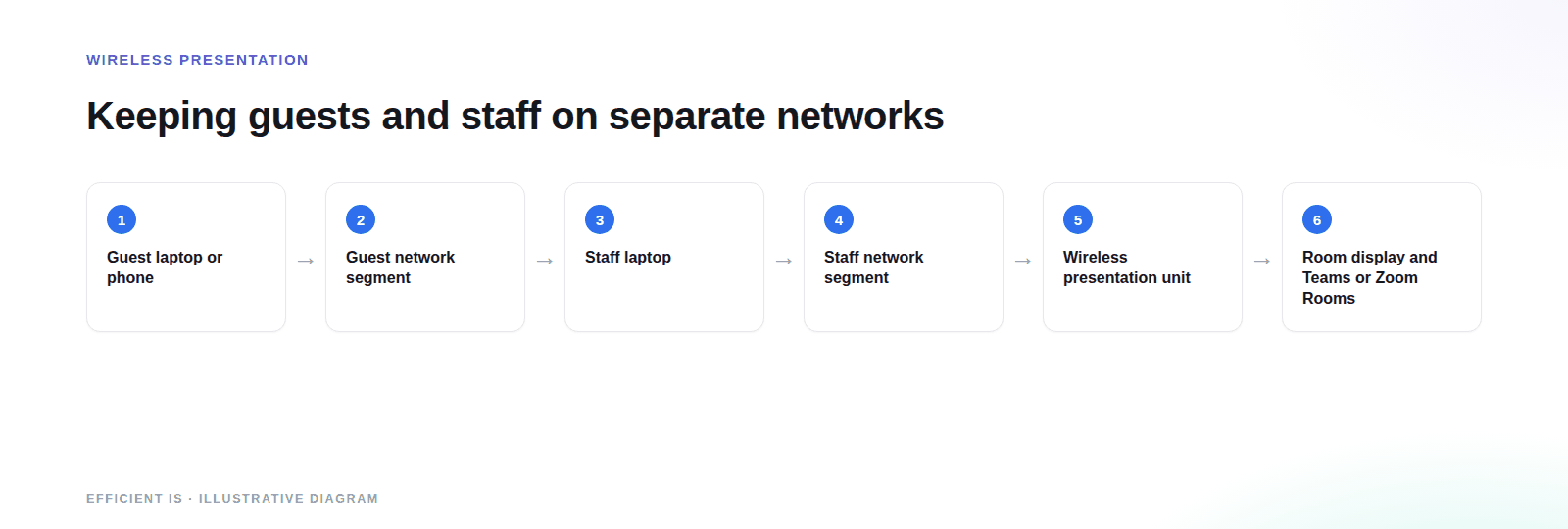
Guests should share to the room unit without joining your corporate network. Either the unit offers its own guest connection, or the guest SSID can reach the unit and nothing else. Our WiFi installation work builds the guest network and segmentation first, then fits the presentation system to it.
AirPlay and Cast both rely on multicast discovery, and multicast doesn’t cross VLANs by default. The usual fix is a controlled discovery gateway, set up as part of network design, that lets a device see the room units and nothing else. It’s the most common reason wireless sharing works in the demo room and fails in yours.
A presentation unit needs a changed admin password, current firmware and a place on your asset list: the same checks Cyber Essentials asks of every device on the network.
Decide before install: who can share, whether a guest needs a code, and what the room shows while it waits. Room names visible to every phone invite people to cast to the wrong room, and in an office with ten similar rooms they will.
A code displayed on the screen is the simplest control. Google’s Cast moderator works this way: users connect with a single-use code shown on the receiver, and only one person casts at a time.
The test is whether a first-time visitor can share within a minute without asking anyone: instructions on the idle screen, one method that works for most people, and an obvious fallback. We commission each room by trying it as a stranger would, on devices we haven’t set up.
Keep a wired lead at the table anyway.
A Scottish justice-sector training environment needed its wireless presentation system replaced. The real requirement was getting a wireless device approved for a network built for a secure judicial estate, a process that took months while the installation took days.
Read the case studyWe scoped the approval as its own workstream so nothing else was held hostage to it, and worked directly with the client’s own network architects rather than asking for an exception. The room is now in daily use, live on the client’s own network.
One unit, one display, instructions on the screen.
Wireless sharing alongside a video bar or room system, with a wired fallback.
Several people sharing in turn, host control over what’s on screen, and all the common methods supported.
Teams Rooms and Zoom Rooms are a separate question. Some room systems support wireless sharing themselves, and a separate unit is used where they don’t or where you want one method across every room. Ask any supplier whether a wireless share goes only to the room display or into the call as well, because it depends on the product.
The hardware is the small part. These are the things that move the number.
Twenty rooms need a template and a rollout plan.
Supporting every method costs more than supporting two.
Guest segmentation and multicast handling are usually where the effort goes.
A secure estate may need device testing and sign-off, which can outlast the install.
Teams Rooms, Zoom Rooms and room controllers each change the configuration.
A unit in every room costs more than a few shared ones, but removes the ‘where’s the dongle’ problem.
Prefer to talk it through? Call 0845 095 3600 or email av@efficient-is.co.uk, we’ll give you a straight answer, not a sales script.
Your devices, your guests, your network policy, and what each room is used for.
Protocols per room, the guest and discovery approach, and a short BYOD policy you can publish.
Units fitted and tested as a visitor would use them, on staff and guest devices. Delivered by our engineers in Scotland, or a vetted local partner, anywhere in the UK.
Short guide for staff, admin access for your IT team, and optional support and maintenance.
Usually. Some units create their own connection, Miracast style direct connections don’t need a network, and a guest network can be limited to reaching the room unit only. Which one fits depends on your security policy.
There isn’t a winner, because they serve different devices. A mixed-device business needs AirPlay and Cast at the least, plus a browser or cable fallback. Miracast mainly helps Windows laptops and is handy where a network can’t be involved.
It’s nearly always the network. AirPlay and Cast rely on multicast discovery, which doesn’t cross VLANs by default, so a laptop on one segment can’t see a unit on another. It’s solvable, but it needs the network to be set up for it.
Keep one. Wireless fails now and then, and a lead on the table means the meeting carries on. It costs a few pounds and saves a very public failure.
It can, though the details vary. Some room systems share wirelessly on their own; others pair with a separate unit. Ask whether a share reaches the call as well as the room display.
Tell us the rooms, who uses them and your network policy.












Find our work useful? Add us as a preferred source on Google.